
Protel PCB: Is It the Same as Altium Designer, and How to Open Legacy Protel Files
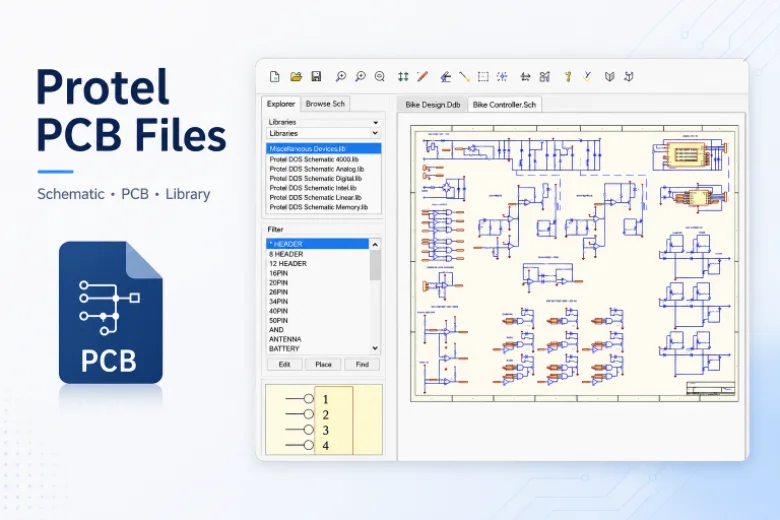
Figure 1. Legacy Protel PCB files often need review before they are migrated or exported for manufacturing.
Protel is the PCB design software that grew into today’s Altium Designer, so the name turns up in two situations: maintaining older designs made in Protel or Protel DXP, and researching Altium’s lineage. This guide answers what people search – is Protel the same as Altium, how to open an old Protel file, how to get manufacturing data out – and shows how Highleap Electronics turns a revived Protel design into a built, assembled board.
1. Is Protel the same as Altium Designer?
Yes – Protel is the predecessor of Altium Designer. The software evolved through successive generations, including the widely remembered Protel DXP era, into the unified environment now sold as Altium Designer, so they are the same product lineage rather than competing tools. When someone refers to “Protel” today, they usually mean either an older design file from that era or the Altium product line as a whole.
For a working engineer this matters concretely: a modern Altium install is the natural home for Protel-era designs, and the manufacturing output it produces is the same standardized data any fabricator expects. The tool’s heritage does not change what the factory needs – Gerber or ODB++, drill data, a BOM, and assembly data. When only a bare board exists and the original source is lost, schematic extraction can recover a usable design to work from.
2. How to open an old Protel or Protel DXP file
Open an old Protel or Protel DXP file in current Altium Designer, which is its direct successor and the most reliable path for migrating the project while preserving the schematic-to-layout linkage. Because Altium descends directly from Protel, it understands the legacy formats and updates them into the modern environment without losing connectivity.
The key caution is not to assume an opened file is immediately production-ready. Migrating the file is only the first step; the design then needs re-validation against current parts and current fabrication capability, which the next section covers. Treat the migration as recovering the design, not certifying it.
3. Reviving a legacy Protel design: what to check
When reviving a legacy Protel design, verify footprints against current datasheets, replace obsolete components, update design rules to a modern fabrication capability, and re-run connectivity checks. Components go obsolete and fabrication tolerances move on, so an unverified migration can carry forward footprints that no longer match available parts:
- Verify footprints and libraries against current datasheets and parts you can actually buy; a footprint correct years ago may point to an obsolete package.
- Re-check design rules. Clearances, trace widths, and via sizes from an older design may not match modern part density or your current fab’s capability.
- Confirm connectivity. Re-run design-rule and connectivity checks so you trust the converted design before manufacturing.
Treat a revived Protel design as something to re-validate against current electronic circuit design practice, not just re-export.
4. How to export manufacturing files from Altium/Protel
From a migrated Protel design or a fresh Altium project, export the same standardized set: Gerbers (or ODB++), an NC drill file, a BOM with manufacturer part numbers, and assembly data. Generate and verify:
- Gerber files (or ODB++) for every copper, mask, silkscreen, and paste layer, plus the board outline. ODB++ reduces layer-naming ambiguity, and understanding how a CAM engineer processes the data helps before export.
- NC drill file with all hole sizes and plated/non-plated status.
- BOM with manufacturer part numbers – critical for a legacy design where original parts may be obsolete; see what a production-ready BOM should contain.
- Pick-and-place / centroid file with each part’s position, rotation, and side.
- Assembly drawing showing polarity, pin one, fiducials, and do-not-populate notes.
Always open the exported Gerbers in an independent viewer before sending them. With a migrated design especially, a viewer check confirms the conversion did not drop a layer, mirror something, or misplace drills – easy to introduce when moving between tool generations.
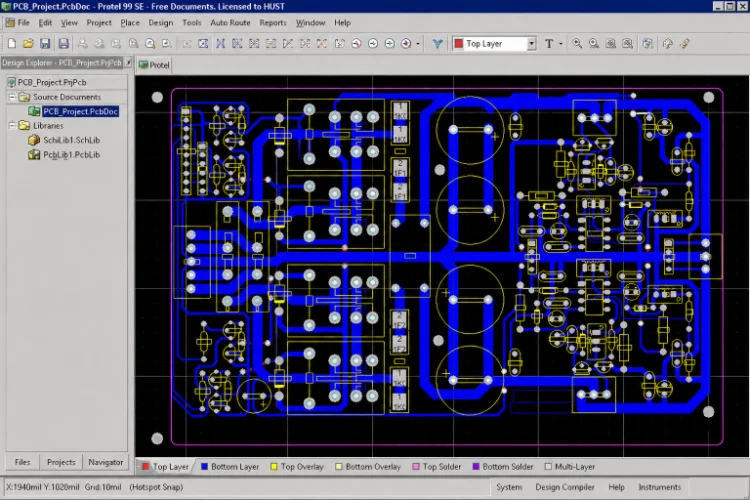
Clean Gerber and drill outputs are required before an old Protel design can be fabricated again.
5. PCB manufacturing checklist for legacy designs
Before requesting a quote for a revived design, confirm these items – with extra attention to the legacy-specific ones:
- Legacy project opened and updated in current Altium Designer, with connectivity re-verified.
- Footprints checked against current datasheets; obsolete parts replaced with confirmed equivalents.
- Design rules updated to a real fabrication capability, with the DRC passing cleanly.
- Gerbers, drill, BOM, centroid, and assembly drawing all exported from the same final revision.
- Generated files opened and confirmed in an independent Gerber viewer.
- Board outline, layer count, copper weight, surface finish, and quantity decided.
- Any impedance, high-voltage, RF, or thermal requirements stated for the fabricator.
6. From Protel file to manufactured board
Once your output package is clean, Highleap builds from the standard files, whether they originated in Protel, Protel DXP, or modern Altium Designer. For revived legacy designs in particular, a review of common manufacturability issues is valuable because it checks footprints and clearances are still buildable and surfaces obsolete-part and tolerance problems before the build, not after.
From there, Highleap covers low-volume PCB manufacturing through higher volumes, plus turnkey assembly with component sourcing from authorized channels – helpful when an old BOM needs current equivalents – along with SMT and through-hole placement and inspection. When you submit your files, note that the design is legacy and flag any parts you suspect are obsolete, along with your target quantity and lead-time need.
Revive your legacy design – get a quote
7. Protel PCB FAQ
Is Protel the same as Altium Designer?
Yes. The software evolved from Protel (including the Protel DXP era) into today’s Altium Designer, so they are the same product lineage rather than competing tools.
How do I open an old Protel or Protel DXP file?
Open it in current Altium Designer, the natural successor and the most reliable path for migrating legacy Protel projects while preserving the schematic-to-layout linkage.
What should I check when reviving a legacy Protel design?
Verify footprints against current datasheets, replace obsolete components, update design rules to a modern fabrication capability, and re-run connectivity and design-rule checks before manufacturing.
What files does a fab need?
Gerber or ODB++ files, an NC drill file, the board outline, and – for assembly – a BOM with manufacturer part numbers, a pick-and-place file, and an assembly drawing. Add stackup notes for multilayer or controlled-impedance boards.
Can Highleap manufacture a board from a legacy Protel design?
Yes. Highleap builds from standard manufacturing files regardless of the design tool’s age, sources current equivalents for obsolete parts, and uses a manufacturability review to confirm an older design is still buildable.

Recommended Posts

TMM4 Filter PCB Manufacturing
TMM4 filter PCB manufacturing is controlled by the...

TMM3 PCB Manufacturing for RF Modules
TMM3 PCB manufacturing is most useful where the RF module...

TMM6 PCB Fabrication
TMM6 fabrication is the process-control page for a mid-Dk...
TMM10 PCB Manufacturing for Compact RF Designs
Table of contentsHow TMM10 Shrinks RF StructuresTMM10 vs...
How to get a quote for PCBs
Let’s run DFM/DFA analysis for you and get back to you with a report. You can upload your files securely through our website. We require the following information in order to give you a quote:
-
- Gerber, ODB++, or .pcb, spec.
- BOM list if you require assembly
- Quantity
- Turn time
For PCBA services, please provide your BOM (Bill of Materials) and any specific assembly instructions. We also offer DFM/DFA analysis to optimize your designs for manufacturability and assembly, ensuring a smooth production process.