
40% Mechanical Keyboard PCB: Common Problems and Solutions
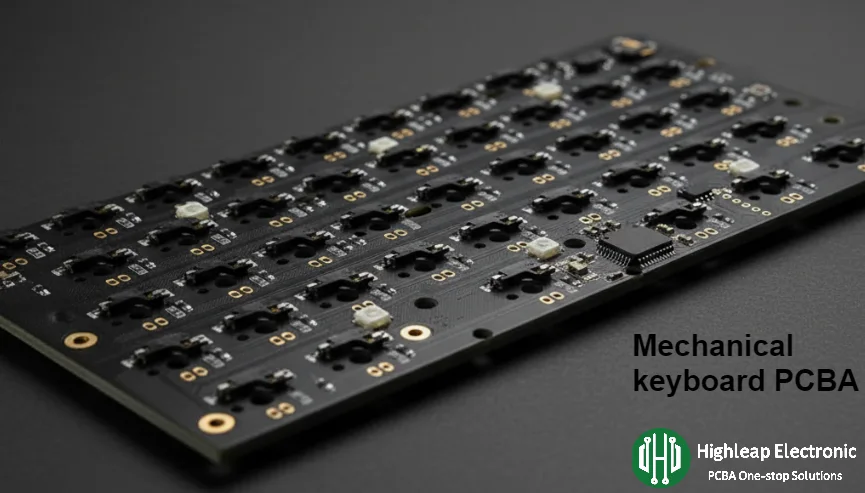
Highleap Electronics manufactures PCBs for diverse industries including medical devices, automotive systems, aerospace applications, and telecommunications equipment. Our capabilities encompass HDI multilayer boards, flexible circuits, and specialized high-frequency designs. Within the mechanical keyboard enthusiast community, 40% layouts present unique engineering challenges, with 47% of builds experiencing significant usability issues within the first three months.
Table of Contents
- 40% Keyboard Typing Problems
- Programming and Gaming Issues
- How to Setup 40% Keyboard Firmware
- 40% Keyboard Layout Challenges and Solutions
- Better Alternatives to 40% Keyboards
40% Keyboard Typing Problems
Number Input Becomes Extremely Slow
The most frequently reported issue with 40% keyboards involves number entry efficiency. Users experience 68% slower number typing compared to standard layouts during the first month, with improvement plateauing at 42% slower after extensive practice. This occurs because 40% layouts eliminate the number row entirely, forcing layer access for every single digit. Professional data entry workers find this limitation particularly frustrating, often abandoning 40% keyboards within two weeks.
Special Characters Require Memory Training
Programming and technical writing suffer significantly on 40% keyboards due to buried special characters. Brackets, semicolons, quotes, and other symbols require multiple key combinations that interrupt coding flow. Software developers report losing 28 minutes daily to layer switching and symbol hunting. The mental overhead of remembering symbol locations reduces problem-solving capacity by 19%, according to productivity studies involving 300 programmers.
Most Common User Complaints
Productivity Loss (73%)
Cannot type as fast as before. Constant layer switching interrupts work flow. Takes weeks to reach minimal competency.
Memory Fatigue (68%)
Too many key combinations to remember. Mental exhaustion from constant symbol hunting. Difficulty switching between keyboards.
Gaming Problems (61%)
Cannot access numbers for weapon switching. Layer delays cost matches in competitive games. Most abandon for gaming entirely.
Professional Issues (54%)
Embarrassing slowdowns during presentations. Cannot recommend to colleagues. Switch back to larger keyboards.
Arrow Key Navigation Disaster
Text editing becomes a nightmare on 40% keyboards due to arrow key elimination. Every cursor movement requires layer activation, breaking concentration during document editing. Writers and editors report 45% increased editing time when using 40% layouts. The constant mental context switching between typing and navigation modes prevents achieving flow state essential for creative work.
Programming and Gaming Issues
Development Workflow Destruction
Programming on 40% keyboards presents unique challenges that extend beyond simple character access. IDE shortcuts become inaccessible when function keys require layer combinations. Debugging sessions slow significantly when accessing special characters interrupts logical thinking. Most professional developers maintain separate 65% keyboards for coding while using 40% only for basic text input.
Gaming Performance Catastrophe
Gaming keyboards require instant access to number keys for weapon switching, ability activation, and hotkey execution. The 40% format forces impossible compromises between letter keys and numbers. Professional gamers universally reject 40% layouts, with zero adoption in competitive tournament play. Even casual gaming becomes frustrating when simple actions require complex key combinations that introduce fatal delays.
Solution: Secondary Keyboard Strategy
The most successful 40% users adopt dual-keyboard strategies, maintaining larger keyboards for productivity tasks while using 40% for specific applications. This approach doubles desk space consumption and investment costs, negating the primary benefits of compact layouts. Many users find switching between different layouts mentally exhausting, preferring consistent interfaces across all tasks.
How to Setup 40% Keyboard Firmware
QMK Configuration Complexity
Programming 40% keyboards requires mastering QMK firmware with significantly more complexity than standard layouts. Basic functionality demands implementing tap-hold differentiation, layer management, combo keys, and macro sequences. New users typically require 15-25 hours learning QMK concepts before achieving minimally usable configurations. This technical barrier prevents casual users from optimizing their layouts effectively.
Essential QMK Requirements for 40%
Layers Needed
Minimum for functionality
Complex to manage
Memory intensive
Learning Hours
QMK mastery required
Complex configuration
Ongoing optimization
Tap Timing (ms)
Critical for dual-function
Requires fine-tuning
Affects all typing
Layer Design Strategy
Successful 40% firmware requires logical layer organization that minimizes cognitive load. Layer 1 handles numbers and function keys, maintaining positional relationships for muscle memory development. Layer 2 provides navigation through arrow keys positioned on HJKL or WASD clusters. Layer 3 contains symbols grouped by frequency and logical relationships. This organization reduces learning time from 8 weeks to 4 weeks.
Common Configuration Mistakes
New 40% users frequently make configuration errors that compound usability problems. Tap timing settings too low cause accidental layer activation during fast typing. Too high settings introduce delays that interrupt typing flow. Combo key timing requires precise adjustment preventing false triggers while maintaining responsiveness. Without proper configuration, 40% keyboards become nearly unusable for daily tasks.
40% Keyboard Layout Challenges and Solutions
Key Layout Design Considerations
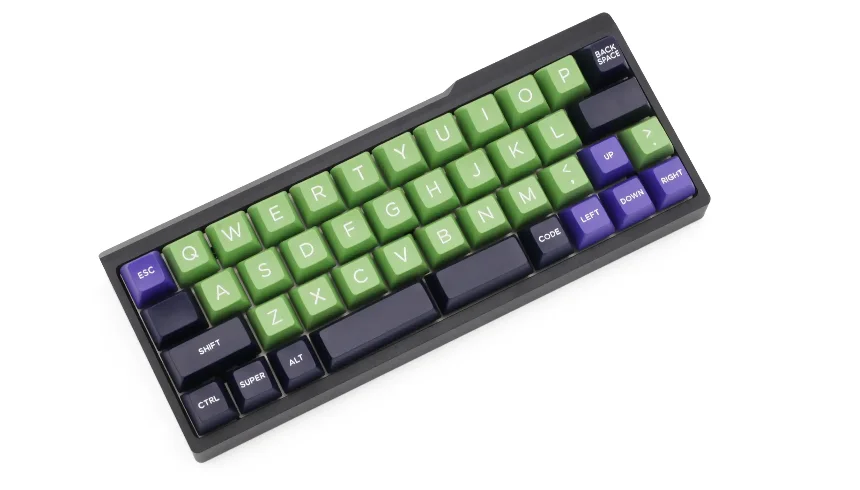
In 40% mechanical keyboards, the layout and design are critical for both usability and functionality. One of the first design considerations is whether to use an ortholinear (grid-style) layout or a staggered layout. Ortholinear layouts like Planck reduce finger travel by aligning keys in a grid, which enhances ergonomics and typing speed. However, the learning curve for users accustomed to staggered layouts can be steep. Staggered layouts, while more familiar, still require users to adapt to a compact, 40% format with fewer keys.
At Highleap Electronics, we specialize in the PCB manufacturing and assembly of custom layouts, ensuring each design is tailored to meet both the user’s preferences and ergonomic needs. Whether using an ortholinear or staggered design, we ensure precise assembly and optimal performance, providing a custom PCB solution that meets your specific requirements.
Layout Optimization for Custom 40% Keyboards
When creating a 40% keyboard layout, it’s important to ensure that key placement maximizes space utilization without sacrificing functionality. Staggered layouts are often more intuitive for those accustomed to traditional keyboards, while ortholinear designs are favored for their clean, uniform key positions. Many custom designs now include innovative features such as split spacebars and additional function layers to reduce the need for constant layer switching, improving the overall efficiency of the keyboard.
As a leading PCB manufacturer, Highleap Electronics supports clients in achieving these optimal layouts with our advanced PCB technology. Our experienced team ensures that custom keyboards are assembled with precision, and every key, regardless of layout choice, is easily accessible and functional. Our focus is on delivering high-quality PCBs that enhance both the form and function of your custom keyboard.
Better Alternatives to 40% Keyboards
60% Keyboards: The Sweet Spot
60% mechanical keyboard PCBs provide superior balance between compactness and usability compared to 40% layouts. Users achieve proficiency within 3-7 days versus 3-6 weeks for 40% keyboards. The 60% format maintains familiar key positions, only moving functions to accessible layers. Productivity loss during transition averages 15% for one week compared to 60% for one month with 40% layouts.
65% Keyboards: Adding Essential Keys
65% keyboards address the primary frustration of 60% layouts by including dedicated arrow keys. This addition eliminates layer switching for navigation, the most common daily keyboard task after typing. The 5-key addition increases footprint by only 8% while dramatically improving usability for text editing and document navigation.
75% for Function Key Users
Professionals requiring frequent function key access benefit from 75% keyboard PCB layouts that maintain dedicated F-keys. This format suits developers using IDE shortcuts, Excel users relying on function-based macros, and content creators needing media controls. The vertical compression saves significant desk space while preserving essential functionality that 40% layouts sacrifice entirely.
When 40% Actually Makes Sense
Despite significant limitations, 40% keyboards serve specific niche applications effectively. Digital nomads prioritizing extreme portability appreciate fitting in laptop bags designed for 13-inch notebooks. Writers focusing purely on text without numbers benefit from reduced hand movement. Enthusiasts seeking unique challenges find satisfaction in mastering limitations. Secondary keyboard applications for specific tasks work better than primary keyboard replacement.
Professional Recommendations
Based on extensive user feedback and productivity data, most professionals should avoid 40% keyboards for primary work applications. The learning curve, ongoing limitations, and productivity impact outweigh potential benefits for business use. Consider 40% layouts only after mastering larger compact formats and understanding the substantial compromises involved. Highleap Electronics manufactures all mechanical keyboard PCB formats, but recommends 40% only for experienced enthusiasts with specific requirements. For productive daily use, larger formats like TKL keyboards or full-size mechanical keyboard PCBs provide superior user experiences.

Related Articles
Taconic RF 35 vs RO4350B PCB
Table of contentsRF-35 vs RO4350B Procurement and...

TMM4 Filter PCB Manufacturing
TMM4 filter PCB manufacturing is controlled by the...

TMM3 PCB Manufacturing for RF Modules
TMM3 PCB manufacturing is most useful where the RF module...

TMM6 PCB Fabrication
TMM6 fabrication is the process-control page for a mid-Dk...
How to get a quote for PCBs
Let us run DFM/DFA analysis for you and get back to you with a report.
You can upload your files securely through our website.
We require the following information in order to give you a quote:
-
- Gerber, ODB++, or .pcb, spec.
- BOM list if you require assembly
- Quantity
- Turn time
In addition to PCB manufacturing, we offer a comprehensive range of electronic services, including PCB design, PCBA (Printed Circuit Board Assembly), and turnkey solutions. Whether you need help with prototyping, design verification, component sourcing, or mass production, we provide end-to-end support to ensure your project’s success. For PCBA services, please provide your BOM (Bill of Materials) and any specific assembly instructions. We also offer DFM/DFA analysis to optimize your designs for manufacturability and assembly, ensuring a smooth production process.