
ICT (In-Circuit Test): How It Works, What It Costs, and Designing Boards for It

Figure 1. PCB ICT Test
Last updated: May 2026 · A production-focused guide to in-circuit testing
In-circuit test, or ICT, is one of the workhorses of electronics manufacturing — a fast, thorough electrical check that catches the defects fabrication and assembly introduce. But ICT only works well when the board is designed for it and the volume justifies its up-front cost. This guide explains what ICT actually does, how a bed-of-nails fixture works, what ICT catches and what it misses, how it compares with flying probe and other test methods, the economics that decide which to use, and the design-for-test rules that make a board testable in the first place.
- What in-circuit test (ICT) is
- How a bed-of-nails fixture works
- What ICT detects — and what it misses
- ICT vs. flying probe vs. FCT vs. AOI vs. X-ray
- The economics: when ICT is worth the fixture
- Designing for ICT: the rules that matter
- What to send your manufacturer for ICT
- How Highleap handles ICT
- Frequently asked questions
What in-circuit test (ICT) is
In-circuit test is an electrical test of a fully assembled PCB that checks each component and net individually. Rather than asking “does the product work?” — that is functional test — ICT verifies that the right part is in the right place, at the right value, in the right orientation, with a sound solder joint.
The defect-catcher of the line
ICT is the manufacturing-defect catcher. It finds shorts, opens, wrong component values, and reversed parts — the errors that fabrication and assembly introduce, as distinct from design errors. If a resistor is the wrong value, a capacitor is missing, a diode is backwards, or two nets are bridged, ICT is the stage built to catch it.
Why it suits volume
Because ICT can probe many nodes nearly simultaneously, a full test cycle takes only seconds per board. That speed is exactly why ICT suits stable designs in volume — once the fixture and program exist, each board flies through. The cost is concentrated up front in the fixture, not in the per-board time, which shapes the entire economic case for using it.
How a bed-of-nails fixture works
The defining hardware of ICT is the bed-of-nails fixture: a tooled plate holding dozens to thousands of spring-loaded pins (pogo pins), each positioned to land on a specific test pad, via, or exposed net on the board.
The mechanics
The board is pressed down onto the fixture so every pin makes contact at once. The tester then sources and measures voltage, current, and resistance at each node, building a complete electrical picture of the board in a single operation. Because all contacts are made simultaneously, the measurement phase is extremely fast — the seconds-per-board speed that defines ICT comes directly from this parallel contact.
Boundary scan for hidden nets
Dense boards with BGAs have nets that no physical probe can reach, because the connections are buried under the package. Boundary scan (JTAG) extends ICT coverage to those buried digital connections by using test circuitry built into the chips themselves — the chip reports on its own connections, so no physical probe is needed. Combining bed-of-nails probing with boundary scan gives broad coverage even on packed, modern boards where bare probing alone would miss large areas.
What ICT detects — and what it misses
Knowing ICT’s boundaries is as important as knowing its strengths — it is one stage in a flow, not a complete test by itself.
What ICT is strong at
ICT excels at catching shorts and opens between nets; missing, wrong, or out-of-tolerance resistors and capacitors; reversed diodes, electrolytics, and ICs; solder bridges and insufficient joints; and absent or incorrect components. These are precisely the manufacturing defects that escape visual inspection or that AOI cannot judge electrically.
What ICT cannot do
ICT cannot confirm the product actually functions — power sequencing, firmware behavior, RF performance, and user features all lie outside its scope; that is the job of functional test. Nor can ICT reliably reach nets with no probe access, which is why test access must be designed into the board rather than added afterward. A net with no test point is invisible to the bed of nails.
The practical implication
Because ICT verifies construction rather than function, production lines pair it with a functional test as the final gate. ICT confirms the board was built correctly; functional test confirms it works. Both matter, and neither replaces the other.
ICT vs. flying probe vs. FCT vs. AOI vs. X-ray
No single method covers everything, so production lines combine several. The table shows where each fits.
| Method | Checks | Fixture/NRE | Speed | Best volume |
|---|---|---|---|---|
| ICT | Values, opens/shorts, polarity, solder | High | Seconds | Medium–high, stable |
| Flying probe | Same electrical checks, done serially | Low | Minutes | Prototype–low |
| FCT | Whether the board actually works | Custom jig | Varies | Any (final gate) |
| AOI | Visible placement/solder defects | None | Fast | Any |
| X-ray (AXI) | Hidden joints under BGA/QFN | None | Moderate | Hidden-joint boards |
How they combine in a typical flow
A common sequence runs: AOI after reflow to catch visible placement and solder defects → X-ray for hidden BGA joints → ICT or flying probe for electrical verification → FCT as the final functional gate. Each stage catches a class of defect the others can’t, and the combination gives far higher coverage than any single method.
ICT and flying probe are siblings
ICT and flying probe perform essentially the same electrical checks; the difference is mechanical. ICT contacts every point at once through a fixture; flying probe moves a few probes from point to point serially. That single distinction drives the entire cost and speed trade-off between them.
The economics: when ICT is worth the fixture
ICT’s cost lives in the fixture, and understanding that is the key to deciding whether to use it at all.
The fixture cost
A custom bed-of-nails fixture is a one-time investment — commonly a few hundred to several thousand US dollars depending on pin count and complexity — plus the cost of writing and debugging the test program. Once that is paid, each board tests in seconds, so the cost-per-board falls steadily as volume rises. High volume spreads the fixture cost thin; low volume cannot.
The flying-probe trade-off
Flying probe needs no fixture — the probes move point to point — but it takes minutes per board rather than seconds. A cycle that runs in 30 seconds on ICT can take far longer on flying probe. So flying probe wins on low volume (no fixture to pay for or scrap) and loses on high volume (slow per board), which is the mirror image of ICT.
The decision rule
- Prototypes, low volume, or a design still changing → flying probe: no fixture to scrap when the layout changes.
- Mature, frozen designs at medium-to-high volume → ICT: the fixture pays for itself across the run.
A caution worth heeding: a layout change can force the fixture to be rebuilt, so freeze the design and confirm test points before committing to an ICT fixture. Building a fixture for a design that then changes wastes the entire investment.
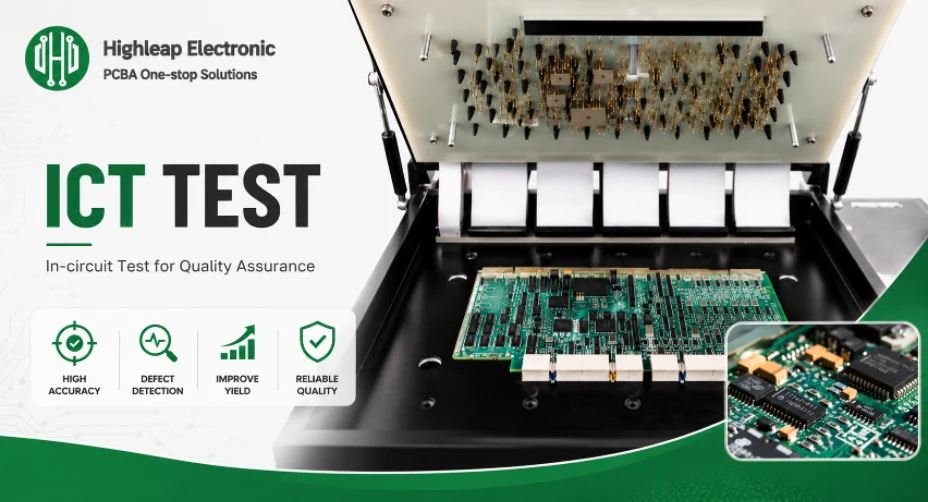
Figure 2. PCB in-circuit test fixture
Designing for ICT: the rules that matter
Test access must be planned before the layout is frozen — retrofitting it later is expensive or impossible. These design-for-test (DFT) guidelines make a board ICT-ready.
Test point rules
- Provide one dedicated test point per net wherever practical — a net with no test point cannot be probed.
- Make test pads about 1 mm (35–40 mil) in diameter; never below your fixture house’s stated minimum.
- Place pads on a 100-mil (2.54 mm) grid where possible to suit standard tooling.
Clearance and placement rules
- Keep at least 0.5 mm clearance from each pad edge to neighboring copper or components.
- Put test pads on one side of the board (usually the bottom) so it seats flat on the fixture.
- Keep pads clear of the board edge and away from tall components; never place a pad where a part blocks the probe’s path.
- Add tooling holes and fiducials so the fixture aligns the board accurately.
Why these rules pay off
Each rule exists to ensure a probe can reliably reach and contact every net. Skimp on test points and coverage drops; crowd the pads and probes miss; forget fiducials and alignment suffers. Designing for test from the start costs almost nothing; adding it later can mean a respin.
What to send your manufacturer for ICT
ICT setup needs more than fabrication files — the test program is built from design data that maps every node and its expected value.
| Data | Why ICT needs it |
|---|---|
| Gerber/ODB++, NC drill, outline | Defines geometry and where probes can land |
| Netlist and schematic | Maps nodes and the expected value at each |
| BOM and centroid | Identifies parts, values, and orientation to verify |
| Test requirements / pass-fail limits | States which checks are in scope and their tolerances |
| Target volume and revision status | Determines ICT vs. flying probe |
Why complete data prevents delays
The test program can only check what the netlist and BOM describe. Incomplete or mismatched data means the program is built on guesses, which shows up as false failures or missed defects. Sending a complete, revision-matched package lets the test engineer build a program that reflects the board you actually want made.
How Highleap handles ICT
Highleap Electronics reviews test access during DFM and flags nets with no probe point before a fixture is built, advises on ICT vs. flying probe based on your volume and how often the design may change, and combines ICT with AOI, X-ray, FCT, and programming where the product needs them — with test logs for traceability on request. Catching a missing test point during the free DFM review is far cheaper than discovering it after a fixture is cut. See our PCB assembly services.
Get a quote with test included →
Frequently asked questions
Is ICT the same as functional test?
No. ICT checks each component and connection at the board level; functional test (FCT) checks whether the finished product actually works. Many products use both, with ICT first and FCT as the final gate.
How much does an ICT fixture cost?
It varies widely with pin count and complexity — commonly from a few hundred to several thousand US dollars, plus test-program development. The cost is one-time, which is why ICT favors higher volumes.
Should I use ICT or flying probe for a prototype?
Almost always flying probe — there’s no fixture to scrap when the design changes, at the cost of slower per-board testing. ICT makes sense once the design is frozen and volume rises.
Can ICT test BGAs and hidden joints?
Only indirectly. Use boundary scan (JTAG) for buried digital nets, and X-ray inspection for the solder joints themselves under BGAs and QFNs.
What is a bed of nails?
The ICT fixture: a plate of spring-loaded pins positioned to contact specific test points on the board, so the tester can measure every node at once.
Do I need to design my board for ICT?
Yes. Test points, pad sizes, spacing, and single-side access must be planned before the layout is frozen; retrofitting test access later is expensive and sometimes requires a respin.
How fast is ICT compared with flying probe?
Much faster per board — seconds versus minutes — because ICT contacts all points simultaneously while flying probe moves probes serially from point to point.

Recommended Posts

TMM4 Filter PCB Manufacturing
TMM4 filter PCB manufacturing is controlled by the...

TMM3 PCB Manufacturing for RF Modules
TMM3 PCB manufacturing is most useful where the RF module...

TMM6 PCB Fabrication
TMM6 fabrication is the process-control page for a mid-Dk...
TMM10 PCB Manufacturing for Compact RF Designs
Table of contentsHow TMM10 Shrinks RF StructuresTMM10 vs...
How to get a quote for PCBs
Let‘s run DFM/DFA analysis for you and get back to you with a report. You can upload your files securely through our website. We require the following information in order to give you a quote:
-
- Gerber, ODB++, or .pcb, spec.
- BOM list if you require assembly
- Quantity
- Turn time
For PCBA services, please provide your BOM (Bill of Materials) and any specific assembly instructions. We also offer DFM/DFA analysis to optimize your designs for manufacturability and assembly, ensuring a smooth production process.