
How To Get Satisfied PCB Silkscreen?

Figure 1. PCB silkscreen image for PCB manufacturing review.
The silkscreen is the printed layer of text and symbols on a PCB — reference designators, polarity marks, logos, and warnings — that turns a bare board into something an assembler, tester, and technician can actually read. Good silkscreen speeds assembly and prevents errors; sloppy silkscreen overlaps pads, becomes illegible, or gets clipped in fabrication. This guide explains what silkscreen is, the design rules that keep it legible, the color and application options, and how Highleap Electronics produces clean, readable legends.
1. What is PCB silkscreen and what goes on it?
PCB silkscreen is the printed layer of ink — usually white — applied over the solder mask to add human-readable text and symbols to the board: component reference designators, pin-one and polarity marks, the board name and revision, logos, test points, and warning or safety markings. It carries no electrical function; its job is information, making the board possible to assemble, inspect, and service correctly.
That information is essential at every stage: reference designators tell the assembler and pick-and-place which part goes where, polarity marks prevent backwards installation, and revision text identifies the board. The silkscreen is applied on top of the solder mask, so the two layers work together visually, and a well-executed silkscreen on a PCB is one of the simplest things that separates a professional board from a confusing one.
2. PCB silkscreen design rules: minimum text and line width
The core silkscreen design rules are a minimum line width and text height the fabricator can reliably print, and never placing silkscreen over exposed pads or vias. Text below the minimum becomes a blurry, unreadable blob, and ink on a pad interferes with soldering — so legibility and clearance are the two constraints that matter. Key rules:
- Minimum line width. Each stroke must be wide enough for the printing process to render cleanly; thinner lines smear or break up.
- Minimum text height. Characters need a minimum height (and a width-to-height ratio) to stay legible; tiny text is wasted ink.
- No silkscreen on pads. Keep ink clear of solderable pads and exposed metal, since it disrupts soldering and can cause defects.
- Clear of vias and holes. Ink falling into a via or hole prints poorly and serves no purpose.
The exact minimums depend on the application method and the fabricator’s capability, so confirm them rather than assuming. These rules are part of designing a board that builds cleanly, the same family of checks covered in any review of manufacturability issues — silkscreen that violates them is often silently trimmed or dropped by the fab.
3. How to arrange silkscreen for clean, error-free assembly
Arrange silkscreen so every reference designator is clearly associated with its component, oriented consistently for easy reading, and never hidden under the part it labels — the goal is that an assembler can identify and orient every component at a glance. Thoughtful arrangement is what turns the silkscreen from clutter into a genuine assembly aid:
- Place designators next to their parts and consistently (e.g. all readable from the same one or two orientations) so there is no ambiguity about which label belongs to which component.
- Keep labels visible after assembly where practical, so they aid inspection and rework, not just initial placement — a designator hidden under its own part cannot be read later.
- Mark polarity and pin one clearly for every polarized part, which is the single biggest defense against backwards assembly.
- Avoid crowding. On dense boards, prioritize the marks that prevent errors and a clean overall silkscreen layout over decorative text.
The payoff is faster assembly, easier inspection, and fewer build errors. On crowded boards there is real skill in fitting clear, useful marks without overlapping pads or other text, which is why arranging the silkscreen well is a design task in its own right.
4. PCB silkscreen colors and solder-mask combinations
The standard silkscreen color is white, but black, yellow, and other colors are available, and the choice should give strong contrast against the solder-mask color so the text stays readable. Silkscreen and solder mask are a visual pair, so they are chosen together for legibility and appearance:
| Solder-mask color | Common silkscreen choice |
|---|---|
| Green (most common) | White for strong contrast |
| Black | White (black-on-black is unreadable) |
| White | Black for contrast |
| Red / blue / others | White, chosen for legibility |
The practical rule is contrast: white on green or black is the classic, highly legible combination, while same-on-same (like black silkscreen on a black mask) should be avoided because the text disappears. The full range of solder-mask colors pairs with these silkscreen options, so pick the combination for readability first and aesthetics second — especially on boards where assemblers and technicians must read the legend quickly.
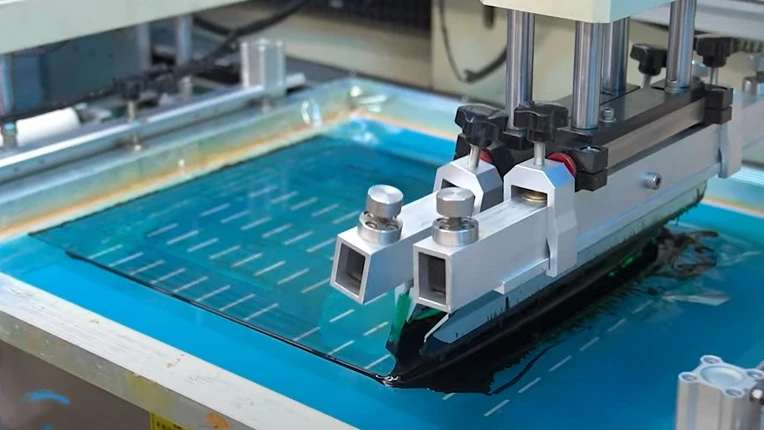
Figure 2. Manufacturing details for PCB silkscreen should be checked before quotation and production.
5. How silkscreen is applied: screen printing, LPI, and inkjet
Silkscreen is applied three main ways: traditional screen printing (ink pushed through a stencil), liquid photo imaging (LPI, a photo-developed ink for fine detail), and inkjet printing (digitally printed, good for fine text and variable data). The method sets the achievable resolution and minimum feature size, which is why it interacts with the design rules above:
- Screen printing pushes ink through a patterned screen — economical and common, but coarser, so it needs larger minimum text and line widths.
- Liquid photo imaging (LPI) coats and photo-develops the ink for higher resolution and finer, sharper text, suited to dense boards.
- Inkjet prints the legend digitally with no screen, giving fine detail and the ability to vary content per board, related to PCB inkjet printing.
Higher-resolution methods allow smaller, sharper text, which matters on crowded modern boards where space for the legend is tight. The right method depends on how fine the silkscreen needs to be and the board’s density, so it is matched to the design rather than fixed — and it determines the minimum text and line width you can rely on.
6. How Highleap produces clean, legible silkscreen
Highleap produces clean, legible silkscreen by matching the application method to the board’s detail needs, holding the minimum text and line widths, and pairing the silkscreen color with the solder mask for strong contrast. The legend is printed clear of pads and vias, with reference designators, polarity marks, and revision text rendered sharply so the board is easy to assemble, inspect, and service.
Because silkscreen quality and placement affect build accuracy, a manufacturability review checks the legend for legibility, pad clearance, and any marks the fabrication process would trim — catching problems before the board is made. Highleap handles this within PCB manufacturing and supports the populated board through turnkey assembly, where clear designators speed placement and inspection. When you request a quote, specify the silkscreen and solder-mask colors, any fine-text needs, and whether you require special markings or per-board data so the legend is produced correctly.
7. PCB silkscreen FAQ
What is the silkscreen layer on a PCB for?
It carries printed text and symbols — reference designators, polarity and pin-one marks, board name and revision, logos, and warnings — to make the board readable for assembly, inspection, and service. It has no electrical function.
What is the minimum silkscreen text size on a PCB?
It depends on the application method and the fabricator’s capability, but each character needs a minimum height and line width to stay legible. Text below that minimum smears or breaks up, so confirm the limit with your manufacturer.
Can silkscreen go over pads or vias?
No — ink on solderable pads interferes with soldering and can cause defects, and ink in vias prints poorly. Keep silkscreen clear of pads, exposed metal, and holes; fabricators often trim ink that violates this.
What is the best silkscreen color?
The one with the strongest contrast against your solder mask. White is standard and reads well on green or black; on a white mask, black silkscreen is used. Avoid same-on-same combinations where the text disappears.
Why is some of my silkscreen missing on the finished board?
Usually because text or lines were below the minimum size, or ink landed on pads or vias and was trimmed by the fabrication process. Designing within the minimum text/line rules and keeping clear of pads prevents this.
Can I print a QR code or logo in the silkscreen?
Yes — logos and fixed graphics print well in silkscreen, and a fixed (non-unique) code can be included. For unique per-board codes and serialization, laser or inkjet marking is used instead, since silkscreen prints the same image on every board.

Recommended Posts

TMM4 Filter PCB Manufacturing
TMM4 filter PCB manufacturing is controlled by the...

TMM3 PCB Manufacturing for RF Modules
TMM3 PCB manufacturing is most useful where the RF module...

TMM6 PCB Fabrication
TMM6 fabrication is the process-control page for a mid-Dk...

TMM10 PCB Manufacturing for Compact RF Designs
Table of contentsHow TMM10 Shrinks RF StructuresTMM10 vs...