
PCB QR Code Size and Placement: Design Rules for Reliable Scanning
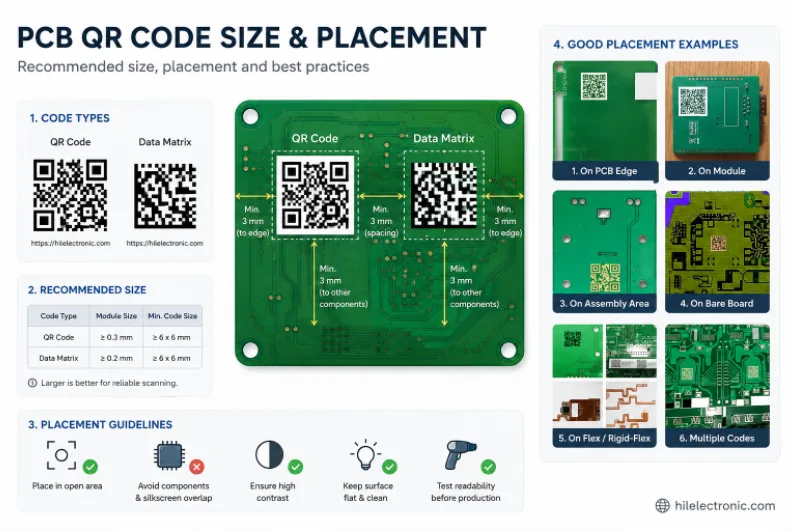
Figure 1. PCB QR code size and placement image for PCB manufacturing review.
PCB QR code size and placement determine whether scanners can read a board consistently through assembly, test, shipping, and field service. A code that is too small, too reflective, or too close to tall components can fail even when the traceability system behind it is well designed. This guide focuses on the practical marking rules that make 2D codes readable on real boards, compares the common marking methods, and shows how Highleap Electronics adds reliable scannable identification to production builds.
1. Why put a QR code on a PCB?
A QR code is added to a PCB to give each board a unique, machine-readable identity, enabling traceability, automated routing through assembly and test, and quick access to records in the field. Instead of a human-readable serial alone, a scannable code lets equipment and people instantly tie a physical board to its data — which batch it came from, what firmware it has, what tests it passed.
This matters across the product’s life. On the line, scanners route boards and log each step automatically; in the field, a technician can scan a board to retrieve its history. The code also packs a lot of identity into a small footprint, which is valuable on crowded boards. Marking is closely related to the board’s silkscreen layer, since text and codes are often applied together, and the deeper purpose — connecting each unit to its record — is the heart of PCB traceability.
2. How QR codes are applied to PCBs: laser, inkjet, or silkscreen
QR codes are applied to PCBs three main ways: laser marking (etched into the surface for permanence), inkjet printing (printed directly, often with variable per-board data), and silkscreen (printed with the legend, but only for fixed, non-unique codes). The method determines permanence, resolution, and whether each board can carry unique data:
| Method | Permanence & resolution | Unique per board? |
|---|---|---|
| Laser marking | Permanent, very fine, high contrast | Yes — ideal for serialization |
| Inkjet printing | Good resolution, surface-printed | Yes — variable data per board |
| Silkscreen | Coarser, part of the legend | No — same on every board |
For true traceability you need a unique code per board, so laser or inkjet is used; silkscreen only works for a fixed code identical on every unit. Laser marking gives the finest, most permanent result and is common where the code must survive harsh handling, drawing on capability like laser direct imaging, while PCB inkjet printing is a flexible way to apply variable per-board data.
3. What is the minimum QR code size on a PCB?
The minimum practical QR code size on a PCB is governed by the marking method’s resolution and the scanner that must read it — laser marking can produce very small codes a few millimeters square, but the code must keep enough module (cell) size and contrast for reliable scanning. Smaller is not always better: shrink the code too far and the individual cells become too small for the marking process to render or the scanner to resolve.
Three factors set the floor. The marking method’s resolution limits how fine each cell can be; the scanner’s capability sets the smallest cell it can read; and the amount of data encoded matters, since more data means more cells, so a smaller code must carry less information. The practical approach is to encode only what is needed (often a serial that links to a database rather than all the data itself), keep adequate contrast against the surface, and confirm the size with your manufacturer against the scanners used. A code that looks fine on screen can fail on the line if it is pushed below what the process reliably produces.
4. Where to place a QR code and how to design it for scanning
Place a QR code in a flat, uncluttered area with good contrast, clear of tall components and the board edge, and keep a quiet zone (blank margin) around it so scanners can locate it reliably. Placement and surrounding clearance affect scanning as much as the code itself. Key rules:
- Choose a clear, flat spot. Avoid placing the code under or beside tall parts that cast shadows or block the scanner’s view.
- Keep a quiet zone. A blank margin around the code lets scanners detect its boundaries; crowding it with traces or text hurts read rates.
- Ensure contrast. The code needs to stand out against the board surface or solder mask for the scanner to resolve the cells.
- Stay clear of the edge. Keep marking away from board edges and tooling areas, consistent with good silkscreen and legend practice.
Plan the code’s location early in layout, not as an afterthought, so there is room for it and its quiet zone where a scanner can reach it at every step — placement, inspection, test, and the field.
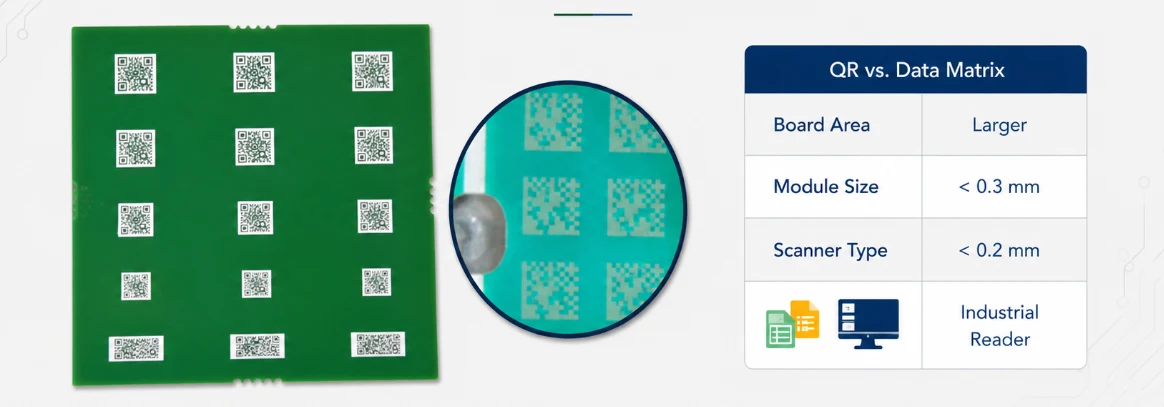
Figure 2. Manufacturing details for PCB QR code size and placement should be checked before quotation and production.
5. QR codes and PCB traceability: what the code links to
A PCB QR code typically links each board to a database record containing its serial number, batch and date, board revision, component lot data, test results, and firmware version — so the small code on the board unlocks the full history stored elsewhere. The code itself usually encodes a unique identifier rather than all the data, keeping it small while the records live in a traceability system.
This unlocks real value across the lifecycle: during production, each process step is logged against the board; for quality, a field failure can be traced back to its batch and even component lots to scope the issue; and for support, a scan retrieves the board’s configuration instantly. That is exactly what a robust traceability system provides, and it is increasingly expected in automotive, medical, and industrial products where accountability and recall management matter. The marking is the visible front end of a much larger data trail.
6. How Highleap adds traceable marking to your boards
Highleap adds QR codes and 2D data-matrix marking to boards by laser or inkjet for unique per-board identity, and ties the marking into traceability during assembly. The marking method is matched to your needs — laser for permanent, fine, harsh-environment codes; inkjet for flexible variable data — and sized and placed for reliable scanning against the equipment in use.
Because the code is only useful if it connects to records, Highleap can link it to batch, test, and configuration data through its traceability capability, captured during turnkey assembly where each board’s build and test history is logged. A quick manufacturability check confirms the code’s size, contrast, and placement are scannable before the run. When you request a quote, tell us the marking method you prefer, what the code must encode, the scanners it must work with, and your traceability requirements so the marking is set up correctly.
7. PCB QR code FAQ
What is the difference between a QR code and a data-matrix code on a PCB?
Both are 2D codes, but data-matrix codes are often preferred on PCBs because they pack data into a smaller area and remain readable at small sizes and lower contrast. “QR code” is the familiar term; many board codes are technically data-matrix.
How small can a QR code be on a circuit board?
Laser marking can produce codes only a few millimeters square, but the limit is set by the marking resolution, the scanner, and how much data is encoded. Encoding only a serial keeps the code small; always confirm the minimum with your manufacturer.
Will a laser-marked QR code damage the PCB?
No — laser marking is a controlled surface process that creates contrast without harming the board when done correctly. It is favored precisely because it is permanent and does not add material or risk to the board.
Can a QR code be added to the solder mask or copper?
Yes — codes can be marked on the solder mask surface (the usual choice) and, with some methods, formed in copper or bare laminate. The key is achieving enough contrast for the scanner against whatever surface is used.
Does adding a QR code increase PCB cost?
Marking adds a small processing step, and unique per-board serialization with database linking adds setup, but the cost is modest relative to the traceability and automation benefits. A fixed silkscreen code adds little; serialized laser or inkjet adds a bit more.
Can I track a board through its whole life with a PCB QR code?
Yes — when the code links to a traceability database, you can follow a board from production through test, shipment, and field service, including its batch, revision, and even component lots, which supports quality analysis and recall management.

Recommended Posts

TMM4 Filter PCB Manufacturing
TMM4 filter PCB manufacturing is controlled by the...

TMM3 PCB Manufacturing for RF Modules
TMM3 PCB manufacturing is most useful where the RF module...

TMM6 PCB Fabrication
TMM6 fabrication is the process-control page for a mid-Dk...
TMM10 PCB Manufacturing for Compact RF Designs
Table of contentsHow TMM10 Shrinks RF StructuresTMM10 vs...
How to get a quote for PCBs
Let’s run DFM/DFA analysis for you and get back to you with a report. You can upload your files securely through our website. We require the following information in order to give you a quote:
-
- Gerber, ODB++, or .pcb, spec.
- BOM list if you require assembly
- Quantity
- Turn time
For PCBA services, please provide your BOM (Bill of Materials) and any specific assembly instructions. We also offer DFM/DFA analysis to optimize your designs for manufacturability and assembly, ensuring a smooth production process.