
Gerber vs ODB++ vs IPC-2581: Choosing a PCB Manufacturing Data Package
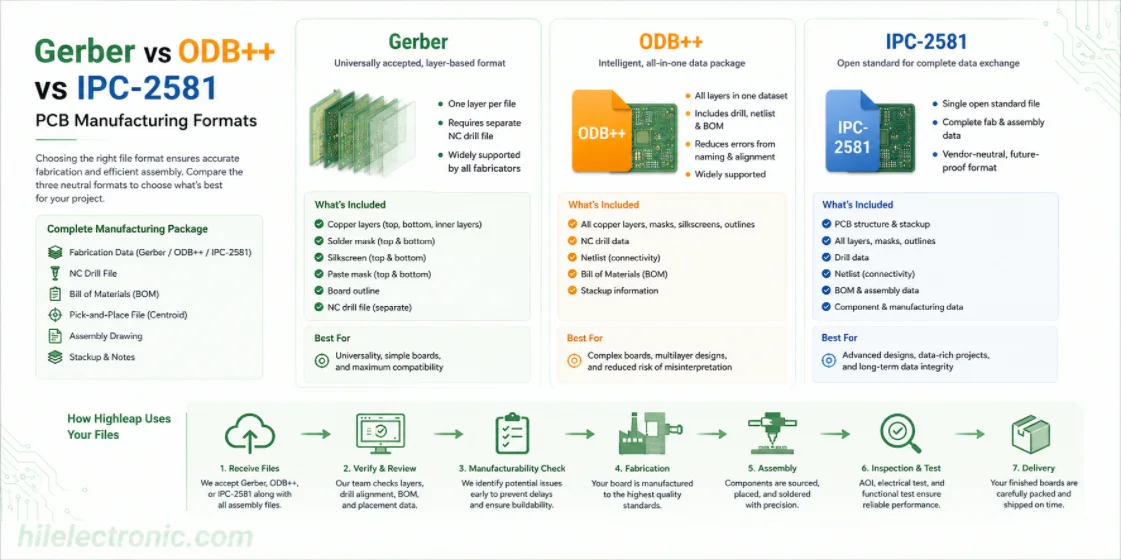
Figure 1. Gerber vs ODB++ vs IPC-2581 image for Highleap Electronics PCB manufacturing and assembly review.
Choosing between Gerber, ODB++, and IPC-2581 is really a decision about how much manufacturing intelligence you want to hand off with the job. Gerber is nearly universal but layer-based, while ODB++ and IPC-2581 package more design context into a cleaner dataset for fabrication and assembly. This guide compares the three neutral manufacturing formats, explains when each is the better choice, and shows how Highleap Electronics uses the rest of the data package to fabricate and assemble the board.
1. What file formats does a PCB manufacturer need?
A PCB manufacturer needs a fabrication dataset — either Gerber files plus an NC drill file, or an all-in-one format like ODB++ or IPC-2581 — and, for assembly, a bill of materials, a pick-and-place (centroid) file, and an assembly drawing. The fabrication data defines the bare board; the assembly data defines what goes on it and where.
These formats exist because your CAD project file is tool-specific and not directly buildable, whereas these are neutral, standardized outputs any fab can read. The full set a manufacturer expects is summarized in this overview of PCB design files, and the practical “how to produce them” steps live in the companion guide on Gerber files. The rest of this article explains what each format actually contains so you can send the right package the first time.
2. What is a Gerber file and what does it contain?
A Gerber file is a 2D vector file that describes a single layer of a PCB — its copper, solder mask, or silkscreen — as a set of shapes drawn with defined apertures. One Gerber represents one layer, so a complete bare-board package is a folder of Gerbers (top and bottom copper, inner layers, both solder masks, both silkscreens, paste layers, and the board outline) accompanied by a separate NC drill file for the holes.
The modern standard is RS-274X (and the newer X2), which embeds the aperture definitions inside the file — older “RS-274D” Gerbers required a separate aperture list and are obsolete and error-prone. Because each layer is a separate file with a name you assign, the main weakness of plain Gerbers is ambiguity: a mislabeled or missing layer is a classic cause of a manufacturing hold, which is why every Gerber set should be checked in a viewer before sending and why the all-in-one formats below were created. Gerber data also feeds directly into the CAM step where a fab turns your files into a build.
3. Gerber vs ODB++ vs IPC-2581: which format is best?
Gerber is the universal baseline, while ODB++ and IPC-2581 are intelligent single-file formats that bundle all layer, drill, netlist, and often BOM data together — making them less error-prone and the better choice where your fab supports them. The trade-off is universality versus richness:
| Format | Contains | Strength |
|---|---|---|
| Gerber (RS-274X) | One layer per file + separate drill | Universally accepted baseline |
| ODB++ | All layers, drill, netlist, BOM in one dataset | Intelligent, low-ambiguity, widely supported |
| IPC-2581 | Complete fab + assembly data, open standard | Single open file, vendor-neutral |
For most projects, Gerber works everywhere and remains the safe default. Where your manufacturer accepts it, ODB++ is preferable because packaging every layer, the drill data, and the netlist into one intelligent dataset removes the layer-naming and alignment ambiguity that loose Gerber folders invite. IPC-2581 pursues the same goal as a single open, vendor-neutral standard. The best format is simply the richest one your fab supports — and confirming that upfront avoids rework.
4. Drill, BOM, and pick-and-place files for assembly
For an assembled board you must also supply three files: the NC drill file (every hole’s location, size, and plated status), the bill of materials (every part with its manufacturer part number), and the pick-and-place file (each component’s position, rotation, and side). The fabrication data alone makes a bare board; these turn it into a populated PCBA. What each provides:
- NC drill file. Defines drilling — hole sizes, coordinates, and plated vs non-plated status — and is part of the fabrication set even though it is separate from the Gerbers.
- Bill of materials. Lists every component with a real manufacturer part number, not just a value, so parts can actually be sourced; a complete PCB BOM is essential for accurate quoting and procurement.
- Pick-and-place (centroid) file. Gives each part’s X/Y position, rotation, and board side so the placement machine sets it correctly; here is how the centroid file drives assembly.
- Assembly drawing. Shows polarity, pin one, fiducials, and do-not-populate notes that the data files alone do not convey.
An incomplete assembly package — Gerbers with no BOM part numbers, or a missing centroid file — is one of the most common reasons an assembly quote cannot be finalized, so sending all of these together keeps the project moving.
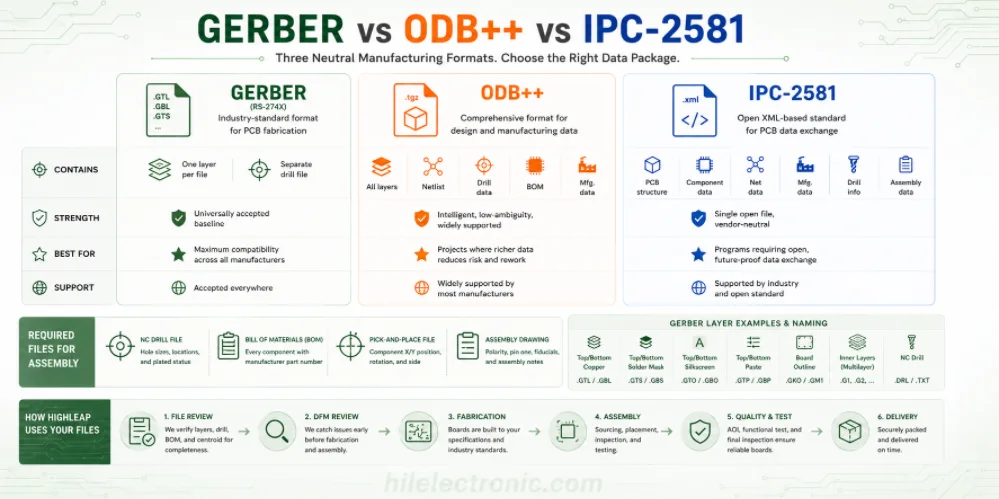
Figure 2. Manufacturing details for Gerber vs ODB++ vs IPC-2581 should be checked before quotation and production.
5. What each Gerber layer file is and how to name them
In a Gerber package, each file represents one physical layer of the board, and clear naming is what stops a fabricator from guessing which file is which. Because plain Gerbers carry no inherent “this is the top copper” label beyond the filename, an ambiguous or non-standard naming scheme is a common cause of a manufacturing hold. A complete two-layer package, and the layers a multilayer board adds, look like this:
| Layer | What it defines | Common extension |
|---|---|---|
| Top / bottom copper | The conductive traces and pads | .GTL / .GBL |
| Top / bottom solder mask | Where mask is removed to expose pads | .GTS / .GBS |
| Top / bottom silkscreen | Reference designators and markings | .GTO / .GBO |
| Top / bottom paste | Stencil apertures for assembly | .GTP / .GBP |
| Board outline | The board profile and cutouts | .GKO / .GM1 |
| Inner layers (multilayer) | Internal copper / planes, in order | .G1, .G2, … |
| NC drill | Hole sizes, positions, plated status | .DRL / .TXT |
Extensions vary between EDA tools, so the safest practice is to keep your tool’s standard naming, include a short readme or layer map when names are non-obvious, and state the layer order for multilayer boards so inner layers are stacked correctly. This naming ambiguity is precisely the problem that ODB++ removes by bundling every layer, its role, and the drill data into one structured dataset — which is why it is the preferred handoff where a fab supports it. Whatever you send, opening the package in a viewer confirms the layers are complete and correctly identified before it reaches the CAM step.
6. How Highleap uses your files to build the board
Highleap accepts Gerber, ODB++, or IPC-2581 fabrication data plus your BOM, pick-and-place, and assembly drawing, then verifies the package before building so fabrication and assembly work from one confirmed revision. Whatever format you send, the files are opened and checked — layers present, nothing mirrored, drill aligned, BOM and centroid consistent — and anything that would cause a hold is flagged early.
This review is a private, in-house step (not a public upload), and it pairs with a manufacturability review that catches issues the files alone do not reveal. From there the verified data drives fabrication and turnkey assembly with sourcing, placement, inspection, and test. To get an accurate quote the first time, send your fabrication data (Gerber or ODB++), the NC drill file, BOM with part numbers, pick-and-place file, board outline, stackup, and quantity.
7. PCB file format FAQ
What software opens Gerber files?
Dedicated Gerber viewers, your EDA tool’s built-in viewer (KiCad includes GerbView), and various free desktop and online viewers all open Gerbers. Load the full layer set plus the drill file together to see the board as the fabricator will.
What is the difference between a Gerber file and an Excellon drill file?
Gerber files describe the board’s layers — copper, mask, silkscreen — while the Excellon (NC drill) file describes the holes: their sizes, positions, and plated status. Both are needed; the drill file is not a Gerber layer.
What is the difference between RS-274X and Gerber X2?
X2 is an extension of the RS-274X format that adds machine-readable attributes — such as which layer a file is and each pad’s function — making the data more self-describing and less ambiguous for the fabricator while staying backward compatible.
Can you edit a Gerber file?
Yes, with CAM software a fabricator can edit Gerbers, and viewers can measure and inspect them, but designers should make changes in the source CAD and re-export rather than editing Gerbers directly, to keep the design and outputs in sync.
How do I convert my design to Gerber format?
You do not convert a finished design file directly; you export Gerbers from your EDA tool’s manufacturing-output function, which generates a Gerber per layer plus the drill file. The neutral output is then readable by any fabricator.
Can a fabricator build from my native CAD file instead of Gerbers?
Generally no — native CAD files are tool-specific and not a manufacturing format. Fabricators build from neutral data: Gerber plus drill, or an all-in-one ODB++ or IPC-2581 dataset, which any shop can read regardless of your design tool.

Recommended Posts

TMM4 Filter PCB Manufacturing
TMM4 filter PCB manufacturing is controlled by the...

TMM3 PCB Manufacturing for RF Modules
TMM3 PCB manufacturing is most useful where the RF module...

TMM6 PCB Fabrication
TMM6 fabrication is the process-control page for a mid-Dk...

TMM10i PCB Fabrication and DFM
TMM10i PCB fabrication has a stronger DFM emphasis because...
How to get a quote for PCBs
Let’s run DFM/DFA analysis for you and get back to you with a report. You can upload your files securely through our website. We require the following information in order to give you a quote:
-
- Gerber, ODB++, or .pcb, spec.
- BOM list if you require assembly
- Quantity
- Turn time
For PCBA services, please provide your BOM (Bill of Materials) and any specific assembly instructions. We also offer DFM/DFA analysis to optimize your designs for manufacturability and assembly, ensuring a smooth production process.