
How to Solder Electronics: A Step-by-Step Guide From First Joint to SMT

Figure 1. how to solder electronics
Last updated: May 2026 · A complete hands-on walkthrough for beginners
Learning to solder electronics comes down to one habit — heating the joint so the joint melts the solder — plus a clear sequence you repeat until it becomes muscle memory. This guide is the hands-on procedure: how to set up your workspace, heat and tin the iron, make a clean through-hole joint step by step, inspect and trim it, fix the five mistakes everyone makes, undo a joint when you get it wrong, and then progress to surface-mount. The focus throughout is on doing — the exact actions, in the exact order, that produce reliable joints.
- Gear and workspace setup
- Heating and tinning the iron
- The core soldering sequence, step by step
- Inspecting and trimming the joint
- The five common mistakes and quick fixes
- How to undo a joint: desoldering basics
- Progressing to surface-mount soldering
- When to let a machine do it
- Frequently asked questions
Gear and workspace setup
Good soldering starts before the iron is even hot. Set yourself up properly and the rest gets far easier.
The workspace
Work on a heat-safe surface with good ventilation — an open window or a fume extractor, not optional. Use a vise or “helping hands” so both your hands are free: one for the iron, one for the solder. Keep brass wool or a damp sponge within reach to clean the tip between joints. Clear clutter so a hot iron never lands on something it shouldn’t.
The tools you need
- Temperature-controlled iron — set to ~300–350 °C for leaded solder; a steady temperature is what makes joints consistent.
- Rosin-core solder wire — 0.6–0.8 mm leaded 63/37 or 60/40 for learning; lead-free where RoHS applies.
- Flux — extra flux beyond the wire’s core noticeably improves results, especially on rework.
- Side cutters — for trimming leads after soldering.
- Eye protection — clipped leads fly and flux can spit.
One setup habit that prevents frustration
Before your first joint, make sure the board is held steady and the solder is within easy reach of your non-iron hand. Most beginner fumbling comes from trying to hold the board, the iron, and the solder all at once. Free both hands and the technique below becomes straightforward.
Heating and tinning the iron
The first thing you do every session, and repeatedly during it, is tin the tip. Skipping this is the number-one cause of beginner struggles.
How to tin the tip
Bring the iron up to temperature, then melt a little solder directly onto the tip and wipe the excess on brass wool (or a damp sponge). This leaves the tip bright and silver. A clean, tinned tip transfers heat efficiently into the joint; a dull, oxidized tip barely transfers heat at all, which is why beginners with a black tip conclude — wrongly — that their solder “won’t melt.”
Keeping the tip tinned
Re-tin any time the tip looks dull or discolored during your session, not just at the start. A quick wipe and a fresh dab of solder takes two seconds and keeps every joint consistent. When you finish, leave a blob of solder on the tip to protect it from oxidizing while it cools — clean it off next time before use.
The core soldering sequence, step by step
This four-step sequence is the heart of through-hole soldering. Repeat it until it is automatic.
Step 1 — Place the component
Push the through-hole part’s leads through the holes from the top of the board. Bend the leads slightly outward on the back at about 45 degrees so the part won’t fall out when you flip the board over to solder. This holds the component in place and frees both your hands for the iron and solder.
Step 2 — Heat the joint, not the solder
This is the single most important move in all of soldering. Touch the iron so it contacts both the copper pad and the component lead at the same time. Hold for one to two seconds to bring both up to temperature together. You are heating the joint so the joint can melt the solder — never the other way around. If you melt solder on the iron and dab it on, you get a cold joint.
Step 3 — Feed the solder into the joint
With the iron still on the joint, touch the solder wire to the joint itself — the side opposite the iron tip — not to the tip. The heat in the pad and lead should melt the solder, which then flows around the lead and across the pad, forming a smooth cone. A small amount is enough — think a grain of rice. Feeding solder to the joint (not the tip) is what guarantees the metal is hot enough to bond.
Step 4 — Remove solder, then iron, then wait
Pull the solder wire away first, then lift the iron off the joint. Now the critical part: do not move the joint while it solidifies. Movement during cooling produces a dull, weak cold joint. The joint sets in just a second or two — hold everything still until it does. Then move on to the next joint.
Inspecting and trimming the joint
Every joint should be checked before you move on, and the visual standard is simple.
What to look for
A good joint is shiny, smooth, and concave, fully covering the pad and hugging the lead like a small volcano. If it’s dull, lumpy, or ball-shaped, it’s a cold joint — add a touch of flux and reheat until the solder reflows into a bright, smooth cone, then let it cool undisturbed. Catching a bad joint now is far easier than tracing an intermittent fault later.
Trimming the lead
Once you’re satisfied with the joint, clip the excess lead just above the solder with side cutters. Wear eye protection — clipped leads fly off with surprising speed. Cut close to the joint but not into it. A neatly trimmed lead leaves a clean, professional joint and prevents the long leads from shorting against neighboring parts.
The five common mistakes and quick fixes
Almost every beginner problem falls into one of five categories. The table gives the symptom and the fix.
| Problem | Fix |
|---|---|
| Solder won’t melt / beads up | Tin the tip; add flux; heat the joint longer before feeding solder |
| Dull, lumpy joint | Cold joint — reheat with flux until it flows shiny, then hold still |
| Two pads bridged | Remove the excess with desoldering wick |
| Pad peeled off the board | Too much heat — work faster and lower the temperature |
| Burnt, brown joint or board | Iron too hot or held too long — reduce time on the joint |
The pattern behind the fixes
Notice that most fixes come down to two things: enough heat with enough flux, but not for too long. Too little heat or flux gives you beaded solder and cold joints; too much heat or time burns the board and lifts pads. Good soldering lives in the narrow band between these, and getting there is mostly a matter of practice with a properly tinned tip.
Choosing solder and temperature for the job
The solder and temperature you pick shape how forgiving the whole process feels. For learning and most hand work, leaded 63/37 rosin-core wire is the easiest choice: it is eutectic, so it freezes instantly and cleanly with no “plastic” window in which a nudge ruins the joint, and a 300–350 °C iron sits comfortably above its 183 °C melting point. Lead-free SAC305, required where RoHS applies, melts higher (around 217–220 °C) and generally wants an iron 20–30 °C hotter plus a little more dwell time, and it tends to look slightly duller even when sound — so do not mistake a good lead-free joint for a cold one. Wire diameter matters too: 0.6–0.8 mm suits general board work, while finer 0.4 mm wire gives more control on small SMT pads. Match the solder to your market and the diameter to your parts, and many “technique” problems disappear on their own.
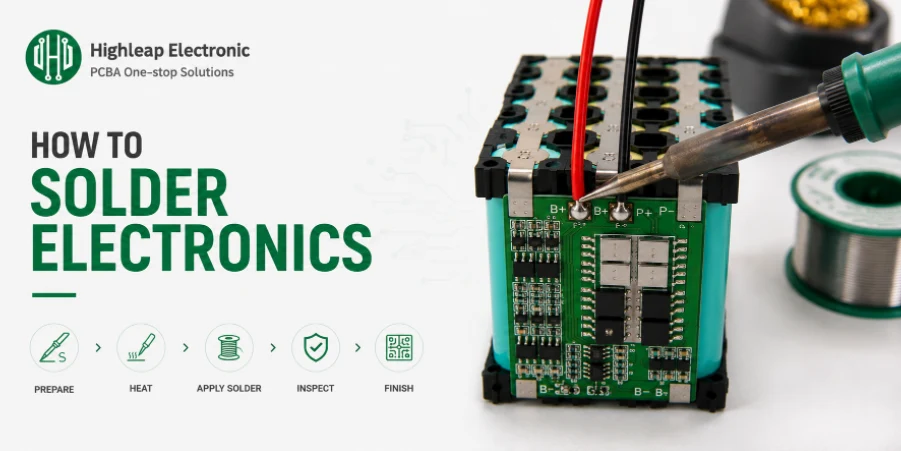
Figure 2. electronics soldering and SMT work
How to undo a joint: desoldering basics
Mistakes happen, so learn to reverse them. Two tools cover almost everything.
The two tools
A desoldering pump (solder sucker) clears through-holes and large amounts of solder: melt the joint, place the nozzle over the molten solder, and trigger the vacuum to suck it up. A desoldering wick (copper braid) cleans flat pads and lifts solder bridges: lay the braid on the joint, press the iron on top, and capillary action draws the molten solder into the braid, leaving a clean flat pad.
The technique that protects the board
For both tools: add fresh flux, fully melt the solder before trying to remove it, and don’t press hard or linger. The most common desoldering damage is a lifted pad caused by excess heat and pressure on a pad that’s already been through one solder cycle. Work in short bursts and remove heat as soon as the solder transfers.
Progressing to surface-mount soldering
Once through-hole feels natural, surface-mount is the next step. The components are smaller, but the technique is learnable with the right approach.
The tack-one-pad method
Use a finer tip and plenty of flux. The reliable technique for a small SMT part: tack one pad first — apply a little solder to one pad, then hold the component in place and remelt that solder to anchor it. Check the part’s alignment under good light, nudge it straight if needed, then solder the remaining pins now that the part won’t move. This sidesteps the main SMT difficulty of holding a tiny part steady while soldering.
Drag soldering for fine-pitch ICs
For chips with many close-spaced pins, “drag soldering” works well: flux the pins generously, then run a bead of solder along the row with the iron, letting surface tension pull solder onto each pin. If pins bridge, lay desoldering wick across them to lift the excess. Cheap SMT practice kits build the steadiness and confidence you need before risking a real board — well worth the small cost.
Starting with the right part sizes
SMT parts come in standardized sizes, and the size you start with hugely affects your success rate. Larger passives like 0805 (roughly 2.0 × 1.25 mm) and 0603 are very hand-solderable and the sensible place to begin; 0402 is doable with a fine tip and a steady hand; 0201 and the tiny 01005 are genuinely difficult by hand and better left to reflow. The same logic applies to ICs: a SOIC or larger-pitch chip is forgiving, whereas a fine-pitch QFP or a leadless QFN tests your technique. When you design a board you intend to assemble by hand, choosing the larger end of each part family makes the whole job easier and more reliable.
When to let a machine do it
Hand soldering is perfect for prototypes, repairs, and learning — and the skills above make you genuinely capable. But there is a point where hand work is the wrong tool.
The signs to scale up
Volume and dense fine-pitch boards belong on a reflow line, where placement and soldering are automated and consistent across every joint. Hidden-joint parts like BGAs cannot be hand-soldered reliably at all — there is no way to reach the joints under the package. When you hit any of these, machine assembly is faster, more consistent, and ultimately cheaper than hand work.
The next step
Highleap Electronics runs SMT and through-hole assembly with automated inspection — the natural next step once your hand-built prototype is proven and you need quantity. We review your design first with a free DFM check.
Frequently asked questions
How long do I hold the iron on a joint?
Usually one to two seconds to heat the joint, then a moment more while the solder flows. Beyond about five seconds you risk lifting the pad or damaging the component.
Do I touch the solder to the iron or the joint?
To the joint. The heated pad and lead should melt the solder; melting it on the tip instead leads to cold joints that don’t bond.
How do I fix a cold joint?
Add a little flux and reheat until the solder reflows into a shiny, smooth cone, then let it cool undisturbed without moving the part.
What if I use too much solder?
Remove the excess with desoldering wick. A good joint needs only a small amount — about a grain of rice for a typical through-hole pin.
Can I solder surface-mount parts by hand?
Yes — use a fine tip, extra flux, and the tack-one-pad-first method. Very small parts (0201) and BGAs are better suited to a reflow line.
Why does my iron tip turn black and stop working?
It has oxidized. Keep it tinned, clean it on brass wool, and never leave it hot and bare for long. Re-tin a dull tip immediately.
What’s the most important habit for a beginner?
Heat the joint, not the solder. That one habit, combined with a well-tinned tip, prevents the majority of beginner failures.

Recommended Posts

TMM4 Filter PCB Manufacturing
TMM4 filter PCB manufacturing is controlled by the...

TMM3 PCB Manufacturing for RF Modules
TMM3 PCB manufacturing is most useful where the RF module...

TMM6 PCB Fabrication
TMM6 fabrication is the process-control page for a mid-Dk...

TMM10 PCB Manufacturing for Compact RF Designs
Table of contentsHow TMM10 Shrinks RF StructuresTMM10 vs...
How to get a quote for PCBs
Let‘s run DFM/DFA analysis for you and get back to you with a report. You can upload your files securely through our website. We require the following information in order to give you a quote:
-
- Gerber, ODB++, or .pcb, spec.
- BOM list if you require assembly
- Quantity
- Turn time
For PCBA services, please provide your BOM (Bill of Materials) and any specific assembly instructions. We also offer DFM/DFA analysis to optimize your designs for manufacturability and assembly, ensuring a smooth production process.