
Press-Fit vs Soldered PCB Pins: Header, Connector, and Through-Hole Choices
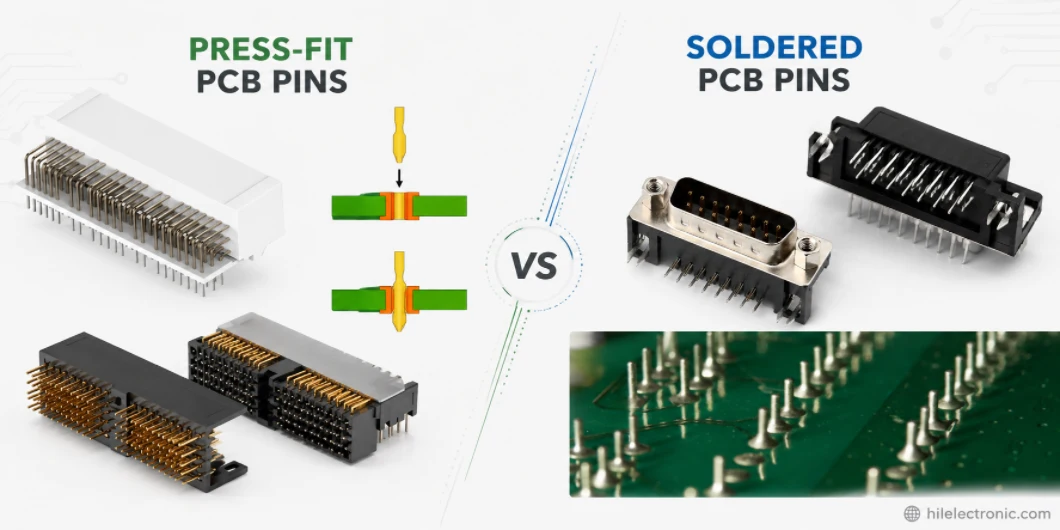
Figure 1. press-fit vs soldered PCB pins image for PCB manufacturing review.
Choosing between press-fit and soldered PCB pins affects more than assembly convenience: it changes connector retention, serviceability, plating requirements, and the risk profile of the finished product. Headers and power terminals still use through-hole soldering widely, but press-fit technology can remove thermal stress and speed installation when the design supports it. This guide compares press-fit vs soldered PCB pins, covers where manual soldering and desoldering still matter, and shows how Highleap Electronics handles connector pins reliably at production scale.
1. What are PCB solder pins?
PCB solder pins are the metal pins, leads, or terminals — most often on headers and connectors — that pass through holes in a board and are soldered to plated pads to make a strong electrical and mechanical connection. Unlike surface-mount terminals that sit on the surface, these pins go through the board, giving a robust joint that resists mechanical stress, which is why connectors and headers so often use them.
This is through-hole technology: the pin sits in a plated through-hole, and solder fills the barrel to bond the pin to the copper on both sides. The mechanical strength is the main reason through-hole pins persist for connectors, power terminals, and anything that gets plugged, pulled, or stressed, even in an otherwise surface-mount design. Understanding the broader through-hole technology context makes the soldering and desoldering steps below much clearer.
2. How to solder header pins to a PCB
To solder header pins, fit the header in its holes, tack one end pin to hold it square, then heat each pad-and-pin together and feed solder so it flows around the pin and fills the hole, forming a smooth cone-shaped joint. The trick is heating the joint, not the solder, so it wets properly. The method:
- Seat and tack one pin. Place the header, then solder a single end pin while holding the header flush and straight; recheck alignment before doing the rest.
- Heat the joint. Touch the iron to both the pad and the pin for a moment so both are hot, which is what lets the solder wet both surfaces.
- Feed solder to the joint. Apply solder to the heated pad and pin (not directly to the iron tip) so it flows around the pin and fills the plated hole.
- Aim for a clean cone. A good joint is shiny and concave, wetting up the pin and out onto the pad; remove the iron and let it cool undisturbed.
Use flux to help wetting, and a temperature-controlled iron to avoid overheating the pad. This kind of hand work is fine for prototypes and rework — the foundational technique for soldering and desoldering header pins every engineer should know — but for quantity, machine soldering is faster and more consistent.
3. How to desolder pins without damaging the board
To desolder pins, melt the joint and remove the molten solder with a solder sucker or desoldering braid, freeing each pin — and for multi-pin headers, use a desoldering gun or add fresh solder to spread heat so all pins release together. Multi-pin parts are the hard case because every pin must be molten at once to pull the part free without tearing pads. The approaches:
- Single pins: heat the joint and clear the solder with a spring-loaded solder sucker or desoldering braid, then the pin lifts free.
- Multi-pin headers: a desoldering gun with a heated hollow tip melts and vacuums each joint, which is the cleanest way to remove a header.
- Without a gun: adding fresh solder to bridge several pins can spread heat so they stay molten together while you work the part loose, or cut the plastic body and remove pins one at a time.
- Protect the pads: never force a pin while solder is solid — lifting or pulling cold pins is what rips copper pads and ruins the board.
The recurring risk is pad damage from impatience or excess heat, which leads to the lifted pads that turn a simple rework into a repair. On plated-through holes the barrel adds strength, but the surface pads are still vulnerable, so steady technique matters more than force.
4. Soldered pins vs press-fit pins: which to use
Soldered pins are bonded with solder for the broadest compatibility and lowest tooling cost, while press-fit pins are pressed into plated holes to form a solderless connection — press-fit suits high-pin-count connectors, very thick boards, and high-reliability applications that avoid solder-joint fatigue. Both make a through-hole connection but in different ways:
- Soldered pins rely on a solder joint, work with standard processes, and are the default for most headers and connectors.
- Press-fit pins have a compliant section that deforms into the plated hole for a gas-tight connection without solder, ideal for large connectors and backplanes where soldering hundreds of pins is impractical or where solder-joint reliability under vibration is a concern.
Press-fit needs precise hole sizing and plating and the right pin design, so it is a process decision made with the fabricator. Both are part of the wider PCB connector picture, and the soldered-versus-solderless choice mirrors the broader surface-mount versus through-hole trade-off — strength and serviceability against process simplicity.
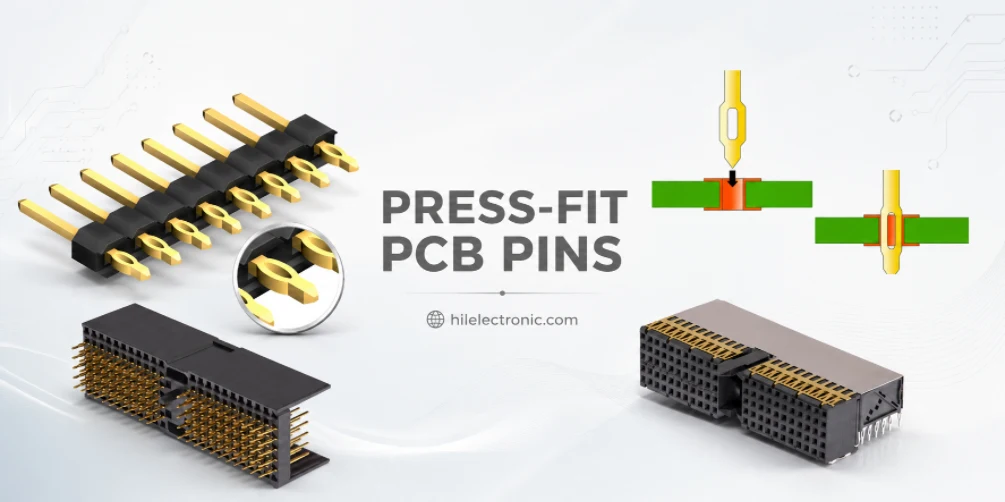
Figure 2. Manufacturing details for press-fit vs soldered PCB pins should be checked before quotation and production.
5. Common solder-pin defects and how to prevent them
The most common solder-pin defects are bridges between pins, cold joints, insufficient hole fill, and lifted pads — and each has a clear cause and fix. Knowing them turns rework into prevention:
| Defect | Cause | Prevention |
|---|---|---|
| Solder bridge | Too much solder, tight pin pitch | Less solder, flux, wick away excess |
| Cold joint | Joint not hot enough; dull, cracked look | Heat pad and pin together, adequate iron temp |
| Insufficient fill | Too little solder or heat in the barrel | Heat the hole, feed enough solder to fill |
| Lifted pad | Forcing a cold pin or overheating | Fully melt solder first; avoid excess heat |
The common thread is heat control and solder volume. In volume production these joints are made by wave soldering or selective soldering, which apply consistent heat and solder to every pin and then are inspected — far more repeatable than hand soldering rows of pins. Defect patterns on these processes are well understood, as in this look at wave soldering defects.
6. How Highleap solders through-hole pins at scale
Highleap solders through-hole pins in volume with wave or selective soldering — and press-fit where it suits the design — within one assembly flow, so connectors and headers get consistent, inspected joints rather than variable hand work. The process is matched to the board: wave soldering for many through-hole joints, selective soldering when a mostly surface-mount board has only a few through-hole parts that must not disturb nearby components.
Because through-hole pins are usually connectors that get mechanically stressed, joint quality and pad integrity matter, so the build is inspected and, where needed, the holes and plating are specified for press-fit reliability. Highleap delivers this through full through-hole PCB assembly alongside surface-mount in turnkey assembly. When you request a quote, list the connectors and headers, the through-hole pin count, whether you need soldered or press-fit, and the board thickness so the right process is applied.
7. PCB solder pins FAQ
What temperature should I use to solder header pins?
A temperature-controlled iron around 315–370°C suits most header pins, higher for lead-free than leaded solder. The goal is to heat the pad and pin quickly so the solder wets without lingering long enough to lift the pad.
How do you remove a header from a PCB without a desoldering gun?
Add fresh solder across several pins so they stay molten together while you ease the header out, or cut the plastic body and desolder the pins individually. Never pull a pin while the solder is solid, as that lifts pads.
Why do my header pins keep bridging?
Usually too much solder on a tight pin pitch. Use less solder, add flux so it flows onto the pads rather than between pins, and wick away any bridge with desoldering braid.
Can you reuse header pins after desoldering?
Often yes if they are removed cleanly without bending or overheating, though the plastic spacer may be damaged by heat. For reliability-critical work, using fresh headers is the safer choice.
What is a press-fit pin and does it need soldering?
A press-fit pin has a compliant section that is pressed into a plated hole to form a solderless, gas-tight connection — it needs no soldering. It is used for high-pin-count connectors and high-reliability or thick-board applications.
Do solder pins need flux?
Yes — flux removes oxide so the solder wets the pin and pad properly. Solder wire has flux in its core, but adding extra flux when soldering or desoldering pins improves flow and makes clean joints much easier.

Recommended Posts

TMM4 Filter PCB Manufacturing
TMM4 filter PCB manufacturing is controlled by the...

TMM3 PCB Manufacturing for RF Modules
TMM3 PCB manufacturing is most useful where the RF module...

TMM6 PCB Fabrication
TMM6 fabrication is the process-control page for a mid-Dk...
TMM10 PCB Manufacturing for Compact RF Designs
Table of contentsHow TMM10 Shrinks RF StructuresTMM10 vs...
How to get a quote for PCBs
Let’s run DFM/DFA analysis for you and get back to you with a report. You can upload your files securely through our website. We require the following information in order to give you a quote:
-
- Gerber, ODB++, or .pcb, spec.
- BOM list if you require assembly
- Quantity
- Turn time
For PCBA services, please provide your BOM (Bill of Materials) and any specific assembly instructions. We also offer DFM/DFA analysis to optimize your designs for manufacturability and assembly, ensuring a smooth production process.