
Online Circuit Simulation for PCB Design

Figure 1. online circuit simulation
Online circuit simulation means running a model of your circuit in a web browser to see how it behaves before you build any hardware. It lets you check whether a design works, tune component values, and catch mistakes early, all without a soldering iron or a single ordered board. This guide explains what online circuit simulation is, the main browser-based tools and what each is best for, what simulation can and cannot predict, and how to move from a verified simulation to a manufactured PCB.
Key takeaways
- Online simulators run in the browser with nothing to install, ranging from analog SPICE tools to digital-logic and microcontroller simulators.
- Choose by use case: Falstad and CircuitLab for analog, CircuitVerse for digital logic, Wokwi for firmware, EasyEDA when you also want PCB layout.
- Simulation verifies circuit behavior and component values; it cannot capture layout parasitics, thermal effects, or EMI.
- Offline tools like LTspice remain free and powerful for serious analog work.
- A working simulation still needs a physical prototype, because real-world board effects only appear once it is built.
Table of Contents
What Online Circuit Simulation Is and Why It Helps
A circuit simulator solves the equations that describe your circuit and shows you the result, voltages, currents, waveforms, logic states, so you can see how it behaves before committing to hardware. Running it online means it works in a browser tab, with no installation and your work saved in the cloud.
The value is in catching problems early and cheaply. Adjusting a resistor in a simulator takes a second; changing it on an assembled board takes a rework station. Simulation lets you confirm a topology, choose component values, explore “what if” changes, and understand a circuit you are learning, all before any cost is incurred. It is a thinking and checking tool, not a replacement for building, and used that way it saves both time and money.
Types of Circuit Simulation
Not all simulators do the same thing, and matching the type to your circuit is the first decision.
- Analog / SPICE simulation models continuous voltages and currents, ideal for amplifiers, filters, power circuits, and anything where exact values and waveforms matter.
- Digital logic simulation models gates, flip-flops, and logic states, suited to digital design and learning Boolean logic.
- Mixed-signal simulation handles circuits that combine analog and digital sections.
- Microcontroller / firmware simulation runs actual code on a simulated processor and its peripherals, letting you test firmware against virtual hardware.
Some tools specialize in one type; others span several. Knowing which behavior you need to verify points you to the right tool below.
The Main Online Simulators
Several browser-based simulators are widely used, each with a clear sweet spot.
| Tool | Best for | Notes |
|---|---|---|
| Falstad / CircuitJS | Visualizing analog circuits | Free; animated current flow makes it great for learning |
| Tinkercad Circuits | Beginners and Arduino | Very approachable; simulates basic circuits and Arduino code |
| CircuitLab | Analog and digital | Capable browser SPICE; paid, with limited free access |
| EasyEDA | Simulation plus PCB design | SPICE simulation built into a full schematic-and-PCB tool |
| CircuitVerse | Digital logic | Open-source; strong for logic design and education |
| Wokwi | Microcontroller firmware | Simulates Arduino, ESP32, Pi Pico and peripherals running real code |
A note on availability
Online tools come and go, and their terms change. One long-standing browser simulator, NI’s Multisim Live, is being retired in 2026, a reminder to confirm a tool is current before you build a workflow around it. The options above are all actively used as of this writing, but checking each tool’s status directly is wise.
Picking one
For analog intuition, start with Falstad. For beginners and Arduino, Tinkercad. For digital logic, CircuitVerse. For firmware against virtual hardware, Wokwi. And if you want simulation in the same tool you will lay out your board, EasyEDA combines SPICE with full schematic capture and PCB design, which streamlines the move from idea to manufacturable files.
Offline Alternatives Worth Knowing
Browser tools are convenient, but two offline options remain staples of serious analog work. LTspice is a free, fast, and widely trusted SPICE simulator favored for power and analog circuits. KiCad includes an ngspice-based simulator integrated with its schematic editor, useful when you are already designing in KiCad.
The trade-off is the usual one: offline tools can be more capable and faster for heavy simulation, while online tools win on accessibility and sharing. Many engineers use both, an online tool for quick checks and teaching, an offline one for demanding analysis.
What Simulation Can and Cannot Catch
Understanding the limits of simulation is what keeps it useful rather than misleading.
What it catches well
- Functional behavior, whether the circuit does what you intended.
- Component values, letting you tune resistors, capacitors, and the like.
- Basic timing and logic, and for firmware tools, code behavior against peripherals.
- Idealized frequency and transient response.
What it cannot capture
A simulator works from your schematic, not your physical board, so it is blind to the effects that the layout creates. It cannot see trace parasitics and impedance, the inductance and capacitance of real copper that matter at high speed and are the concern of high-speed PCB manufacturing. It does not model thermal behavior, how parts heat up and shed heat, which depends on real copper, packages, and thermal design, sometimes calling for a substrate like that used in metal-core assembly. And it generally cannot predict EMI, crosstalk, or mechanical effects. These only reveal themselves on a built board, which is why a prototype remains essential.
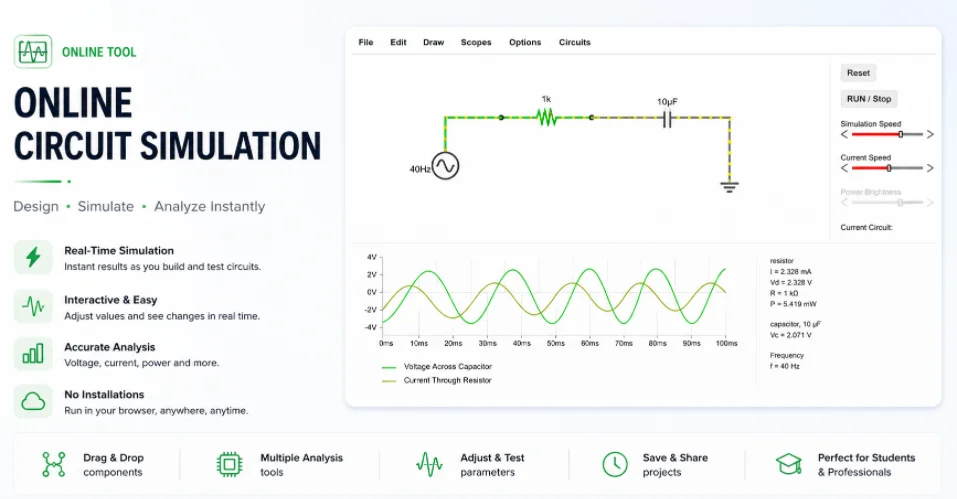
Figure 2. online circuit simulation details
Running a Simulation You Can Trust
A simulation is only as good as the way you set it up. Treat the result with the right amount of skepticism and a few habits make it genuinely useful rather than misleading.
Choose the right analysis for the question
SPICE-style simulators offer several analysis modes, and picking the right one matters. The table below maps the common ones to what they answer.
| Analysis | What it tells you |
|---|---|
| DC operating point | The steady bias voltages and currents at every node |
| Transient | How signals change over time, the waveform view |
| AC (frequency) sweep | Gain and phase versus frequency, for filters and amplifiers |
| DC sweep | How the output moves as an input is swept across a range |
| Noise | Where noise comes from and how much, across frequency |
Build up incrementally
Simulate small blocks first, then combine them. If you drop an entire complex circuit in at once and it misbehaves, finding the cause is hard. Verifying each stage and adding complexity gradually makes problems easy to localize.
Use realistic models and values
Default, idealized models can flatter a design. Where a manufacturer publishes a SPICE model for a part, use it, and include the parasitics you already know matter. Even then, remember a model omits the board-level effects, parasitics, thermal, EMI, described above, so a clean simulation is necessary but not sufficient.
Watch convergence and units
If a simulation refuses to converge or returns nonsensical numbers, the usual culprits are wrong units, missing initial conditions, or an invalid model, not a real circuit fault. Check those before you trust, or distrust, a result.
Sanity-check against hand calculations
For the results that matter, confirm the simulator agrees with a quick back-of-the-envelope calculation, a divider ratio, a filter corner frequency, an expected current. When the two disagree, one of them is wrong, and tracking down which deepens your understanding and exposes setup errors that a simulation alone would quietly hide.
From a Verified Simulation to a Real PCB
A circuit that simulates correctly is a good starting point, but it is not a finished product. The path from simulation to hardware looks like this.
- Lay out the board. Translate the verified schematic into a PCB, where placement and routing introduce the physical realities simulation ignored.
- Review for manufacturability. Check the design against what a factory can build; a DFM review catches issues before they reach production.
- Fabricate a prototype. Order a small run through professional PCB manufacturing to get real boards.
- Assemble and test. Populate the board, by hand for simple through-hole or via PCB assembly for surface-mount parts, then measure how it actually behaves.
- Iterate, then scale. Refine based on the prototype, and when it works, move toward high-volume PCB assembly with the same files.
What to verify on the first prototype
When the prototype arrives, measure the things a simulation could not show: real signal integrity on fast edges, temperatures under load, and any noise or interference. These board-level realities are exactly why the physical step exists, and confirming them is what turns a promising simulation into a proven design.
Treat simulation as the first checkpoint in this flow, not the finish line. It removes design errors cheaply, so that the prototype you build is testing the physical board rather than a flawed concept.
Simulate to get the circuit right, then build to find out how the board behaves. Used together, an online simulator and a physical prototype give you a fast, low-cost route from idea to working hardware. You can read more about Highleap Electronics and how we take designs from prototype to production.
Frequently Asked Questions
What is the best free online circuit simulator?
It depends on the circuit. Falstad/CircuitJS is excellent and free for visualizing analog circuits, Tinkercad Circuits is best for beginners and Arduino, CircuitVerse is strong for digital logic, and Wokwi is best for microcontroller firmware. EasyEDA adds SPICE simulation alongside full PCB design.
Can simulation replace building a prototype?
No. Simulation verifies circuit behavior and component values, but it cannot capture layout parasitics, thermal effects, EMI, or mechanical issues, which only appear on a real board. A physical prototype is still essential before production.
Is Multisim Live still available?
NI’s Multisim Live is being retired in 2026. Because online tools and their terms change, it is wise to confirm any simulator’s current status before building a workflow around it. The other tools listed here are actively used as of this writing.
What is the difference between SPICE and logic simulation?
SPICE simulates continuous analog voltages and currents, ideal for amplifiers, filters, and power circuits. Logic simulation models digital gates and states. Mixed-signal tools handle both, and firmware simulators run code on a virtual processor and peripherals.
Should I use an online or offline simulator?
Online tools win on accessibility and sharing with nothing to install. Offline tools such as LTspice can be faster and more capable for heavy analog analysis. Many engineers use an online tool for quick checks and an offline one for demanding work.
How do I get from a simulated circuit to a real board?
Lay out the verified schematic as a PCB, review it for manufacturability, fabricate a prototype, assemble and test it, then iterate and scale to production. Simulation is the first checkpoint, removing design errors before you spend on hardware.
Which simulation analysis should I use?
Use a DC operating-point analysis to check bias conditions, a transient analysis to see waveforms over time, an AC sweep for gain and phase versus frequency, a DC sweep to map the output against a swept input, and a noise analysis to find noise sources. Match the analysis to the question you are asking.
My simulation won’t converge, what is wrong?
Non-convergence usually points to a setup problem rather than a real circuit fault, wrong units, missing initial conditions, or an invalid component model. Build the circuit up in small stages, use realistic models, and check those settings before trusting or discarding the result.
Are paid simulators worth it over the free ones?
Free tools cover most learning and many real designs. Paid tools or paid tiers add capacity, more component models, and advanced analyses for professional work. Start free and upgrade only when you hit a concrete limit, since free online tools and offline options like LTspice are very capable.

Recommended Posts
Taconic RF 35 vs RO4350B PCB
Table of contentsRF-35 vs RO4350B Procurement and...

TMM4 Filter PCB Manufacturing
TMM4 filter PCB manufacturing is controlled by the...

TMM6 PCB Fabrication
TMM6 fabrication is the process-control page for a mid-Dk...

TMM3 PCB Manufacturing for RF Modules
TMM3 PCB manufacturing is most useful where the RF module...
How to get a quote for PCBs
Let‘s run DFM/DFA analysis for you and get back to you with a report. You can upload your files securely through our website. We require the following information in order to give you a quote:
-
- Gerber, ODB++, or .pcb, spec.
- BOM list if you require assembly
- Quantity
- Turn time
For PCBA services, please provide your BOM (Bill of Materials) and any specific assembly instructions. We also offer DFM/DFA analysis to optimize your designs for manufacturability and assembly, ensuring a smooth production process.