
Electronic Circuit Projects for Beginners

Figure 1. electronic circuit projects for beginners
Last updated: May 2026 · A hands-on starter guide for students, hobbyists, and self-taught makers
The best beginner electronics projects are simple, cheap, and teach one clear idea at a time — and they build on each other, so by the tenth project you understand current limiting, timing, switching, sensing, and even microcontrollers. This guide gives you ten classic circuits in a sensible order, what each one teaches, and the handful of parts you need. Build them on a solderless breadboard first, move the ones you like to a soldered protoboard, and when a project is good enough to keep or share, turn it into a real PCB. Everything here uses safe, low-voltage battery supplies.
What You Need to Start Electronics Projects
A small, inexpensive kit covers every project below:
| Category | Items |
|---|---|
| Build surface | Solderless breadboard, jumper wires |
| Power | 9 V battery + clip, or a 5 V USB supply; AA holder |
| Measuring | A basic digital multimeter |
| Passives | Assorted resistors, capacitors (ceramic + electrolytic) |
| Active parts | LEDs, NPN transistors (e.g., 2N3904/BC547), 555 timer IC, diodes |
| Sensors/extras | LDR, push-button, small buzzer, potentiometer, LM317 regulator |
| Optional | An Arduino-compatible board for the microcontroller project |
10 Easy Electronic Circuit Projects for Beginners
1. Light an LED with a current-limiting resistor
What it does: turns on a single LED. What you learn: Ohm’s law and why an LED needs a series resistor. Size it with R = (Vsupply − VLED) / I — for example, a 9 V supply, a red LED (~2 V), and 10 mA gives (9 − 2)/0.01 = 700 Ω, so use a standard 680 Ω. Core parts: LED, resistor, battery. This is the “hello world” of electronics and the foundation for everything else.
2. LED flasher with a 555 timer
What it does: blinks an LED on and off. What you learn: the 555 timer in astable mode and how an RC network sets timing — frequency ≈ 1.44 / ((R1 + 2·R2)·C). Change R or C and the blink rate changes. Core parts: 555 IC, two resistors, a capacitor, LED. The 555 is the single most useful chip a beginner can learn.
3. Two-transistor blinker (astable multivibrator)
What it does: alternately flashes two LEDs back and forth. What you learn: how transistors switch and how a cross-coupled RC circuit oscillates — the same idea as the 555, built from discrete parts. Core parts: two NPN transistors, two capacitors, four resistors, two LEDs.
4. Automatic night light (LDR dark sensor)
What it does: turns an LED on when it gets dark. What you learn: voltage dividers and sensing — an LDR (light-dependent resistor) and a fixed resistor form a divider whose midpoint voltage tracks light level, driving a transistor that switches the LED at a threshold. Core parts: LDR, resistor, transistor, LED. Swap the LED for a relay and you have an automatic lamp switch.
5. Transistor touch / push switch
What it does: turns a load on with a button or a finger touch. What you learn: using a transistor as a switch, base resistors, and how a small current controls a larger one. Core parts: NPN transistor, resistors, push-button or touch pads, LED.
6. Simple buzzer / doorbell
What it does: sounds a buzzer when a button is pressed. What you learn: driving an audible output and (optionally) using a transistor to switch a buzzer that needs more current than a button contact should carry. Core parts: buzzer, push-button, transistor, resistor.
7. Battery / voltage level indicator
What it does: lights LEDs to show a voltage level. What you learn: comparators and thresholds — a row of LEDs that turn on in sequence as voltage rises, teaching reference voltages and how to read an analog level. Core parts: LEDs, resistors, and either transistors or a dedicated LED-bar driver IC.
8. Water-level or rain alarm
What it does: beeps when water bridges two probes. What you learn: using conductivity as an input and triggering an output — water between two contacts completes a base circuit and switches on a buzzer. Core parts: two probes, transistor, resistor, buzzer.
9. Adjustable bench supply with an LM317
What it does: produces a variable, regulated DC voltage. What you learn: voltage regulation and feedback — the LM317’s output follows Vout = 1.25 × (1 + R2/R1), so a potentiometer sets the voltage. Core parts: LM317 regulator, two resistors/pot, capacitors. A genuinely useful tool you’ll keep using.
10. Microcontroller “blink” (Arduino)
What it does: blinks an LED under software control. What you learn: the leap from fixed circuits to programmable ones — uploading code, digital outputs, and timing in firmware instead of RC parts. Core parts: Arduino-compatible board, LED, resistor. This opens the door to sensors, displays, and connected projects.
What Each Beginner Electronics Project Teaches
| Project | Key concept | Level |
|---|---|---|
| LED + resistor | Ohm’s law, current limiting | Very easy |
| 555 flasher | Timing, RC, the 555 IC | Easy |
| Two-transistor blinker | Transistor switching, oscillation | Easy |
| LDR night light | Voltage dividers, sensing | Easy |
| Touch/push switch | Transistor as a switch | Easy |
| Buzzer / doorbell | Driving outputs | Easy |
| Voltage indicator | Comparators, thresholds | Medium |
| Water/rain alarm | Conductive sensing, triggering | Medium |
| LM317 supply | Voltage regulation | Medium |
| Arduino blink | Microcontrollers, firmware | Medium |
Build Path: Breadboard to Protoboard to PCB
Use the same three-stage progression professionals use:
- Breadboard — build and debug each project with no soldering, swapping parts freely until it works.
- Protoboard (perfboard) — solder a working circuit onto a perfboard so it becomes a permanent, rugged build you can keep or put in an enclosure.
- Custom PCB — when you want a compact, reliable, reproducible version (to gift, sell, or build several of), lay out a PCB and have it fabricated and assembled.
Moving from breadboard to a real PCB is also the best way to learn PCB design — you take a circuit you already understand and turn it into a manufacturable board.
Beginner Electronics Tips and Safety
- Stay low-voltage. Everything here runs on batteries or a 5 V supply — never practice on mains voltage.
- Mind LED and electrolytic polarity. Reversed electrolytic capacitors and missing LED resistors are the two most common beginner mistakes.
- Double-check power and ground before applying power. A reversed battery can destroy ICs instantly.
- Use a multimeter. Measure voltages and check continuity rather than guessing.
- Read datasheets. Pinouts and maximum ratings for the 555, transistors, and LM317 are all in their datasheets.
- Change one thing at a time when debugging, so you learn what each change does.
Turning a Beginner Project into a Real PCB
Once a project earns a permanent home, a custom PCB makes it smaller, sturdier, and repeatable. Highleap Electronics is a China-based PCB and PCBA manufacturer that supports makers and students taking that step, with service to the United States, Europe, and Asia-Pacific:
- PCB fabrication with fast prototype turnaround for your first boards.
- Low-volume PCB assembly perfect for a handful of finished units.
- DFM review that checks your first layout is manufacturable before you commit.
- Online Gerber viewer to preview your exported design.
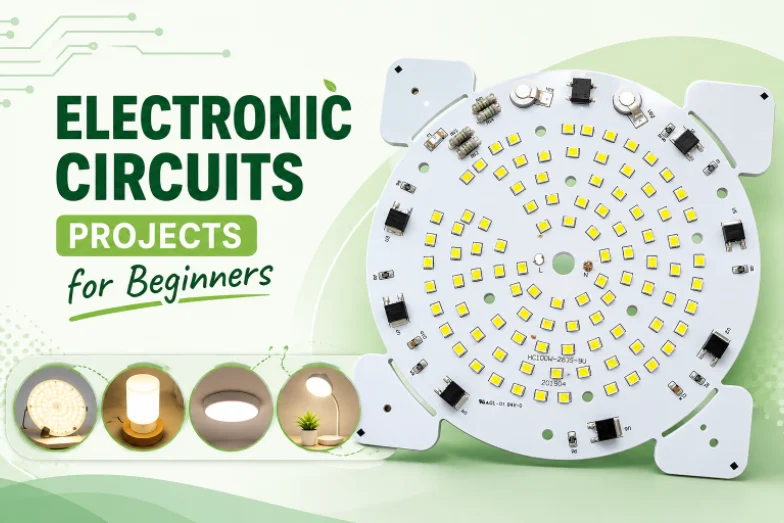
Figure 2. electronic circuit projects for beginners details
Beginner Electronics Projects FAQ
What is the easiest electronics project for a complete beginner?
Lighting an LED through a current-limiting resistor. It teaches Ohm’s law and the single most common rule in electronics — always limit current to an LED — and it needs only three parts.
Do I need to know how to solder to start?
No. Begin on a solderless breadboard, which needs no tools. Learn soldering later when you move a working circuit to a protoboard or build a PCB.
What components should a beginner buy first?
A breadboard and jumpers, a multimeter, assorted resistors and capacitors, several LEDs, a few NPN transistors, a 555 timer, an LDR, a push-button, a small buzzer, and a 9 V battery. That covers every project in this list.
Is the 555 timer good for beginners?
Yes — it is one of the best learning chips. With a few resistors and capacitors you can make blinkers, timers, and tones, and you’ll learn RC timing that applies across electronics.
When should I move from a breadboard to a PCB?
When a project works and you want it permanent, compact, reliable, or reproducible. Solder it to a protoboard for a one-off, or design a PCB when you want a professional, repeatable board — which is also a great way to learn PCB layout.
Are these projects safe?
Yes, when you stick to battery or low-voltage USB power, observe component polarity, and never work on mains electricity. Low-voltage DC projects like these are the safe way to learn.
Can I get my beginner project made into a proper board cheaply?
Yes. Prototype PCB fabrication and low-volume assembly are affordable and fast, and a DFM review helps a first-time designer avoid manufacturability mistakes before ordering.
What’s a good order to build these projects in?
Start with the LED-and-resistor circuit to learn Ohm’s law and polarity, then the transistor switch and the LDR night light to see how a small signal controls a larger load. Move to the 555 flasher and tone projects to learn RC timing, then the voltage indicator and water alarm to combine sensing with output. Finish with the LM317 supply and the Arduino blink, which bridge into power regulation and programmable control — the two doors into more advanced electronics.
What are some simple electronic circuits projects for beginners with diagrams?
Good first builds with simple circuit diagrams include an LED-and-resistor circuit, a 555-timer LED flasher, a light-sensitive LDR night light, a transistor switch, and an Arduino “blink” — all covered on this list. Each one uses a handful of inexpensive parts, teaches a single core idea, and runs safely on battery or low-voltage USB power.

Recommended Posts

TMM4 Filter PCB Manufacturing
TMM4 filter PCB manufacturing is controlled by the...

TMM3 PCB Manufacturing for RF Modules
TMM3 PCB manufacturing is most useful where the RF module...

TMM6 PCB Fabrication
TMM6 fabrication is the process-control page for a mid-Dk...
TMM10 PCB Manufacturing for Compact RF Designs
Table of contentsHow TMM10 Shrinks RF StructuresTMM10 vs...
How to get a quote for PCBs
Let‘s run DFM/DFA analysis for you and get back to you with a report. You can upload your files securely through our website. We require the following information in order to give you a quote:
-
- Gerber, ODB++, or .pcb, spec.
- BOM list if you require assembly
- Quantity
- Turn time
For PCBA services, please provide your BOM (Bill of Materials) and any specific assembly instructions. We also offer DFM/DFA analysis to optimize your designs for manufacturability and assembly, ensuring a smooth production process.