
PCB Current Calculator: Sizing Trace Width and Vias with the IPC-2221 Formula

Figure 1. Pcb Current Calculator reference image for PCB manufacturing review.
- Governing standard: IPC-2221 (charts) and the more accurate IPC-2152
- Constant k: 0.048 external traces, 0.024 internal traces
- Copper weight: 1 oz = 1.37 mil (≈ 35 µm) thick; 2 oz ≈ 2.74 mil
- Internal traces carry roughly half the current of an identical external trace
- Typical design temperature rise: 10–20 °C above ambient
- Cross-section: A (mil²) = width (mil) × copper thickness (mil)
A PCB current calculator turns a deceptively simple question — “how wide does this trace need to be?” — into a number you can design to. Undersize a power trace and it runs hot, drops voltage, and can eventually fail; oversize everything and you waste board space you may not have. This guide explains the IPC-2221 math that every PCB trace width current calculator runs under the hood, shows a full worked example you can reproduce by hand, and extends the same thinking to vias. The same math sits behind every related tool — a PCB trace current calculator, a via current calculator, a PCB via current calculator — and behind the everyday question of how much trace width a given current needs.
What follows is how our DFM engineers at Highleap Electronics sanity-check current-carrying copper before a board goes to fabrication.
1. What a PCB Current Calculator Does and Why Trace Width Matters
A PCB current calculator relates four quantities: the current a trace carries, its copper cross-sectional area, the temperature rise that current produces, and whether the trace is on an outer or inner layer. Fix any three and the calculator solves for the fourth. In practice designers use it two ways — to find the maximum safe current for a trace they have already drawn, or to find the minimum width for a current they need to deliver.
The physics is straightforward: copper has resistance, current through resistance generates heat (I²R), and that heat raises the trace’s temperature until it reaches equilibrium with its surroundings. A wider or thicker trace has more copper, lower resistance, and more surface area to shed heat, so it carries more current at the same temperature rise.
Why this is a reliability issue
An overheated trace does not just run warm. Sustained high temperature accelerates copper oxidation, degrades the laminate around it, raises resistance further in a damaging feedback loop, and on power boards can lift pads or open the trace entirely. Sizing current-carrying copper correctly is one of the cheapest reliability investments in a design.
Why temperature rise is a design choice
There is no single “rated” current for a trace — only a current for an acceptable temperature rise. A 10 °C rise is conservative and common; 20 °C is widely used; higher rises pack more current into less copper at the cost of margin. Choosing that allowed ΔT is the first decision before any calculator gives a meaningful answer.
2. The IPC-2221 Formula Behind Every Trace Width Calculator
Nearly every online PCB current calculator implements the same empirical equation from IPC-2221, derived from heating curves of real traces.
Here I is current in amperes, ΔT is the allowable temperature rise in °C, and A is the trace’s cross-sectional area in square mils. The constant k captures cooling conditions: it is 0.048 for external traces, which are exposed to air and cool well, and 0.024 for internal traces, which are buried in laminate with no convective cooling.
Turning copper weight into thickness
Cross-sectional area is width times thickness, and thickness comes from the copper weight. One ounce of copper spread over a square foot is 1.37 mil (about 35 µm) thick. So a 1 oz trace that is 50 mil wide has a cross-section of 50 × 1.37 = 68.5 mil². Doubling to 2 oz copper doubles the thickness to 2.74 mil and therefore doubles the area for the same width.
| Copper Weight | Finished Thickness | Common Use |
|---|---|---|
| 0.5 oz | ~0.68 mil (17 µm) | Inner signal layers, fine pitch |
| 1 oz | 1.37 mil (35 µm) | Default for most boards |
| 2 oz | 2.74 mil (70 µm) | Power traces, higher current |
| 3 oz+ | 4.1 mil+ (105 µm+) | Heavy-copper power and motor drives |
IPC-2221 versus IPC-2152
IPC-2221 is the classic, conservative reference and what most quick calculators use. The newer IPC-2152 accounts for additional factors — board thickness, the presence of copper planes, and thermal environment — and generally allows narrower traces or predicts lower temperatures because it models heat-spreading more realistically. For tight power designs, IPC-2152 is worth the extra rigor; for everyday sizing, IPC-2221 gives a safe starting point.
3. How to Calculate Trace Width Step by Step (Worked Example)
Working the formula once by hand makes every calculator result intuitive. Suppose you need an external trace to carry 5 A with a 10 °C rise on a 1 oz board.
Step 1 — Rearrange the formula for area
Solve I = k × ΔT0.44 × A0.725 for A:
Step 2 — Plug in the values
With k = 0.048 (external) and ΔT = 10: ΔT0.44 = 100.44 ≈ 2.75. So k × ΔT0.44 = 0.048 × 2.75 ≈ 0.132. Then I ÷ 0.132 = 5 ÷ 0.132 ≈ 37.9.
Step 3 — Solve for the area
Raise 37.9 to the power (1 ÷ 0.725 ≈ 1.379): A ≈ 37.91.379 ≈ 150 mil².
Step 4 — Convert area to width
Divide by the 1 oz thickness of 1.37 mil: width = 150 ÷ 1.37 ≈ 110 mil (about 2.8 mm). That is the minimum external width for 5 A at a 10 °C rise.
Step 5 — Check the internal-layer case
If that same trace ran on an inner layer, k drops to 0.024 — half the value. Because of the 0.725 exponent, halving k does not merely double the area: it raises it by about 2.6× (21.379). So the same 5 A at a 10 °C rise now needs roughly 390 mil², about 285 mil wide. This is why power routing is kept on outer layers, or given heavier copper, when it must go internal.
| Scenario (1 oz, ΔT 10 °C) | Approx. Width for 1 A | Approx. Width for 5 A |
|---|---|---|
| External trace (k = 0.048) | ~12 mil | ~110 mil |
| Internal trace (k = 0.024) | ~31 mil | ~285 mil |
These are first-order numbers; raising the allowed ΔT or the copper weight reduces the width quickly, which is exactly the trade space a calculator lets you explore.
4. Via Current Capacity: Sizing and Stitching Vias
Traces are only half the story. A power net usually has to change layers, and a via that is too small becomes the hottest, most resistive point in the path.
How via current capacity is estimated
A plated via behaves like a short, rolled-up trace: its current capacity depends on the copper cross-section of its barrel, which is set by the finished hole diameter and the plating thickness. A common engineering approach is to treat the unrolled barrel (the plating circumference times its thickness) as an equivalent trace cross-section and apply the same IPC-style reasoning, then add margin because vias cool less effectively than surface copper.
Stitching vias in parallel
Rather than rely on one large via, designers carry high current through multiple vias in parallel (“via stitching”). Several vias share the current, lower the combined resistance, and spread the heat, which is far more robust than a single hole. A useful habit is to budget a conservative current per via and add enough vias to cover the net with margin.
| Via Factor | Effect on Current Capacity |
|---|---|
| Finished hole diameter | Larger barrel = more copper = more current |
| Plating thickness | Thicker plating directly raises capacity |
| Number of parallel vias | Capacity adds up; spreads heat |
| Filled vs open via | Copper-filled vias improve conduction and thermal path |
When Highleap reviews a power design, we confirm that via counts and plating support the net current — the same via-stitching reasoning described above — that heavy-copper layers are manufacturable, and that the stackup actually delivers the cross-section the calculator assumed.
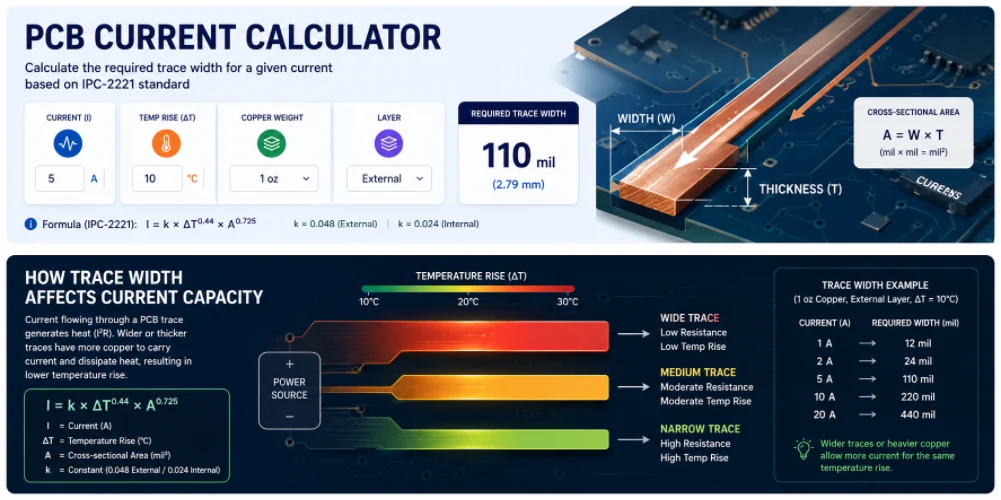
Figure 2. Pcb Current Calculator details should be checked before quotation and production.
5. Common PCB Current Calculation Mistakes and Better Practices
The formula is reliable; the inputs are where designs go wrong.
- Using the external k on an internal trace. Forgetting to switch from 0.048 to 0.024 overestimates internal capacity by roughly 2×.
- Assuming finished copper equals base copper. Plating adds thickness on outer layers; inner layers stay near nominal. Use the realistic finished thickness.
- Ignoring ambient and nearby heat. The ΔT is a rise above the local ambient, which may already be elevated by surrounding components.
- Forgetting the via in a layer-changing power net. A correctly sized trace feeding an undersized via just moves the hot spot to the via.
- Sizing for steady current only. Inrush, fault, and pulse currents can exceed the steady value and need their own check or fusing strategy.
- Treating IPC-2221 as exact. It is conservative and chart-based; for marginal power designs, validate with IPC-2152 or thermal testing.
The better practice is to decide the allowed temperature rise first, use realistic finished-copper thickness, keep heavy current on outer layers or specify heavier copper, size vias as deliberately as traces, and add margin for transient currents. Then confirm the chosen stackup and copper weight are actually buildable with your manufacturer before committing the layout.
6. When the Numbers Point to Heavy Copper
A current calculation is only useful if the board can be built to match it — and for real power designs, the answer the formula gives often points past standard 1 oz copper. Carrying tens of amps without large temperature rises usually means 2, 3, or 6+ oz copper, wider spacing between heavy traces, and via structures plated to match. Those are fabrication parameters, so they are worth confirming as buildable before the layout is locked.
Highleap fabricates from standard 1 oz boards through heavy-copper PCBs, and we will check your trace widths, copper weight, and via counts against the real current-carrying capacity the build can deliver — and flag where IPC-2152 would let you tighten it. Send your currents, temperature-rise target, and stackup, and we will confirm the copper is manufacturable.
7. Frequently Asked Questions
What formula does a PCB current calculator use?
Most use the IPC-2221 equation I = k × ΔT0.44 × A0.725, where I is current in amps, ΔT is the allowed temperature rise in °C, A is cross-sectional area in mil², and k is 0.048 for external traces or 0.024 for internal traces. The newer IPC-2152 standard refines this with board and thermal factors.
Why do internal traces need to be wider than external ones?
Internal traces are buried in laminate with no air cooling, so they shed heat far less effectively. In the IPC-2221 formula their constant k is half that of external traces (0.024 vs 0.048) — and because of the 0.725 exponent, a halved k works out to needing about 2.6 times the cross-sectional area for the same current and temperature rise.
How does copper weight affect current capacity?
Copper weight sets trace thickness — 1 oz is about 1.37 mil thick — and thickness multiplies width to give cross-sectional area. Doubling the copper weight from 1 oz to 2 oz doubles the area for the same width, so the trace carries substantially more current at the same temperature rise.
What temperature rise should I design for?
A 10 °C rise is a conservative, common choice and 20 °C is widely used. The right value depends on your laminate’s temperature rating, the ambient inside the enclosure, and how much margin you want. Remember the rise is added on top of the local ambient, not the room temperature.
How do I size a via for high current?
Treat the plated barrel like a short trace whose copper cross-section depends on hole diameter and plating thickness, then add margin because vias cool poorly. For real power nets, use several vias in parallel (via stitching) so they share current and spread heat rather than relying on one large hole.
Is IPC-2221 or IPC-2152 better?
IPC-2221 is simpler and conservative, making it a safe default for quick sizing. IPC-2152 is more accurate because it accounts for board thickness, copper planes, and thermal environment, and it often permits narrower traces. For tight or high-power designs, validating with IPC-2152 or thermal testing is worthwhile.

Recommended Posts

TMM4 Filter PCB Manufacturing
TMM4 filter PCB manufacturing is controlled by the...

TMM3 PCB Manufacturing for RF Modules
TMM3 PCB manufacturing is most useful where the RF module...

TMM6 PCB Fabrication
TMM6 fabrication is the process-control page for a mid-Dk...

TMM10 PCB Manufacturing for Compact RF Designs
Table of contentsHow TMM10 Shrinks RF StructuresTMM10 vs...
How to get a quote for PCBs
Let’s run DFM/DFA analysis for you and get back to you with a report. You can upload your files securely through our website. We require the following information in order to give you a quote:
-
- Gerber, ODB++, or .pcb, spec.
- BOM list if you require assembly
- Quantity
- Turn time
For PCBA services, please provide your BOM (Bill of Materials) and any specific assembly instructions. We also offer DFM/DFA analysis to optimize your designs for manufacturability and assembly, ensuring a smooth production process.