
Soldering Iron for PCB: Selection Guide
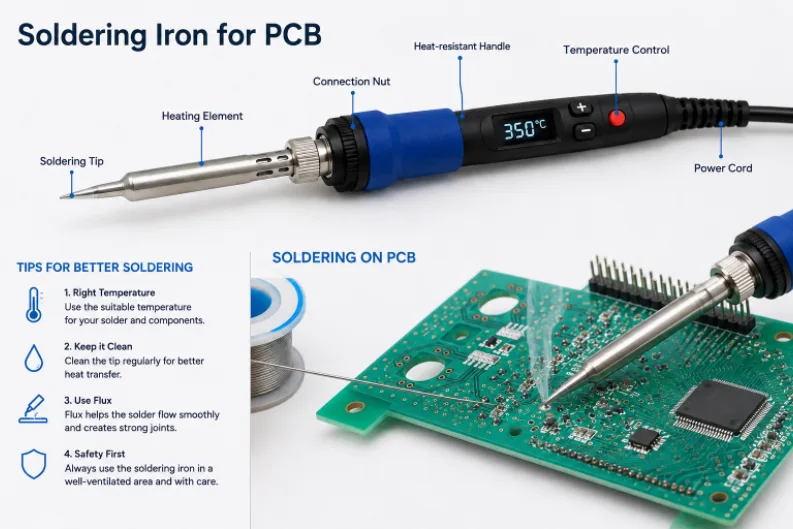
Figure 1. soldering iron for PCB
The best soldering iron for PCB work is a temperature-controlled station in the 40–80 W range with good thermal recovery, interchangeable fine tips, and a grounded (ESD-safe) tip. Wattage is about how fast the iron reheats after touching a joint, not how hot it gets — and stable, adjustable temperature is what protects pads and components. This guide explains exactly what to look for, the iron types available, the right temperature and tip for circuit-board work, and the soldering technique that produces clean joints, plus where hand soldering gives way to machine assembly.
What to look for in a soldering iron for PCB work
Circuit boards are unforgiving: copper pads act like heat sinks, and too much heat lifts pads or kills sensitive parts. The features that matter for PCB work are about control and heat delivery, not raw power.
| Feature | What to look for | Why it matters |
|---|---|---|
| Temperature control | Adjustable and stable (±2–10 °C); digital or magnetic/Curie-tip control | Prevents overheating and lets you match leaded vs lead-free |
| Wattage / thermal recovery | 40–80 W with fast recovery after touching a joint | Keeps the tip at temperature on large pads and ground planes |
| Interchangeable tips | A range of fine chisel and conical tips that are easy to swap | One iron covers through-hole, SMD, and fine-pitch work |
| ESD-safe / grounded tip | Earthed tip and ESD-safe handle | Protects static-sensitive ICs from tip leakage |
| Ergonomics & stand | Light, slim handle; stable stand with tip cleaner | Improves precision and safety on small pads |
A cheap fixed-temperature iron can work for the occasional wire, but for real PCB work a temperature-controlled iron with good recovery is what removes most of the frustration and the risk to your board.
Soldering iron types (and popular models)
- Basic pencil iron — a fixed-power iron with no temperature control. Cheap, fine for rough wiring, but a poor choice for delicate boards.
- Temperature-controlled station — a base unit with an iron and adjustable temperature. The standard recommendation for PCB work. Widely used examples include the Hakko FX-888D and FX-951, Weller WE1010, and JBC stations.
- Smart / portable irons — compact USB-C or DC-powered irons with fast heat-up and on-handle temperature control, such as the Pinecil and TS100/TS101. Convenient for kits, field repair, and small boards.
- Hot-air rework station — blows hot air rather than touching the joint; used for SMD and BGA rework, removing and replacing surface-mount parts. A complement to an iron, not a replacement.
For most people building or repairing boards, a mid-range temperature-controlled station plus a small selection of tips covers nearly everything. Add a hot-air station only when you do regular surface-mount rework.
Best temperature for soldering a PCB
Set the iron above the solder’s melting point so heat transfers into the joint quickly — but not so high that you damage the board. The right setting depends mainly on whether you use leaded or lead-free solder.
| Solder | Typical tip temperature | Notes |
|---|---|---|
| Leaded (Sn63/Pb37, 60/40) | 315–370 °C (600–700 °F) | Melts at 183 °C; easiest to work with |
| Lead-free (SAC305, Sn100C) | 350–400 °C (660–750 °F) | Melts ~217 °C; larger joints may need up to ~425 °C |
| Large pads / ground planes | Toward the high end of the range | Use a bigger chisel tip rather than just more heat |
| Fine-pitch / small SMD | Lower end of the range | Protects tiny parts; work quickly |
The aim is to make each joint in 1–3 seconds. If you can’t, raise the temperature slightly or switch to a tip with more thermal mass — chasing heat by leaving the iron on the joint longer is what burns boards.
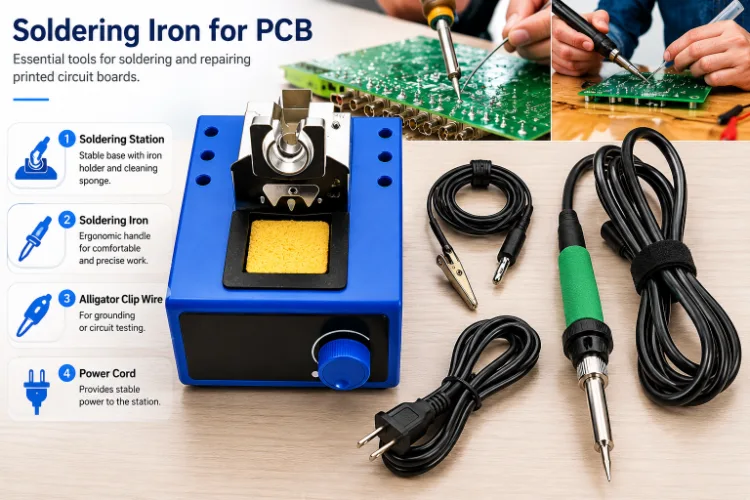
Figure 2. soldering iron for PCB details
Choosing the right soldering tip
Tip shape affects results more than most beginners expect, because the tip is what actually transfers heat into the joint.
- Chisel tip — a flat, broad face that transfers heat efficiently. The best all-round tip for through-hole and most SMD work; pick a width close to the pad size.
- Conical / fine point — a sharp point for tight, fine-pitch spots. Precise but transfers less heat, so it’s slower on larger joints.
- Bevel / hoof tip — an angled face that holds a small bead of solder; excellent for drag-soldering rows of fine-pitch pins.
A common kit is one fine chisel for everyday work, a small conical for tight access, and a bevel for drag-soldering. Keep tips clean and tinned — a blackened, un-tinned tip stops transferring heat and is the usual reason an iron “won’t melt solder anymore.”
How to solder a PCB properly
Good technique matters as much as the iron. The basic through-hole joint:
- Tin the tip — melt a little solder on the clean tip so heat transfers well.
- Heat the joint, not the solder — touch the tip to both the pad and the component lead together for about a second.
- Feed solder into the joint — apply the solder to the heated pad/lead (not the tip) so it flows around the joint and wets both surfaces.
- Remove the solder, then the iron — let the joint form a smooth, shiny cone. A good joint looks like a small volcano, not a ball.
- Don’t move the joint while it cools, or it may come out grainy (a cold joint).
For surface-mount parts, tin one pad first, place the part, tack that pad, then solder the remaining pins — adding flux makes fine-pitch work far easier. Trim through-hole leads after soldering, and clean flux residue if the flux type requires it.
Common mistakes that damage boards
- Too much heat for too long — lifts pads and traces. Use the right temperature and a bigger tip, not a longer dwell.
- A dirty, un-tinned tip — transfers little heat, leading to cold joints; clean and tin regularly.
- Heating the solder instead of the joint — produces blobs that sit on top without wetting.
- No flux on oxidized or fine-pitch work — solder won’t flow; add a suitable electronics flux.
- Ungrounded iron on sensitive ICs — risks ESD damage; use an ESD-safe, grounded iron.
Accessories that make PCB soldering easier
The iron is only part of a working setup. A few inexpensive accessories make a large difference to results and safety:
- Solder — a thin (0.5–0.8 mm) flux-core wire; leaded 60/40 or 63/37 for ease, lead-free SAC305 where required.
- Flux — a no-clean gel flux in a syringe for SMD and rework; it dramatically improves wetting on fine-pitch work.
- Desoldering braid (solder wick) and/or a solder sucker — for removing solder and fixing bridges.
- Tip cleaner — brass-wool cleaner (kinder to the tip) or a damp sponge.
- Helping hands / PCB holder — frees both hands and steadies small boards.
- Fume extractor or good ventilation — flux fumes are an irritant and should not be inhaled.
- Isopropyl alcohol (IPA) and a brush — for cleaning rosin residue and inspecting joints.
With a temperature-controlled iron, the right tip, solder, flux, and a way to hold the board, almost any prototype or repair becomes manageable.
When hand soldering isn’t the right tool
A good iron is ideal for prototypes, repairs, one-offs, and learning. But it’s the wrong tool once a board has dozens of fine-pitch parts, hidden joints under BGAs, or needs to be built in quantity with consistent, inspectable quality. At that point, machine assembly — stencil-printed solder paste, pick-and-place, and reflow — is faster and far more reliable than an iron.
Highleap Electronics, a China-based PCB and PCBA manufacturer, handles exactly that transition. When your hand-built prototype is ready to scale, SMT assembly and turnkey PCBA reflow-solder the whole board at once, with AOI and X-ray verifying joints — including the BGA and QFN joints no iron can reach. A DFM review checks the design is ready before the first build.
Soldering iron for PCB FAQ
What wattage soldering iron is best for PCB work?
40–80 W with a temperature-controlled station. Wattage governs how quickly the tip recovers its temperature after touching a joint; that recovery, not a higher peak temperature, is what matters for clean PCB joints.
What temperature should I set for soldering a circuit board?
Roughly 315–370 °C (600–700 °F) for leaded solder and 350–400 °C (660–750 °F) for lead-free, with large joints sometimes needing up to about 425 °C. Aim to make each joint in 1–3 seconds.
Do I need a soldering station or is a basic iron enough?
For occasional wiring, a basic iron works. For PCB work — especially SMD and fine-pitch — a temperature-controlled station with good thermal recovery and swappable tips is well worth it and protects your board.
Which soldering tip is best for PCBs?
A chisel tip for general work because its flat face transfers heat efficiently; a fine conical for tight, fine-pitch spots; and a bevel/hoof tip for drag-soldering rows of pins. Match the tip width to the pad.
Why won’t my soldering iron melt solder anymore?
Usually a dirty, oxidized, un-tinned tip that no longer transfers heat. Clean it on a brass-wool cleaner or damp sponge and re-tin it with fresh solder; replace the tip if it’s badly worn.
Can I solder SMD components with a regular iron?
Yes for many SMD parts, using a fine tip and flux: tin one pad, place the part, tack it, then solder the rest. Very fine-pitch or BGA parts are better done with a hot-air rework station or by reflow assembly.
Is leaded or lead-free solder easier to hand-solder?
Leaded (Sn63/Pb37) is easier — it melts lower (183 °C) and wets more readily. Lead-free is required for most commercial products and needs a slightly higher tip temperature and a flux rated for it.
How do I keep my soldering iron tip in good condition?
Clean it before and after each joint on brass wool or a damp sponge, keep it tinned with a little fresh solder whenever it’s idle, and don’t run it hotter than needed. A well-maintained tip transfers heat properly and lasts far longer; tip life drops fast once it oxidizes and the solder stops sticking.

Recommended Posts

TMM4 Filter PCB Manufacturing
TMM4 filter PCB manufacturing is controlled by the...

TMM3 PCB Manufacturing for RF Modules
TMM3 PCB manufacturing is most useful where the RF module...

TMM6 PCB Fabrication
TMM6 fabrication is the process-control page for a mid-Dk...
TMM10 PCB Manufacturing for Compact RF Designs
Table of contentsHow TMM10 Shrinks RF StructuresTMM10 vs...
How to get a quote for PCBs
Let‘s run DFM/DFA analysis for you and get back to you with a report. You can upload your files securely through our website. We require the following information in order to give you a quote:
-
- Gerber, ODB++, or .pcb, spec.
- BOM list if you require assembly
- Quantity
- Turn time
For PCBA services, please provide your BOM (Bill of Materials) and any specific assembly instructions. We also offer DFM/DFA analysis to optimize your designs for manufacturability and assembly, ensuring a smooth production process.