
What Is a .SCH File? Schematic Formats and PCB Output
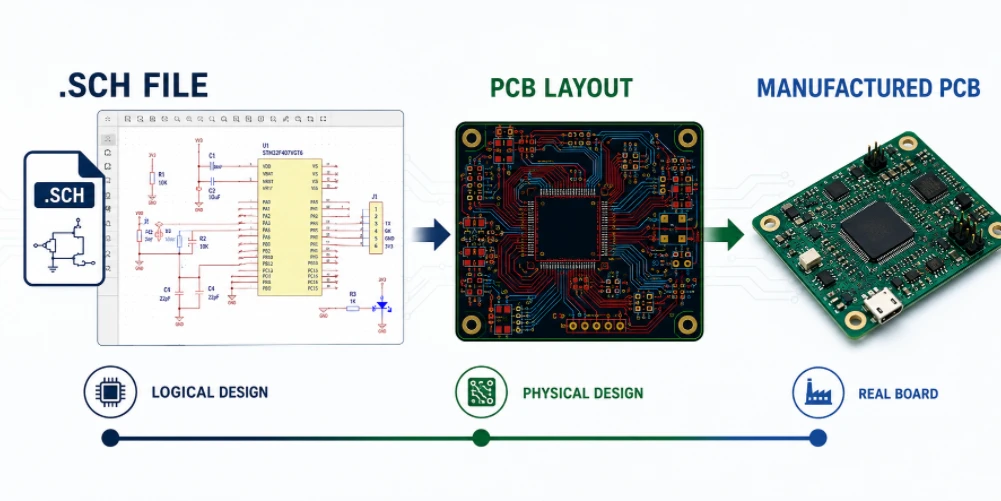
Figure 1. SCH file example for schematic review before PCB layout output.
A .SCH file is a schematic file created by electronic design automation (EDA) software that stores the logical design of a circuit — the components and the connections between them — rather than the physical board layout. It is the starting document of nearly every PCB project, and its accuracy directly shapes whether the finished board can be manufactured and assembled correctly.
Key takeaways
- A .SCH file holds the circuit logic (the schematic), not the physical PCB layout.
- The format is tool-specific: Eagle, KiCad, Altium, OrCAD, and LTspice all use .sch or similar files differently.
- To open a foreign .sch file, you usually need the original software or a compatible viewer.
- Manufacturers do not build from .sch files directly — they need Gerber/ODB++, drill, BOM, and placement data generated from the design.
Table of Contents
- What Is a .SCH File?
- How .SCH Files Differ Across EDA Tools
- How to Open and View a .SCH File
- From Schematic to Layout to Manufacturing Files
- Why the Schematic Matters for Manufacturing
- Preparing a Clean Design Package for Your Manufacturer
- Converting a .SCH File to Gerber for Manufacturing
- Frequently Asked Questions
What Is a .SCH File?
When an engineer designs a circuit, the first step is drawing a schematic: a diagram that shows every component as a symbol and every electrical connection as a line. The EDA software saves that diagram in a schematic file, commonly with a .sch extension. The file records what each component is, how it is labelled, and exactly which pins connect to which nets.
Crucially, a schematic file describes intent, not geometry. It says “this resistor connects to that capacitor and to pin 3 of the microcontroller,” but it does not say where those parts sit on the board or how the copper is routed. That physical information lives in a separate layout file. Understanding this split is the key to understanding the whole PCB workflow.
What a Schematic File Stores
- Components: each part’s symbol, reference designator, and value.
- Nets: the named electrical connections between pins.
- Attributes: part numbers, footprints assigned to symbols, and notes.
- Hierarchy: sheets and sub-circuits in larger designs.
How .SCH Files Differ Across EDA Tools
The .sch extension is not a single universal format. Different EDA tools use it — or a variant of it — with completely different internal structures. A .sch file from one program usually cannot be opened directly by another, which is the source of much of the confusion people have when they receive a schematic file they cannot read.
Because the formats differ, sending a manufacturer only a .sch file is rarely enough — they may not run the same tool, and even if they do, the schematic alone does not contain the manufacturing geometry.
Different EDA tools store schematics in their own formats, even though people loosely call them all “.sch files.” Older Eagle projects use a .sch extension directly, KiCad uses .kicad_sch, Altium uses .SchDoc, and OrCAD uses its own structure. The file holds the logical design — symbols, connections, and net names — but it is not directly manufacturable. To build the board, the schematic first has to be turned into a layout and then into fabrication outputs.
How to Open and View a .SCH File
If you receive a .sch file you need to inspect, you have three practical options. The most reliable is to open it in the same software that created it. The second is to use a free viewer or importer that supports that format. The third, when neither is available, is to ask the sender to export a PDF or an image of the schematic.
Many designers underestimate the value of a simple schematic viewer. Even when you cannot edit a file, being able to view the netlist and component values lets you check the design, prepare a bill of materials, and discuss changes. For the manufacturing side, however, the schematic is only the reference — the build is driven by exported manufacturing files, not by the .sch.
Ways to Open a Schematic File
- Native software: the original EDA tool always opens its own format correctly.
- Compatible viewers: some tools import or display competitors’ formats with varying fidelity.
- Exported PDF/PNG: a universal way to read a schematic without any EDA software.
- Netlist export: a text list of connections that any engineer can review.
From Schematic to Layout to Manufacturing Files
The schematic is step one of a chain. Once the circuit logic is captured, the designer assigns a physical footprint to each component, places those footprints on a board outline, and routes the copper connections defined by the schematic’s nets. That layout is then exported into the standardized files a factory actually uses.
| Stage | File / output | Purpose |
|---|---|---|
| Schematic | .sch / .SchDoc | Defines circuit logic and connections |
| Layout | .brd / .pcb / .PcbDoc | Defines physical placement and routing |
| Fabrication | Gerber / ODB++ + drill | Tells the fab how to build the bare board |
| Assembly | BOM + centroid + drawing | Tells the line what parts go where |
This is why a manufacturer asks for Gerber or ODB++ data rather than your .sch file. Those formats are tool-neutral and contain the exact copper, drill, and mask geometry needed for fabrication, plus the BOM and placement data needed for automated assembly.
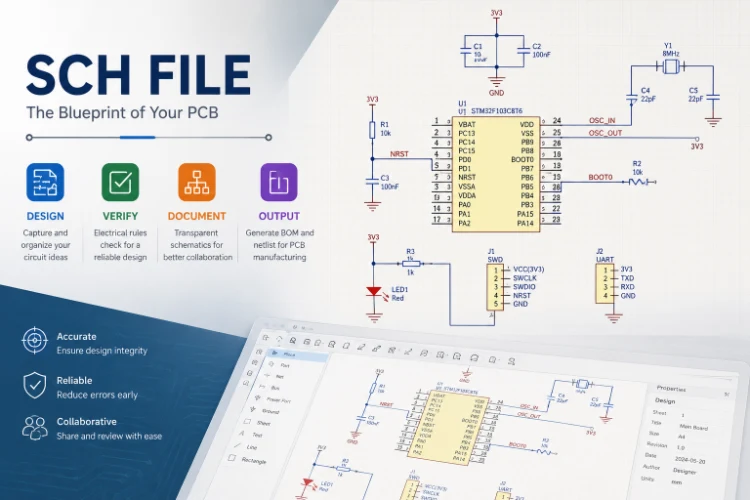
Figure 2. SCH file example for converting schematic data into manufacturing outputs.
Why the Schematic Matters for Manufacturing
Even though the factory builds from exported files, the schematic still governs the outcome. The netlist generated from the schematic is checked against the layout to confirm that every intended connection exists and no unintended ones were created. The footprints assigned in the schematic stage determine whether real components will fit. And the BOM is derived from the schematic’s component attributes.
An error in the schematic propagates silently into the layout and then into a built board. A wrong footprint assignment, a mislabelled net, or an incorrect part number can pass all the way to assembly before anyone notices. That is why a manufacturer’s manufacturability review cross-checks the design data: catching a footprint or netlist problem on paper is far cheaper than discovering it on a populated board.
Preparing a Clean Design Package for Your Manufacturer
The smoothest projects arrive as a complete, self-consistent package generated from one released design revision. Sending a bare .sch file, or mixing files from different revisions, is one of the most common causes of quoting delays and assembly errors. A clean package lets the factory quote the real build instead of guessing.
What to Include in Your Release Package
- Gerber or ODB++ files plus the NC drill file and board outline.
- Bill of materials with exact manufacturer part numbers and approved alternates.
- Centroid (pick-and-place) data and an assembly drawing marking polarity and pin one.
- Stackup and finish notes covering layer count, copper weight, and surface finish.
- A consistent revision so fabrication and assembly work from the same source.
The same care applies regardless of board type. A dense design may need the tolerances of an HDI fabrication process, a high-layer-count product relies on accurate stackup data for a multilayer board build, and a bendable design has its own constraints captured during flexible PCB fabrication. For a first run, a low-volume assembly service is an efficient way to validate the package before scaling. Handling everything through one manufacturing partner keeps the schematic, layout, and exported files aligned from quote to delivery.
Converting a .SCH File to Gerber for Manufacturing
A schematic file cannot be manufactured directly. A factory builds from Gerber and drill data, a bill of materials, and a placement file, so the .SCH has to be carried through layout and then exported into the formats a production line actually reads.
Key steps in the conversion
- Finalize the schematic: confirm symbols, values, and connections are correct.
- Assign footprints: map every symbol to a verified land pattern.
- Lay out the board: place parts and route the connections from the netlist.
- Run design-rule checks: catch spacing, width, and clearance violations.
- Generate fabrication data: export Gerber layers and the NC drill file.
- Export assembly data: output the BOM and the centroid placement file.
Sending this complete package, rather than only the schematic, lets a factory quote and build accurately the first time. It matters most on dense designs such as the robotics control boards we build, and the engineers at our China facility can confirm your export settings before release.
Turning a schematic into something a factory can build follows a fixed path. The schematic generates a netlist that lists every connection; that netlist drives the PCB layout, where parts are placed and traces routed; and the finished layout is exported as Gerber and NC drill files, plus a bill of materials and pick-and-place data for assembly. The schematic alone cannot be quoted for fabrication — it is the source from which the manufacturable files are derived.
Frequently Asked Questions
What program opens a .sch file?
It depends on which tool created it. Eagle, KiCad, OrCAD, and others all use .sch or similar extensions with different internal formats, so the safest choice is the original software. Some viewers can import foreign formats, and a PDF export will open anywhere.
Is a .sch file the same as a PCB layout file?
No. A .sch file holds the schematic — the circuit logic and connections. The PCB layout, which describes physical placement and copper routing, is stored separately, typically with a .brd, .pcb, or .PcbDoc extension.
Can I send my .sch file to a PCB manufacturer to get a board made?
Generally no. Manufacturers build from Gerber or ODB++ fabrication data, drill files, a bill of materials, and placement files exported from your design. The schematic is useful as a reference but does not contain the geometry needed to fabricate the board.
How do I convert a schematic into manufacturing files?
Within your EDA tool, assign footprints, complete the PCB layout, run design-rule and electrical checks, then export Gerber/ODB++, the NC drill file, the BOM, and centroid data. Those exported files are what you send to the factory.
Why won’t another EDA tool open my .sch file correctly?
Because each tool stores schematics in its own format. Even when two programs both use the .sch extension, the internal structure differs, so cross-opening either fails or loses information. Exporting a neutral format such as PDF or a netlist avoids this.
Does the schematic affect the bill of materials?
Yes. The BOM is generated from the component attributes in the schematic, including part numbers and values. Errors or omissions in the schematic carry straight into the BOM, which is why it should be reviewed before release.
Will a manufacturer check my design before building?
A good manufacturer runs a manufacturability review on your exported files, cross-checking footprints, netlist, and the BOM against process capabilities. This catches schematic-derived errors early, before they reach a fabricated and assembled board.
Can a manufacturer build a board directly from a .sch file?
No. A schematic file describes the logical design, not the physical board. A manufacturer needs the layout exported as Gerber and NC drill files, plus a BOM and pick-and-place data, to fabricate and assemble the board.
How do I open a .sch file if I don’t have the original software?
Many EDA tools offer free viewers, and some formats open in cross-compatible or online viewers. The most reliable approach is to open it in the program that created it, or ask the designer to export a PDF and the manufacturing files.
Is a schematic file the same as a Gerber file?
No. A schematic captures the circuit’s logic and connections, while Gerber files describe the physical copper, mask, and silkscreen layers used to manufacture the board. Gerbers are generated from the layout, which is based on the schematic.
What files should I send for a PCB quote?
Send Gerber and NC drill files, a board outline, and the stackup, plus a BOM and pick-and-place file for assembly. Clear notes on material, finish, and quantity let the factory quote the real build instead of guessing.
Why won’t my .sch file open on another computer?
Usually the other machine lacks the EDA tool or library that created it, or the file references parts from a missing library. Installing the same tool, or receiving an exported viewer file, resolves it.
What is the difference between a schematic file and a layout file?
A schematic file stores the logical design — symbols and connections — while a layout file stores the physical board: component positions, copper, and stackup. The layout is built from the schematic and is what the manufacturing files are exported from.

Recommended Posts

TMM4 Filter PCB Manufacturing
TMM4 filter PCB manufacturing is controlled by the...

TMM3 PCB Manufacturing for RF Modules
TMM3 PCB manufacturing is most useful where the RF module...

TMM6 PCB Fabrication
TMM6 fabrication is the process-control page for a mid-Dk...
TMM10 PCB Manufacturing for Compact RF Designs
Table of contentsHow TMM10 Shrinks RF StructuresTMM10 vs...
How to get a quote for PCBs
Let‘s run DFM/DFA analysis for you and get back to you with a report. You can upload your files securely through our website. We require the following information in order to give you a quote:
-
- Gerber, ODB++, or .pcb, spec.
- BOM list if you require assembly
- Quantity
- Turn time
For PCBA services, please provide your BOM (Bill of Materials) and any specific assembly instructions. We also offer DFM/DFA analysis to optimize your designs for manufacturability and assembly, ensuring a smooth production process.