
Gerber File Review Checklist: How to Check PCB Files Before You Order
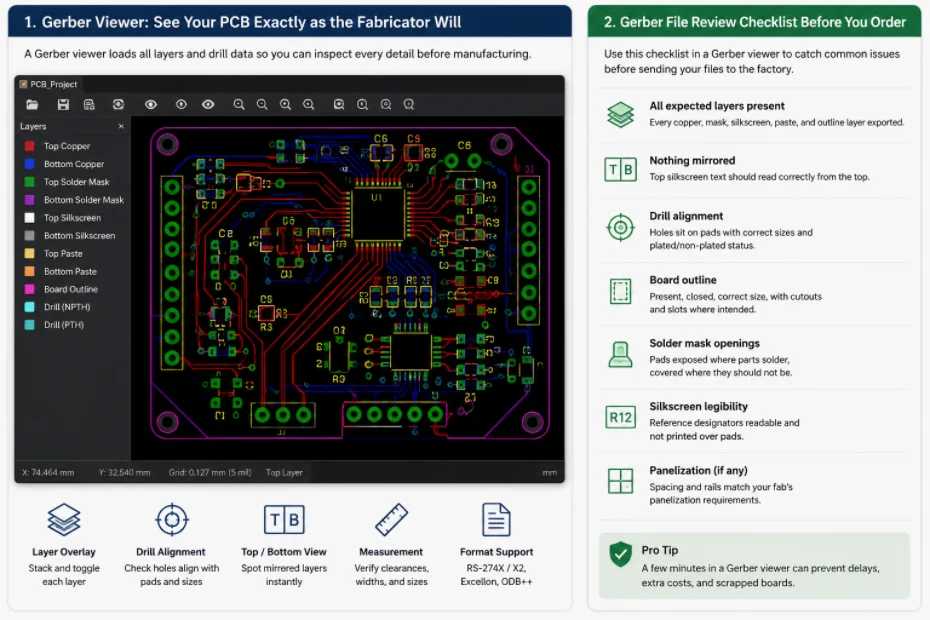
Figure 1. Gerber file review catches missing layers, drill errors, and board outline problems before fabrication.
A Gerber viewer is the easiest way to run a Gerber file review checklist before you commit to manufacturing. It shows the copper, mask, silkscreen, and drill data exactly as your fabricator will read them, so you can catch missing layers, bad outlines, and drill mismatches before upload. This guide explains how to review Gerber files carefully, when an online viewer is useful, and how Highleap Electronics adds a second in-house check before building.
1. What is a Gerber viewer and why use one?
A Gerber viewer is a tool that renders your Gerber and drill files so you can see the PCB exactly as the fabricator will, layer by layer, before ordering. You use one because the factory builds from the exported files, not from your CAD project – and an export setting can introduce a mirrored layer, a missing mask, or misaligned drills that are invisible inside your design tool.
Gerber files are the standard format describing a PCB: each file is one layer (top copper, bottom copper, solder mask, silkscreen, and so on) as shapes and apertures, accompanied by an NC drill file. Together they are the literal definition of your board, so a quick viewer check is the difference between catching a slip and scrapping a batch. The complete guide to Gerber files covers the format in depth, and a clean, well-prepared set of PCB design files always starts with viewing your own output.
2. How to open and view Gerber files
To open Gerber files, load the full set – every layer plus the NC drill file – into a viewer, overlay them in registration, then toggle each layer on and off and switch between top and bottom views. A capable viewer does more than draw layers:
- Layer overlay and toggling – stack all layers in registration and inspect each alone to confirm features line up across layers.
- Drill alignment – overlay the NC drill file on the copper to confirm holes land on pads with sensible sizes.
- Top and bottom views – essential for spotting mirrored layers.
- Measurement – check clearances, trace widths, and feature sizes against your intent.
- Format support – read modern Gerber (RS-274X / X2), your drill formats, and increasingly the ODB++ data format.
The point is to reproduce the fabricator’s view faithfully, so that what you see is what you will get.
3. Are online Gerber viewers safe for confidential designs?
Online Gerber viewers are convenient but upload your files to a third party, so for confidential or proprietary designs a desktop viewer or your fabricator’s secure review is safer. An online viewer is ideal for a fast pre-order sanity check and for sharing exactly what you see with a colleague; the trade-off is that your proprietary layout leaves your control.
| Type | Best for | Trade-off |
|---|---|---|
| Online Gerber viewer | Quick checks, no install, sharing a link | Uploads files to a third party |
| Desktop Gerber viewer | Sensitive designs, frequent use, offline control | Requires installation and updates |
Either way, the habit of viewing before ordering is what matters. For sensitive work, a confidential in-house review by your fabricator gives the same confidence without exposing the design publicly.
4. What to check in a Gerber viewer before ordering
Before placing an order, confirm all layers are present, nothing is mirrored, drills align, the outline is correct, and solder-mask openings are right. Walk through this list in the viewer:
- All expected layers present – every copper, mask, and silkscreen layer exported; a missing mask or paste layer is a frequent, costly omission.
- Nothing mirrored – top silkscreen text should read correctly from the top.
- Drill alignment – holes sit on pads with correct sizes and plated/non-plated status.
- Board outline – present, closed, the right size, with cutouts and slots where intended.
- Solder mask openings – pads exposed where parts solder, covered where they should not be.
- Silkscreen legibility – reference designators readable and not printed over pads.
- Panelization, if any – spacing and rails match your fab’s PCB panelization guidance.
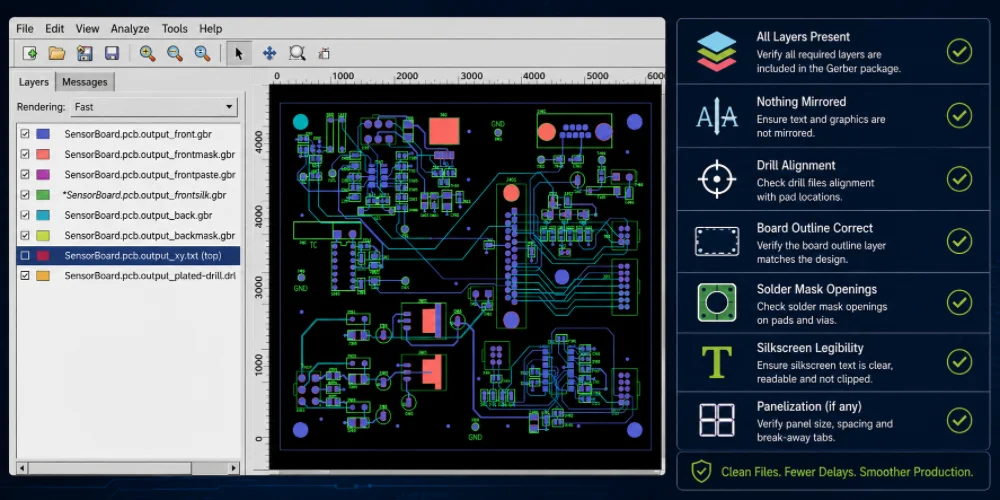
A manufacturable Gerber package should include copper, solder mask, legend, drill, and outline data.
5. Common Gerber mistakes a viewer catches
The most common Gerber mistakes are missing layers, mirrored output, misaligned drills, wrong units or scale, and solder-mask or paste-layer errors. A viewer makes each obvious before it reaches production:
- Missing layers – the export left one out, most often a mask or paste layer.
- Mirrored output – a layer exported flipped, putting parts or text on the wrong side.
- Misaligned drills – a format or origin mismatch between Gerber and drill files.
- Wrong units or scale – an inch/millimeter mismatch making the whole board the wrong size.
- Solder-mask errors – pads not opened, or mask slivers between fine-pitch pads.
- Paste-layer mistakes – wrong or missing paste data, which would ruin a stencil for assembly.
None are exotic – they are the everyday output slips a two-minute viewer check turns into a quick fix, and many overlap with the broader set of common manufacturability issues a fab watches for.
6. How a fabricator reviews your Gerber files
A fabricator opens and checks your Gerbers the same way you should – confirming all layers are present, nothing is mirrored, drills align, the outline is correct, and the design is manufacturable – then flags anything that would cause a hold before building. When you send files to Highleap, this is exactly the kind of confidential, in-house review that avoids uploading proprietary files to a public service.
You can see the depth of that check in a sample DFM report. From there the same files carry through fabrication and, where needed, assembly, so both work from one verified revision. Sending a clean, viewer-checked Gerber set with a clear outline, drill file, stackup, and quantity lets the quote and the build proceed without back-and-forth.
Submit your Gerber files for review
7. Gerber viewer FAQ
What is a Gerber viewer?
A tool that renders Gerber files (and usually the NC drill file) so you can see your PCB exactly as the fabricator will, layer by layer, before ordering.
How do I open Gerber files?
Load the full layer set plus the NC drill file into a viewer, overlay them in registration, then toggle layers and switch between top and bottom views to inspect each one.
Are online Gerber viewers safe for confidential designs?
An online viewer uploads your files to a third party, which may not suit proprietary work. For sensitive designs, use a desktop viewer or your fabricator’s confidential in-house review.
What format are Gerber files?
Modern Gerbers use the RS-274X / X2 format, one file per layer, with an NC drill file. Many fabricators also accept ODB++, which bundles the data and reduces layer-naming ambiguity.
Does Highleap check my files before manufacturing?
Yes. Highleap runs a manufacturability review that opens and verifies your Gerbers and drill data, flags anything that would cause a hold, and builds fabrication and assembly from one confirmed revision.

Recommended Posts

Isola Astra MT77 PCB Manufacturing
Figure 1. Isola Astra MT77 PCB ManufacturingIsola Astra...

Nelco N4000-13 PCB Material and Manufacturing Guide | Highleap Electronics
Figure 1. Nelco N4000-13 PCBNelco N4000-13 PCB is a...

Copper Clad Laminate: Complete Material Selection Guide for PCB Engineers
Every electrical property that matters in a printed...

Inside a China Ceramic PCB Factory: Process Control Across Power/LED/RF/Medical
Table of Contents Inside a China Ceramic PCB Factory: How...
How to get a quote for PCBs
Let’s run DFM/DFA analysis for you and get back to you with a report. You can upload your files securely through our website. We require the following information in order to give you a quote:
-
- Gerber, ODB++, or .pcb, spec.
- BOM list if you require assembly
- Quantity
- Turn time
For PCBA services, please provide your BOM (Bill of Materials) and any specific assembly instructions. We also offer DFM/DFA analysis to optimize your designs for manufacturability and assembly, ensuring a smooth production process.