
PCB Test Point Design Rules for Debug and ICT
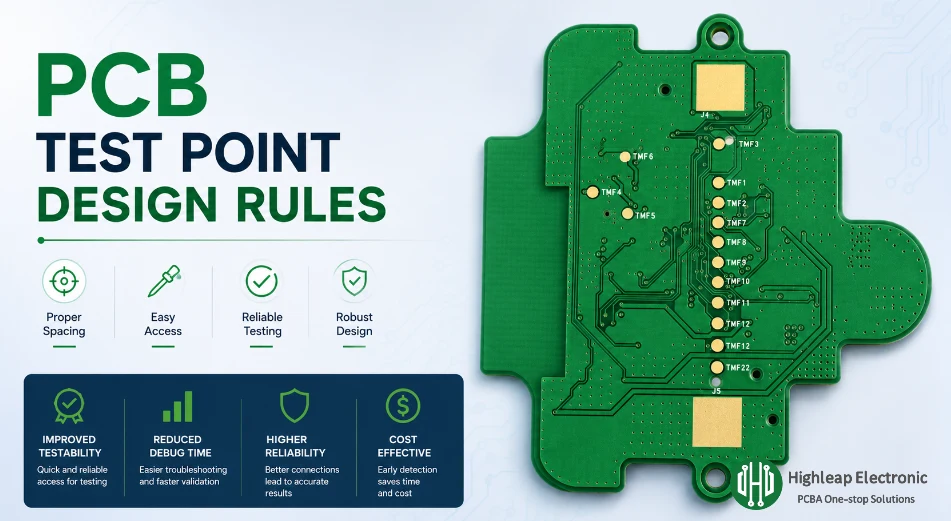
Figure 1. PCB test point design rules help make debugging, ICT, firmware bring-up, and production testing more reliable.
PCB test point design is about reserving exposed pads, vias, or pins that give probes reliable access to specific nets without compromising routing or assembly. Good test point planning makes debug, flying-probe checks, and ICT coverage easier before a board reaches production volume.
- A test point is an exposed pad, via, or pin that gives test equipment a stable place to contact a net.
- Test points make a board measurable: they support bring-up, automated production testing, and field debugging.
- A dedicated ground test point, and a place for an oscilloscope ground clip, is essential for accurate measurements.
- Correct test-point size, spacing, and placement are what make a board testable on a bed-of-nails fixture.
Table of Contents
What Is a PCB Test Point?
A test point is simply a place on the board that is meant to be probed. Instead of touching a tiny component lead, which risks damage and slips easily, a technician or fixture contacts a stable pad that is tied to the net of interest. That makes measurements repeatable and protects the parts around it.
Key features of a test point
- Exposed copper: the pad is left free of solder mask so a probe makes clean contact.
- Tied to one net: each test point connects to a single signal, supply, or ground.
- Labeled: a silkscreen tag such as TP1 identifies it on the board.
- Accessible: it sits where a probe or fixture pin can reach it easily.
- Probe-sized: the pad is large enough for a spring pin or a handheld tip.
Whatever the form, the goal is the same: a dependable contact point that makes the board easy to measure and test during board assembly and afterward.
Why Test Points Matter on a PCB
Test points turn a finished board from a black box into something you can actually verify. They are used at every stage of a product’s life, from the first prototype on the bench to units returned from the field years later.
Key reasons they matter
- Board bring-up: they let engineers confirm power rails and signals on a new design.
- Production testing: automated fixtures use them to test every board the same way.
- Debugging: they give a stable place to watch a signal when something is wrong.
- Calibration: they expose the nodes used to trim and adjust a circuit.
- Programming: they can carry firmware and configuration signals to a chip.
- Field service: they help a technician diagnose a unit without disassembly.
Because testing touches the whole product lifecycle, test-point planning is part of how we approach a build across our manufacturing services, not an afterthought once the board is done.
Test points matter because they make a board observable. During first bring-up they give a probe somewhere clean to sit; on the production line they let automated equipment confirm voltages, signals, and component values; and in the field or on the repair bench they speed up fault-finding. Without them, engineers end up probing fragile component leads, which risks shorts and damage. A few well-placed pads turn an opaque board into one that can be measured quickly and safely.
Types of Test Points, Including Ground Clips
Test points come in several forms, and the right one depends on how the board will be tested. Automated fixtures favor flat pads, while bench work with a scope often needs a post or loop that a clip can grab.
Key types of test points
- SMD pad: a flat surface pad, ideal for spring-pin fixtures.
- Via or through-hole: a plated hole that accepts a probe tip.
- Test loop or post: a raised feature for scope probes and clips.
- Edge or connector point: signals brought out to a connector for test.
- Dedicated ground point: a clear, low-impedance spot for the return path.
| Type | Form | Best For |
|---|---|---|
| SMD test pad | Flat exposed copper | Bed-of-nails ICT |
| Via test point | Plated hole | Manual probing |
| Loop or post | Raised wire or pin | Scope probes and clips |
| Ground point | Low-impedance pad or loop | Measurement reference |
Mixing a few types on one board is common, and it is a normal part of the design work behind the products built at Highleap Electronics.
Ground Test Points and Oscilloscope Ground Clips
Every measurement needs a reference, and that reference is ground. A signal test point is only useful if there is a clean, nearby ground to measure against, which is why a dedicated ground point matters as much as the signal points themselves.
Key ground-access practices
- Ground near the signal: place a ground point close to each cluster of signal points.
- Scope ground loop: add a short loop or spring for the oscilloscope ground clip.
- Keep the lead short: a short ground connection reduces noise and ringing.
- Multiple grounds: large boards benefit from several ground points.
- Label clearly: mark ground points so they are not mistaken for signals.
Getting the ground strategy right is a detail experienced engineers watch for, and the team at our China factory can flag weak grounding during design review.
Ground test points deserve special attention. Every measurement needs a clean ground reference, and a dedicated, low-impedance ground pad near the signals being probed gives accurate readings. For high-speed work, a short ground spring or clip placed right at the probe tip beats the long ground lead supplied with most oscilloscope probes, because that long lead adds inductance that distorts fast edges. Providing proper ground access is as important as the signal test points themselves.
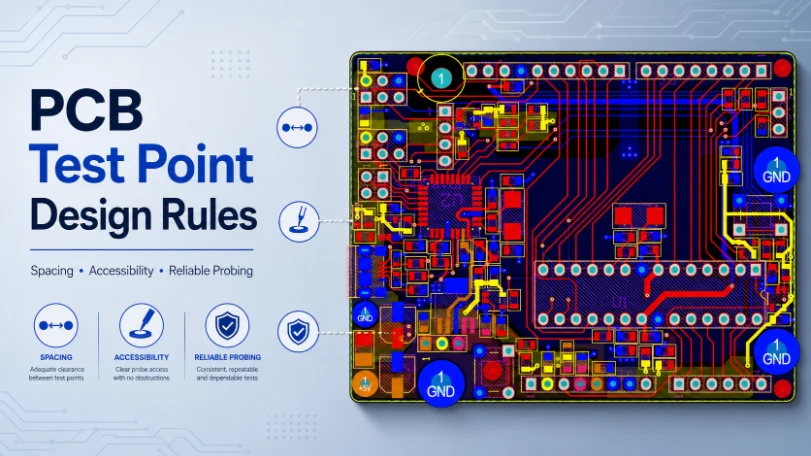
Figure 2. Test point spacing, probe access, solder mask clearance, and net coverage should be reviewed before the board enters production.
Test Point Design Rules and Spacing
Test points only work if a fixture or probe can actually reach and land on them. A handful of geometry rules keep a board testable, and they matter most when an automated bed-of-nails fixture will be built around the design.
Key design rules
- Pad diameter: keep test pads at least about 0.9–1.0 mm (35–40 mil) for reliable pin landing.
- Spacing: aim for 2.54 mm (100 mil) center-to-center, and no tighter than 1.27 mm (50 mil).
- Edge clearance: keep points back from the board edge for tooling and support.
- One-side access: placing test points on a single side simplifies the fixture.
- No mask over pads: leave test pads free of solder mask.
- Clear of tall parts: do not hide points under or beside tall components.
| Rule | Typical Guideline | Reason |
|---|---|---|
| Pad size | ~0.9–1.0 mm minimum | Reliable spring-pin contact |
| Spacing | 2.54 mm preferred | Avoids probe crowding |
| Edge clearance | A few mm from the edge | Leaves room for tooling |
| Access side | One side where possible | Lowers fixture cost |
These rules are part of design-for-test, and they matter especially on the higher-reliability boards used in industrial control hardware, where full test coverage is often required.
Test Points for ICT and Bed-of-Nails Testing
In-circuit test, or ICT, is the most demanding consumer of test points. The board is pressed onto a fixture filled with spring-loaded pins, and each pin must land on a test point that exposes the net it needs to check.
Key fixture considerations
- A node per net: full coverage means every net has its own test point.
- Pads on a grid: aligning points to a grid simplifies the fixture build.
- Tooling holes: the board needs holes that align it on the fixture.
- Single-sided access: probing one side keeps the fixture simple and cheaper.
- Probe force and pitch: spacing must respect the spring-pin size and force.
- Coverage target: agree how much of the board the test must reach.
Planning for ICT early avoids expensive fixture rework later, which is why we raise it during prototype and pilot production builds before a design scales up.
How to Design a Testable PCB
Testability is something you design in, not bolt on at the end. A board planned for test from the first layout is faster to bring up, cheaper to test in volume, and easier to repair, so the small effort up front pays back many times over.
Key design-for-test practices
- Add test points early: place them while routing, not after the board is full.
- Expose critical nets: make sure power, clocks, and key signals are reachable.
- Plan ground points: add ground access next to the signals you will measure.
- Keep one-side access: simplify any future bed-of-nails fixture.
- Label everything: clear TP markings speed up bench and field work.
- Review with the factory: confirm test coverage before release.
A manufacturer can tell you quickly whether a board is testable as drawn. Running an early design check catches missing test points and weak grounding, and pairing it with a robust multilayer rigid build ensures the finished board holds up to repeated fixture testing.
Designing for testability is mostly about planning access early. Place test points on a regular grid where a fixture can reach them, keep them on one side of the board where possible, give each a clear size and spacing, and label them so they are easy to find. Building these rules in from the start, rather than squeezing pads in at the end, is what makes a board genuinely easy to verify in production.
Frequently Asked Questions
What is a test point on a PCB?
It is an exposed pad, via, or pin tied to a single net that gives test equipment a stable place to make contact. Test points let you measure signals and power without probing fragile component leads.
Why do PCBs need a ground test point?
Every measurement is taken relative to ground, so a clean, nearby ground point is needed as the reference. Without one, readings are noisy and an oscilloscope cannot display a stable trace.
What size should a test point be?
For automated bed-of-nails testing, a pad of roughly 0.9 to 1.0 mm (about 35 to 40 mil) is a common minimum, with 2.54 mm (100 mil) spacing preferred. Manual probe points can be smaller, but bigger pads are easier and more reliable to hit.
Where do I connect an oscilloscope ground clip?
Connect it to a dedicated ground point or ground loop placed close to the signal you are measuring. A short ground connection reduces noise and ringing, which matters most on fast signals.
What is the difference between a test point and a via?
A via exists to carry a signal between layers, while a test point exists to be probed. A via can be used as a test point if its pad is exposed and accessible, but a purpose-made test point is sized and placed specifically for contact.
How many test points does a board need?
It depends on the test goal. Full in-circuit test coverage wants a test point on every net, while a simpler production or bring-up test may only need points on power rails and a handful of key signals.
Can you add test points to my design?
Yes. As part of design review we can identify nets that need access, suggest test-point placement and ground points, and confirm the layout is ready for bed-of-nails or functional testing before the board goes to production.
What is the ideal size for a PCB test point?
A common target is a round pad of roughly 0.9–1.0 mm (about 35–40 mil) for bed-of-nails probes, with spacing wide enough for the probe pitch. The exact size depends on the test fixture, so confirm the requirement with whoever builds it.
What is the difference between a test point and a via?
A test point is a pad meant for a probe or fixture pin to contact, while a via is a plated hole that connects layers. A via can serve as a test point if left accessible, but dedicated test pads give more reliable contact.

Recommended Posts
Taconic RF 35 vs RO4350B PCB
Table of contentsRF-35 vs RO4350B Procurement and...

TMM4 Filter PCB Manufacturing
TMM4 filter PCB manufacturing is controlled by the...

TMM3 PCB Manufacturing for RF Modules
TMM3 PCB manufacturing is most useful where the RF module...

TMM6 PCB Fabrication
TMM6 fabrication is the process-control page for a mid-Dk...
How to get a quote for PCBs
Let‘s run DFM/DFA analysis for you and get back to you with a report. You can upload your files securely through our website. We require the following information in order to give you a quote:
-
- Gerber, ODB++, or .pcb, spec.
- BOM list if you require assembly
- Quantity
- Turn time
For PCBA services, please provide your BOM (Bill of Materials) and any specific assembly instructions. We also offer DFM/DFA analysis to optimize your designs for manufacturability and assembly, ensuring a smooth production process.