
Stripboard vs Perfboard vs Breadboard: Which Prototyping Board to Use and When

Figure 1. stripboard vs perfboard vs breadboard
Last updated: May 2026 · A clear guide to the three prototyping boards and the stage each one fits
Breadboard, stripboard, and perfboard solve three different stages of building a circuit — testing an idea, making a permanent simple build, and making a permanent complex build — and confusing them is one of the most common beginner traps in electronics. This guide explains how each board works internally, what soldering each one requires, the trade-offs in layout freedom and permanence, the technique pitfalls unique to each, and the natural progression from a breadboard prototype all the way to a manufactured PCB. By the end you will know exactly which board to reach for at each point in a project.
- The three boards at a glance
- Breadboard: test without soldering
- Stripboard (Veroboard): fast permanent builds
- Perfboard: maximum layout freedom
- How their internal connections differ
- Common mistakes with each board
- The natural progression to a PCB
- Choosing the right board for your stage
- Frequently asked questions
The three boards at a glance
The fastest way to understand these three is side by side. Each row below is a property that genuinely changes which board you should pick.
| Breadboard | Stripboard | Perfboard | |
|---|---|---|---|
| Soldering? | No — push-fit | Yes | Yes |
| Reusable? | Yes, fully | No | No |
| Connections | Spring clips in rows | Continuous copper strips | Isolated pads |
| Permanence | Temporary | Permanent | Permanent |
| Layout freedom | Medium | Constrained by strips | Total |
| Build speed | Fastest to wire | Fast for simple circuits | Slowest |
| Best for | Testing ideas | Simple permanent circuits | Complex one-offs |
Breadboard: test without soldering
A solderless breadboard is a plastic block full of spring clips. You push component leads and jumper wires into the holes, and the clips beneath connect them in defined rows. Because nothing is permanent, you can rearrange a circuit endlessly — which makes it the ideal place for experimenting, learning, and validating a design before you commit anything to solder.
How the rows are arranged
Most breadboards have short terminal strips running across the center (typically groups of five connected holes) and long power rails running down the sides. Understanding which holes are tied together is the whole skill of using one: you build by placing parts so the right leads share a row, and you bridge separate rows with jumper wires.
Limitations
Connections can be intermittent, the board is unsuitable for high-frequency or high-current circuits, and the whole thing falls apart if moved or knocked. Treat a breadboard strictly as a place to prove a circuit works, never as a finished product — its temporary nature is the entire point.
Why high-speed and high-current circuits fail on it
The reasons are worth understanding rather than just memorizing. The long internal spring clips and jumper wires add stray capacitance and inductance, which corrupts fast digital edges and high-frequency analogue signals — a circuit that works perfectly on a PCB can behave erratically on a breadboard purely because of the board itself. The spring contacts also have meaningful resistance and limited current capacity, so power circuits drop voltage and heat up the contacts. This is why a breadboard is a tool for proving logic and low-speed behaviour, not for validating timing, RF performance, or anything drawing significant current — those need a soldered board to test honestly.
Stripboard (Veroboard): fast permanent builds
Stripboard has rows of continuous copper strips bonded to one side, over a regular grid of holes. You place and solder parts through the holes, then build your circuit by cutting the strips at chosen points — with a spot-cutter or a drill bit twisted by hand — to isolate sections from each other. Because the strips provide ready-made connections along each row, simple circuits assemble quickly.
Planning the cuts
The work on stripboard is as much planning as soldering. You decide where each strip needs to be broken so that signals that should be separate are separate, then mark and cut those points before or during assembly. Graph paper or stripboard-planning software helps lay this out before you touch the iron.
The trade-off
The fixed strip direction constrains your layout — every connection along a strip is “free,” but every connection across strips needs a wire link. You must plan cuts carefully, because a missed cut is a short and a wrong cut is an open. Stripboard shines for making a durable version of a small, already-proven circuit where the layout is simple enough to map onto its rigid grid.
Perfboard: maximum layout freedom
Perfboard (perforated board) is a grid of individual isolated pads with no pre-made connections at all. Every connection is one you make yourself — bridging adjacent pads with solder, or running wires on the back of the board. This gives you complete layout freedom, which suits complex or unusual one-off circuits that would fight against stripboard’s rigid strips.
The cost of that freedom
Total freedom means total responsibility: perfboard is slower to build and demands tidy planning to avoid a tangled “rat’s nest” of wires that is hard to debug. Disciplined builders plan the layout on paper first and route wires neatly on the underside.
Plated-through-hole vs. plain
Plated-through-hole perfboard, where each pad has a metal-lined hole, is sturdier and noticeably easier to solder than plain pad-only versions, because solder anchors through the board rather than sitting on a single-sided pad that can lift. For anything beyond the simplest build, the plated variety is worth the small extra cost.
How their internal connections differ
The defining difference between the three is simply what is already connected before you start:
- Breadboard: hidden spring clips connect holes in fixed rows; you exploit those rows and add jumpers between them.
- Stripboard: long copper strips connect entire rows until you deliberately cut them to break the connection where you don’t want it.
- Perfboard: nothing is connected — each pad is an island, and you build every single link yourself.
In short: breadboard and stripboard start with connections you work with (and selectively break, in stripboard’s case), while perfboard starts with a blank slate you build from. That one idea explains nearly every practical difference between them.
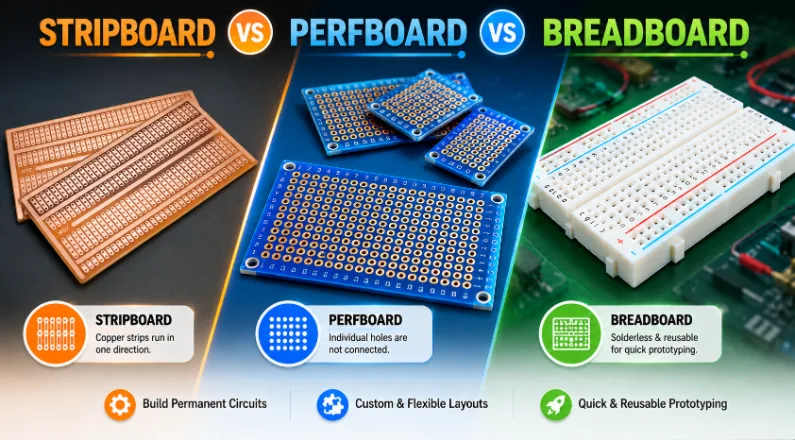
Figure 2. prototyping board comparison
Common mistakes with each board
Each board has a characteristic failure mode worth knowing in advance:
- Breadboard: trusting it for anything permanent, or chasing a “fault” that is really just an intermittent push-fit contact. Re-seat suspect connections before assuming the circuit is wrong.
- Stripboard: forgetting a strip cut (creating a short) or cutting the wrong point (creating an open). Double-check every cut against your plan, and inspect the strips with a magnifier and continuity meter.
- Perfboard: building without a plan and ending up with an unmanageable mess of back-side wires. Lay out the design first and keep the wiring orderly.
Most prototyping frustration comes from one of these, not from a genuine design flaw.
The natural progression to a PCB
These boards are not rivals so much as steps in a sequence:
- Breadboard — design and debug with zero commitment, rearranging freely until the circuit works.
- Stripboard or perfboard — make a durable one-off once the circuit is proven, choosing stripboard for simple layouts and perfboard for complex ones.
- Custom PCB — when you want reliability, a clean repeatable layout, or more than a couple of copies.
The jump to a custom PCB is smaller than most people think. Design tools are free (KiCad being the obvious choice), and prototype fabrication is cheap and fast. A real PCB eliminates the wiring errors and mechanical fragility that hand-built boards are prone to, and it is the only sensible route once you need quantity or dependable reliability.
What you gain by moving to a real board
The advantages compound. A PCB gives you proper ground planes and controlled trace widths, so noise and voltage-drop problems that plagued the hand-built version often disappear on their own. Every copy is identical, which means a fault you fix once stays fixed across the whole batch — impossible to guarantee with hand wiring. Components mount mechanically securely rather than relying on fragile solder bridges, the board survives handling and vibration, and a silkscreen layer documents the assembly so others (or future you) can build and repair it. For anything you intend to use rather than just demonstrate, those gains usually outweigh the modest cost and short wait of a prototype run.
Choosing the right board for your stage
Boiled down to a decision:
- Experimenting, learning, or iterating: breadboard.
- Permanent build of a simple, proven circuit: stripboard (fastest path to a durable result).
- Permanent build of a complex layout: perfboard (the most layout freedom).
- Reliability, repeatability, or quantity: custom PCB.
When it’s time for a real board
Once your circuit is proven, a custom PCB is far more reliable and repeatable than any hand-built board. Highleap Electronics makes both prototype and production PCBs and can assemble them too — send your design, or ask for a free DFM review to check it before fabrication.
Frequently asked questions
What’s the difference between stripboard and perfboard?
Stripboard has continuous copper strips you cut to define connections; perfboard has isolated pads with no connections, so you make every link yourself.
Do I solder on a breadboard?
No. A solderless breadboard uses push-fit spring clips and is fully reusable — that is its entire purpose.
Which board is best for a permanent project?
Stripboard for simple circuits (faster), perfboard for complex layouts (more freedom). For reliability or quantity, move to a custom PCB.
Can I use a breadboard in a finished product?
No — its connections are temporary and unreliable. Move a proven circuit to a soldered board or a PCB.
Is stripboard the same as Veroboard?
Yes — Veroboard is a common brand name for stripboard, and the terms are used interchangeably.
When should I switch from perfboard to a custom PCB?
When you need reliability, a clean repeatable layout, or more than a couple of copies. Custom PCBs remove the wiring errors and fragility of hand-built boards.
Why does my breadboard circuit work intermittently?
Usually a loose push-fit contact rather than a design fault. Re-seat the leads and jumpers firmly; if it must be reliable, it belongs on a soldered board.

Recommended Posts
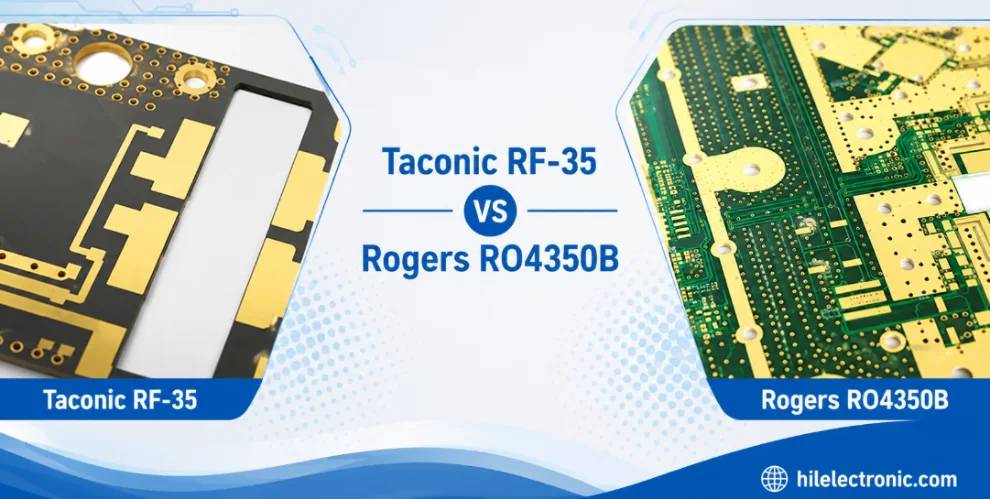
Taconic RF 35 vs RO4350B PCB
Table of contentsRF-35 vs RO4350B Procurement and...

TMM4 Filter PCB Manufacturing
TMM4 filter PCB manufacturing is controlled by the...

TMM3 PCB Manufacturing for RF Modules
TMM3 PCB manufacturing is most useful where the RF module...

TMM6 PCB Fabrication
TMM6 fabrication is the process-control page for a mid-Dk...
How to get a quote for PCBs
Let‘s run DFM/DFA analysis for you and get back to you with a report. You can upload your files securely through our website. We require the following information in order to give you a quote:
-
- Gerber, ODB++, or .pcb, spec.
- BOM list if you require assembly
- Quantity
- Turn time
For PCBA services, please provide your BOM (Bill of Materials) and any specific assembly instructions. We also offer DFM/DFA analysis to optimize your designs for manufacturability and assembly, ensuring a smooth production process.