
Altium CircuitMaker: Is It Free, How Does It Compare, and How to Export Gerbers for Manufacturing
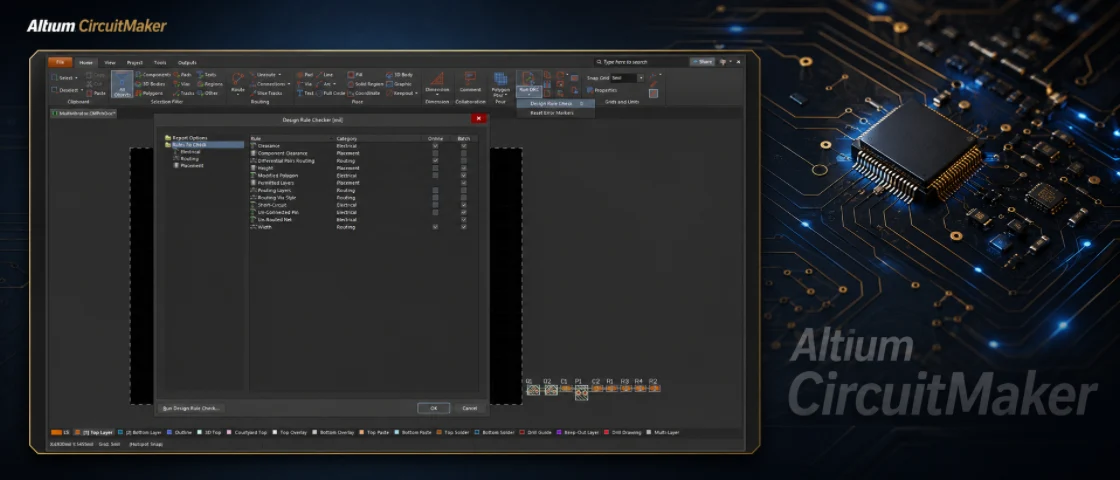
Figure 1. Altium CircuitMaker files should be checked before Gerber export and PCB manufacturing.
Altium CircuitMaker is Altium’s free PCB design tool, built for hobbyists, students, makers, and open-source hardware. It gives you a professional schematic-and-layout engine at no cost, with a community library and cloud storage. This guide answers what people search – is it really free, how it compares to KiCad and Altium Designer, how to export manufacturing files – and shows how Highleap Electronics turns a CircuitMaker design into a built, assembled board.
1. Is CircuitMaker free, and what is the catch?
Yes, CircuitMaker is completely free to use – the catch is that standard free projects are stored in Altium’s community cloud and are publicly visible. It is a genuine EDA tool from Altium, the company behind the professional Altium Designer suite, and because it shares technology with Altium Designer, the editing feel is closer to a paid professional tool than most free options.
It fits individual makers, students learning board design, and open-source hardware. It is a weaker fit for confidential commercial work, because the public-project model is a deliberate trade-off. One point to grasp early: CircuitMaker is a design tool, not a manufacturing service. Whatever you draw the board in, a fab needs a clean, unambiguous set of PCB design and fabrication files – and most problems newcomers hit are output-and-library issues that only surface at quotation, not CircuitMaker bugs.
2. CircuitMaker vs Altium Designer vs KiCad vs EAGLE
Choose CircuitMaker for free Altium-style design of open-source boards, KiCad for free private offline work, EAGLE if you live in the Autodesk world, and Altium Designer for professional commercial complexity. Tool choice is about matching constraints – budget, board size, privacy, team needs – not about which is objectively best.
| Tool | Cost | Best for | Main trade-off |
|---|---|---|---|
| CircuitMaker | Free | Hobbyists, students, open-source hardware | Projects are public; cloud-only storage |
| Altium Designer | Paid (professional) | Commercial teams, complex high-speed boards | Significant license cost |
| EAGLE / Fusion | Subscription (limited free tier) | Makers and small teams in the Autodesk world | Board-size limits on the free tier |
| KiCad | Free and open source | Anyone wanting offline, private, unlimited use | Steeper initial learning curve |
If you want a free, fully private, offline tool with no board-size limit, KiCad is the usual recommendation. Whichever you pick, the electronic circuit design fundamentals – clean schematic, verified parts, sane rules – matter more than the brand on the title bar.
3. Can you use CircuitMaker for commercial products?
You can design commercial boards in CircuitMaker, but its public-project storage makes it unsuitable for confidential or proprietary work. The free model is built around an open community, so your schematic and layout are generally visible to others – fine for open-source hardware, a problem for anything you need to keep private.
Teams that need private storage and version control usually move to Altium Designer, while those wanting a free option choose KiCad for fully private, offline use. The good news for manufacturing is that the output files are standardized regardless of tool, so your choice of EDA software never limits which fab can build the board.
4. How to design a board in CircuitMaker (schematic to layout)
CircuitMaker follows the standard professional flow: capture the schematic, assign verified footprints, set design rules, route, then run the design rule check. Getting each stage right is what prevents trouble at the factory:
- Schematic capture. Place parts, wire the nets, and give every component a real part with a verified footprint rather than the first community match by name.
- Footprint selection. CircuitMaker draws on a large community library – a time-saver, but quality varies, so verify footprints against the datasheet. A wrong land pattern is the leading cause of an unbuildable board.
- Design rules. Set trace width, clearance, via sizes, and annular ring to a capability your fab can hold, so you avoid redesign after a manufacturing review.
- Place and route. Arrange parts for sensible signal flow and thermal behavior, keep power and ground solid, and give sensitive nets the care they need.
- Run the DRC. Clear every error before generating output; unresolved violations almost always become fabrication or assembly problems.
A complete PCB design workflow converts schematic and layout data into fabrication and assembly files.
5. How to export Gerber and assembly files from CircuitMaker
A fab cannot build from a CircuitMaker project file – you must export Gerbers (or ODB++), an NC drill file, a BOM, and assembly data. A complete, unambiguous package is the single biggest factor in a fast, accurate quote, so generate and verify:
- Gerber files (or ODB++) for every copper, mask, silkscreen, and paste layer, plus the board outline. Reading the complete guide to Gerber files first saves a revision cycle; ODB++ is preferable when offered because it bundles data and reduces layer-naming confusion.
- NC drill file with all hole sizes and plated/non-plated status.
- Bill of materials with manufacturer part numbers, not just values – see what a production-ready PCB BOM should contain.
- Pick-and-place / centroid file giving each part’s position, rotation, and side; here is how the centroid file drives assembly.
- Assembly drawing showing polarity, pin one, fiducials, and do-not-populate notes.
One habit above all: open your generated Gerbers in an independent viewer before sending them. CircuitMaker’s own preview is not the same as seeing exactly what the factory receives, and an external check catches a mirrored layer, a missing mask, or a paste-layer slip before it costs you time.
6. PCB manufacturing checklist before you order
Before requesting a quote, confirm these six items – they head off the issues that most often delay CircuitMaker projects at the factory:
- Every footprint verified against its datasheet and the part number you intend to buy.
- Design rules set to a real, achievable capability, with DRC passing cleanly.
- Gerbers, drill, BOM, centroid, and assembly drawing all exported from the same final revision.
- Generated files opened and confirmed in an independent Gerber viewer.
- Board outline, layer count, copper weight, surface finish, and quantity decided.
- Any impedance, high-voltage, RF, or thermal requirements noted clearly for the fabricator.
7. From CircuitMaker file to manufactured board
Once your output package is clean, Highleap builds from the standard files, not from CircuitMaker itself. Because community-sourced footprints are not always production-verified, a quick review of common manufacturability issues before committing is genuinely worth it; it confirms footprints, clearances, drill sizes, and stackup are buildable and flags anything risky.
From there, Highleap covers the whole path – validate the design with a rapid PCB prototyping run, then scale into full turnkey assembly with authorized-channel component sourcing, SMT and through-hole placement, and inspection. That lets a maker or small team take a free CircuitMaker design all the way to a tested board without owning expensive software or running their own line. When you submit your files, include the full output package plus target quantity, lead-time need, and any special requirements.
Send your CircuitMaker files for a quote
8. CircuitMaker FAQ
Is CircuitMaker really free?
Yes. The trade-off is that projects are stored in Altium’s community cloud and are generally public, which suits open-source hardware but not confidential commercial work.
Can I keep my CircuitMaker project private?
Standard free projects are public. For private work, use Altium Designer, or choose KiCad for a free, fully private, offline alternative.
What files does a fab need from CircuitMaker?
Gerber or ODB++ files, an NC drill file, the board outline, and – for assembly – a BOM with manufacturer part numbers, a pick-and-place file, and an assembly drawing. Add stackup notes if the board has controlled impedance.
Why do my Gerbers look wrong at the factory?
Usually a mirrored layer, a missing mask or paste layer, or unclear layer names. Opening exported Gerbers in an independent viewer before sending catches these before they cause delays.
Can Highleap manufacture a board designed in CircuitMaker?
Yes. Highleap builds from standard manufacturing files regardless of the EDA tool, and a manufacturability review helps verify footprints and clearances – useful when a design uses community-sourced parts.

Recommended Posts

Isola Astra MT77 PCB Manufacturing
Figure 1. Isola Astra MT77 PCB ManufacturingIsola Astra...

Nelco N4000-13 PCB Material and Manufacturing Guide | Highleap Electronics
Figure 1. Nelco N4000-13 PCBNelco N4000-13 PCB is a...

Copper Clad Laminate: Complete Material Selection Guide for PCB Engineers
Every electrical property that matters in a printed...

Inside a China Ceramic PCB Factory: Process Control Across Power/LED/RF/Medical
Table of Contents Inside a China Ceramic PCB Factory: How...
How to get a quote for PCBs
Let’s run DFM/DFA analysis for you and get back to you with a report. You can upload your files securely through our website. We require the following information in order to give you a quote:
-
- Gerber, ODB++, or .pcb, spec.
- BOM list if you require assembly
- Quantity
- Turn time
For PCBA services, please provide your BOM (Bill of Materials) and any specific assembly instructions. We also offer DFM/DFA analysis to optimize your designs for manufacturability and assembly, ensuring a smooth production process.