
Circuit Board Schematic Diagram: How to Read It
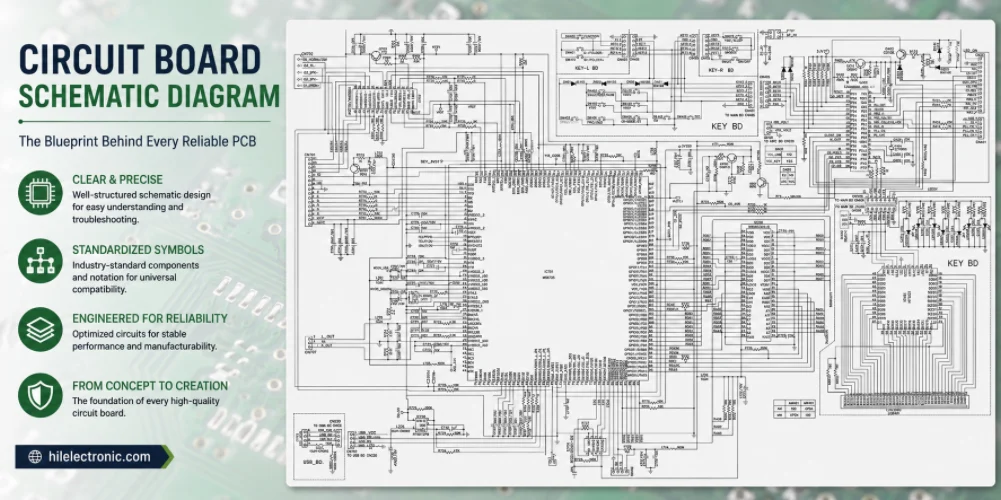
Figure 1. A circuit board schematic diagram shows electrical intent before the layout is converted into a manufacturable PCB.
A circuit board schematic diagram is a symbolic drawing that shows every component in a circuit and how they are electrically connected, without representing their physical size or position on the board. It is the engineering “source of truth” that a PCB layout, and ultimately a manufactured board, is built from.
- A schematic shows logical connections (the netlist); the PCB layout shows physical placement and copper.
- Reading a schematic means recognizing symbols, following nets and labels, and tracing power and ground.
- A clean, fully annotated schematic with correct part numbers is what prevents costly manufacturing errors.
- The schematic drives the netlist, which drives the layout, the Gerbers, and the assembly data.
Table of Contents
- What Is a Circuit Board Schematic Diagram?
- Schematic vs Layout vs Physical Board
- Common Schematic Symbols and What They Mean
- How to Read a PCB Schematic Step by Step
- Tools for Drawing a Circuit Board Schematic
- From Schematic Diagram to a Manufactured PCB
- Schematic Practices That Prevent Manufacturing Errors
- Frequently Asked Questions
What Is a Circuit Board Schematic Diagram?
A schematic diagram represents a circuit using standardized symbols and lines. Each symbol stands for a real component such as a resistor, capacitor, or integrated circuit, and each line represents an electrical connection, or “net,” between component pins. The drawing is deliberately abstract: it tells you what connects to what, not where those parts physically sit.
Key things a schematic communicates
- Components: every part in the design, each with a reference designator such as R1, C3, or U2.
- Connections (nets): the electrical relationships between pins, shown as wires or named labels.
- Values and part numbers: resistance, capacitance, voltage rating, and the manufacturer part number for sourcing.
- Power and ground: the supply rails and ground references the circuit depends on.
- Functional grouping: blocks such as power input, microcontroller, sensors, and connectors, often on separate sheets.
Because the schematic defines the netlist, it is the document every later stage is checked against. If a connection is wrong here, it will be wrong on the finished board too. Teams that send us files for turnkey board assembly always start from a verified schematic.
Schematic vs Layout vs Physical Board
Newcomers often confuse the schematic with the PCB layout. They are different views of the same product, created in sequence, and each answers a different question.
Key differences to understand
- Schematic: answers “what connects to what” using symbols; position and scale are irrelevant.
- Layout: answers “where does everything go” using real footprints, copper traces, and board outline.
- Physical board: the manufactured result, with components soldered onto fabricated copper.
- Order of creation: schematic first, then layout, then fabrication and assembly.
- Shared backbone: the netlist links all three so the copper matches the intended connections.
| View | Shows | Used For |
|---|---|---|
| Schematic | Symbols and logical nets | Design intent, review, simulation |
| Layout | Footprints, traces, planes, outline | Routing, DFM, generating Gerbers |
| Physical board | Soldered components on copper | The shipped product, testing |
For complex designs such as multilayer rigid boards or HDI builds, keeping the schematic and layout perfectly in sync is what makes high pin-count routing predictable.
Common Schematic Symbols and What They Mean
Reading a schematic starts with recognizing its vocabulary. A handful of symbols cover the majority of what you will see, and most variations build on these basics.
Key symbols you will encounter
- Resistor: a zigzag or rectangle; restricts current flow, marked with a value in ohms.
- Capacitor: two parallel lines (or one curved) for storing charge and filtering.
- Diode / LED: a triangle pointing to a bar, indicating one-way current flow.
- Transistor: a circle or lines with arrows showing a BJT or MOSFET switching/amplifying element.
- Integrated circuit: a box with numbered pins, each pin labeled by its function.
- Ground: downward lines or a triangle defining the zero-voltage reference.
| Symbol | Component | Typical Marking |
|---|---|---|
| Zigzag / rectangle | Resistor | R1, value in Ω / kΩ |
| Parallel lines | Capacitor | C2, value in pF / µF |
| Triangle + bar | Diode / LED | D1, polarity matters |
| Numbered box | Integrated circuit | U1, pin functions labeled |
| Coil loops | Inductor | L1, value in µH / mH |
Symbol conventions vary slightly between regions and tools, but the logic is consistent. Once you can name the parts, you can start following how they connect.
How to Read a PCB Schematic Step by Step
Reading a schematic is a structured process. Rather than scanning randomly, follow the signal the way current would actually move through the circuit.
Key steps to follow
- Find power and ground first: locate the supply rails so you have a reference for everything else.
- Identify functional blocks: group the circuit into input, processing, output, and power sections.
- Trace by net name: follow labeled nets across the sheet instead of expecting every wire to be drawn.
- Read pin functions on ICs: match each connection to the chip’s datasheet to confirm intent.
- Note test points and connectors: see where signals enter, leave, or can be measured.
Working block by block keeps a dense schematic manageable. A well-organized drawing makes this natural, which is also why design reviews are easier on clean schematics. Before any board reaches our line, a design-for-manufacturing check compares the netlist against the layout to confirm they agree.
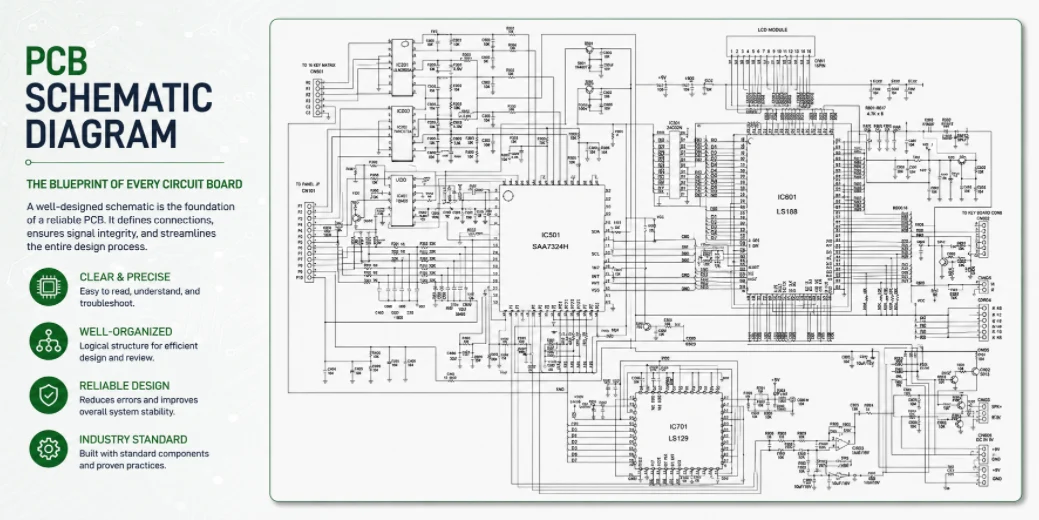
Figure 2. Schematic review helps confirm nets, symbols, polarity, connectors, and test points before fabrication and assembly data are released.
Tools for Drawing a Circuit Board Schematic
Schematics are created in electronic design automation (EDA) software. The tool you choose affects library quality, simulation options, and how cleanly your data exports to a manufacturer.
Key tool categories
- Free and browser-based: EasyEDA and similar tools suit hobbyists and quick prototypes.
- Open-source desktop: KiCad offers professional capability with no license cost.
- Commercial suites: Altium Designer and OrCAD target advanced, high-density, team workflows.
- Integrated simulation: many tools let you verify behavior before committing to a layout.
- Library management: good tools keep symbols and footprints linked to real part numbers.
Whatever tool you use, the goal is the same: a clean schematic that exports an accurate netlist and a complete bill of materials your manufacturer can build from.
Schematics are drawn in EDA software, and the choice usually follows the team and budget. KiCad is a capable free option popular with hobbyists and many professionals; Altium Designer and OrCAD are full commercial suites used in industry; and several browser-based tools let beginners start without installing anything. Whatever the tool, the goal is the same: a clear, correctly connected schematic that can be turned into a layout and then into manufacturing files.
From Schematic Diagram to a Manufactured PCB
The schematic is the first step in a chain that ends with a finished board. Understanding that chain helps you see why early accuracy matters so much.
Key stages from drawing to delivery
- Schematic capture: draw the circuit, assign part numbers, and run electrical rule checks.
- Netlist generation: the tool extracts every connection for the layout to enforce.
- PCB layout: place footprints, route traces, and pour planes to match the netlist.
- Manufacturing data: export Gerbers, drill files, BOM, and pick-and-place data.
- Fabrication and assembly: the bare board is built, then components are placed and soldered.
This flow is the same whether you order a quick prototype through our low-volume assembly service or scale to full production through our broader electronics manufacturing services.
The journey from schematic to finished board is a defined flow. The schematic produces a netlist of every connection; that netlist is imported into a PCB layout where components are placed and traces routed; and the completed layout is exported as Gerber and drill files for fabrication, plus a BOM and placement data for assembly. A clean schematic at the start prevents errors from propagating through every later stage.
Schematic Practices That Prevent Manufacturing Errors
Most board failures trace back to the schematic, not the factory. A few disciplined habits at the drawing stage remove the majority of avoidable problems.
Key practices worth adopting
- Use real part numbers: tie every symbol to a sourceable manufacturer part, not a generic value.
- Verify footprints early: confirm each symbol maps to a footprint that matches the datasheet.
- Label nets clearly: name power, ground, and signal nets so reviewers can follow intent.
- Run electrical rule checks: let the tool flag unconnected pins and conflicting drivers.
- Split by function: keep blocks on separate sheets for readability and easier review.
- Document polarity: mark pin one, anode/cathode, and connector orientation explicitly.
A schematic prepared this way translates cleanly into a board that can be sourced, built, and inspected without guesswork. If you are unsure whether your design is ready, the engineers at our China-based facility can review the package before you commit to production, including options for flexible circuit designs when your product needs to bend or fold.
Frequently Asked Questions
Is a schematic the same as a circuit diagram?
Yes. “Schematic,” “schematic diagram,” and “circuit diagram” all refer to the symbolic drawing of a circuit’s components and connections. The terms are used interchangeably in most engineering contexts.
Do I need a schematic to manufacture a PCB?
Not strictly for fabrication, since the factory builds from Gerbers and drill files. But you need a schematic to create a correct layout in the first place, and you need an accurate BOM for assembly. In practice, every reliable design begins with one.
Why are some connections not drawn as lines?
On busy schematics, designers use named net labels instead of drawing every wire. Any points sharing the same net name are electrically connected, which keeps dense sheets readable.
What is the difference between a schematic and a netlist?
The schematic is the human-readable drawing; the netlist is the machine-readable list of every connection extracted from it. The layout tool uses the netlist to enforce that the copper matches your intent.
How do I check that my schematic is correct?
Run your tool’s electrical rule check, review it block by block against the datasheets, and confirm every part has a valid footprint and part number. A manufacturer’s design review adds a second set of eyes before production.
Can a wrong schematic still produce a working-looking board?
Yes, and that is the danger. A board can be fabricated and assembled exactly as drawn yet still fail because the schematic itself was wrong. That is why verification happens before, not after, manufacturing.
Which schematic tool should a beginner start with?
EasyEDA or KiCad are both good starting points. EasyEDA is browser-based and very approachable, while KiCad is free, powerful, and widely supported, so skills transfer well as your projects grow.
What is the difference between a schematic and a PCB layout?
A schematic is a symbolic diagram showing how components connect, with no regard to physical position. A PCB layout is the physical arrangement of those components and the copper traces. The layout is created from the schematic and must match it connection for connection.
Do I need a schematic before designing a PCB layout?
Yes. The schematic defines every connection the layout must implement, and EDA tools use it to check the routed board against the intended design. Starting a layout without a verified schematic invites wiring errors that are hard to find later.

Recommended Posts

Isola Astra MT77 PCB Manufacturing
Figure 1. Isola Astra MT77 PCB ManufacturingIsola Astra...

Nelco N4000-13 PCB Material and Manufacturing Guide | Highleap Electronics
Figure 1. Nelco N4000-13 PCBNelco N4000-13 PCB is a...

Copper Clad Laminate: Complete Material Selection Guide for PCB Engineers
Every electrical property that matters in a printed...

Inside a China Ceramic PCB Factory: Process Control Across Power/LED/RF/Medical
Table of Contents Inside a China Ceramic PCB Factory: How...
How to get a quote for PCBs
Let‘s run DFM/DFA analysis for you and get back to you with a report. You can upload your files securely through our website. We require the following information in order to give you a quote:
-
- Gerber, ODB++, or .pcb, spec.
- BOM list if you require assembly
- Quantity
- Turn time
For PCBA services, please provide your BOM (Bill of Materials) and any specific assembly instructions. We also offer DFM/DFA analysis to optimize your designs for manufacturability and assembly, ensuring a smooth production process.