
Design Your Own Circuit Board Roadmap

Figure 1. design your own circuit board
Designing your own circuit board is more achievable than it looks. With free software, inexpensive prototype fabrication, and a sensible first project, a beginner can go from an idea to a working custom board in a few weeks. The trick is to start small, expect at least one revision, and make decisions in the right order. This roadmap shows how to design your own circuit board, from deciding whether to do it at all, through choosing tools and a realistic first project, to getting the boards made, with honest expectations about cost, time, and mistakes along the way.
Key takeaways
- You need three things: a circuit that works, design software, and a small, well-chosen first project.
- KiCad and EasyEDA are both free and beginner-friendly; pick one and learn it well.
- Start simple, an LED board, a sensor breakout, a small microcontroller carrier, rather than an ambitious first design.
- Prototype boards are cheap, but plan for at least one revision; a first board rarely is the final board.
- The most common beginner mistakes, wrong footprints, missing decoupling caps, ignoring design rules, are easy to avoid once you know them.
Table of Contents
- Should You Design Your Own Board?
- What You Need to Get Started
- Choosing Your First Design Tool
- The Path From Idea to Finished Board
- Picking a Realistic First Project
- What to Expect: Cost, Time, and Revisions
- Mistakes First-Timers Make
- Understanding What Drives the Cost
- Getting Your First Boards Made
- Frequently Asked Questions
Should You Design Your Own Board?
A custom board is not always the right answer, so it is worth a moment to decide. There are three paths.
- Use something off the shelf. If an existing module or development board does the job, that is often the fastest route, no design work needed.
- Modify an open-source design. Many proven boards are published openly. Starting from one and changing it is a gentle way into PCB design and lowers the risk of fundamental errors.
- Design your own from scratch. When you need a specific size, shape, feature set, or cost target that nothing existing meets, a custom board is the way, and it is very satisfying to build.
Choose a custom board when you genuinely need something existing hardware cannot give you, or when learning the skill is itself the goal. For a first attempt, modifying an open-source design or starting with a simple original board both work well.
What You Need to Get Started
The barrier to entry is low. You need three things, and none of them is expensive.
- A circuit that works. Have a clear, verified idea of the electronics, ideally tested on a breadboard or in a simulator, before you start the board.
- Design software. A free EDA tool (covered next) to capture the schematic and lay out the board.
- A small first project. Something simple enough to finish, so you learn the whole flow end to end rather than getting stuck.
Notice what is not on the list: you do not need a lab full of equipment or years of experience. The fabrication is handled by a manufacturer, so your job is the design. Starting with these three in place keeps the first project from stalling.
Choosing Your First Design Tool
The two most popular free, beginner-friendly tools are KiCad and EasyEDA. Both can take you from schematic to manufacturing files. The table compares them.
| Aspect | KiCad | EasyEDA |
|---|---|---|
| Cost | Free, open-source | Free, with paid tiers |
| Runs | Installed desktop application | In the browser (and desktop) |
| Library | Large community libraries | Huge built-in catalog with live parts |
| Learning curve | A little more setup, very capable | Fast to start, nothing to install |
| Output | Standard manufacturing files | Standard manufacturing files |
There is no wrong choice here. EasyEDA gets you designing fastest with nothing to install and a deep parts library; KiCad is fully open-source and scales to serious work. Pick one, learn it properly, and remember that both export standard files you can take to any fabricator for PCB manufacturing, so you are never locked in.
The Path From Idea to Finished Board
At a high level, every custom board follows the same arc. You do not need to master every detail on your first try, just understand the shape of the journey.
- Capture the schematic, drawing your circuit and connecting the components.
- Assign footprints, giving each part its physical land pattern.
- Lay out the board, setting the outline, placing parts, and routing the copper.
- Check the design, running the design-rule check and fixing every violation.
- Export and order, generating the manufacturing files and sending them to a fabricator.
- Build and test, assembling the board and seeing how it behaves.
That is the whole flow. The detail within each step is where the craft lives, but a first project teaches you all of it at a manageable scale. Each board you design makes the next one easier.
Picking a Realistic First Project
The single best decision a beginner makes is choosing a small first project. An overambitious first board is the most common reason people get discouraged. Good starting points include:
| Project | Why it is a good first board |
|---|---|
| LED badge or blinker | Few parts; teaches the full flow with low risk |
| Sensor breakout board | One main chip plus support parts; practical and reusable |
| Microcontroller carrier | Power, decoupling, and a programming header, core skills |
| Power-supply / regulator board | Teaches trace sizing and layout for current |
Each of these is simple enough to complete yet teaches the essential skills, schematic capture, footprints, placement, routing, and ordering. Finish one, learn from it, and build up from there. Resist the urge to make your first board your dream project.
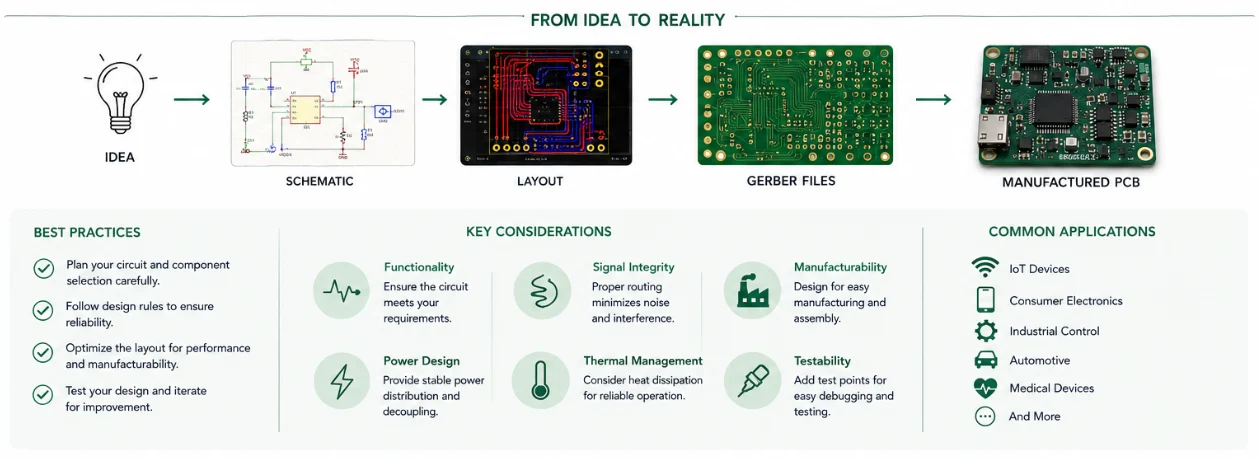
Figure 2. design your own circuit board details
What to Expect: Cost, Time, and Revisions
Cost and lead time
Prototype boards are inexpensive, especially in small quantities, which is what makes learning affordable. Lead times for a simple prototype are typically short, and you can request a price for your specific board through a quick quote. If you want the board assembled rather than hand-soldering it, PCB assembly services populate it for you.
Plan for a revision
Here is the honest part: your first board will probably have at least one issue, a wrong footprint, a missed connection, a value to change. That is normal, even for experienced designers, which is exactly why prototypes are cheap and ordered in small numbers. Treat the first board as a learning iteration, fix what you find, and order a revised version. Expecting this from the start turns a “failure” into simply the next step.
Mistakes First-Timers Make
Almost every beginner hits the same handful of issues. Knowing them in advance lets you avoid most of them.
- Wrong footprints. The number-one cause of a non-working first board. Always verify each footprint against the datasheet.
- Missing decoupling capacitors. Chips need small capacitors close to their power pins; leaving them out causes unreliable behavior.
- Design rules left at defaults. Set rules to match your manufacturer, then actually fix the violations the checker reports.
- Ignoring the DRC. The design-rule check exists to catch errors; treat each item as a fix, not a suggestion.
- Parts too small to assemble by hand. If you plan to hand-solder, avoid the tiniest packages, or have the board assembled instead.
None of these is hard to avoid once you are aware of it. A manufacturer’s free DFM review before you order is a valuable safety net for a first-timer, catching issues you might not yet recognize.
Understanding What Drives the Cost
Knowing what makes a board cost more helps you keep a first project affordable. A few factors dominate the price.
| Factor | Effect on cost |
|---|---|
| Board size | Larger boards cost more; small prototypes are cheap |
| Layer count | Each added layer raises cost; two layers is the cheapest |
| Quantity | Per-board cost falls with volume as setup is shared |
| Surface finish | ENIG costs more than HASL or OSP |
| Assembly | Hand-soldering is free but slow; machine assembly adds setup but scales |
| Lead time | Faster turnaround usually costs more |
Keeping a first project cheap
For a first board, keep it small, two layers, a modest quantity, and a standard finish, and the cost stays low. As a design proves itself and you order more, the per-board price drops, which is the economics behind high-volume PCB assembly. If you would rather not hand-solder fine parts, factoring in PCB assembly from the start is often worth the small added setup.
Getting Your First Boards Made
When the design passes its checks, export the manufacturing files and send them to a fabricator. For a first board, choosing a manufacturer that also offers assembly and a design review is helpful, because the same files can fabricate the bare board and populate it, and an extra set of expert eyes catches beginner mistakes.
As your skills grow and a design proves itself, the same files scale from a handful of prototypes up to high-volume PCB assembly without redesign, and a single partner can handle everything from a basic two-layer board to specialized constructions like flexible PCBs. That continuity means the tools and habits you learn on your first project carry all the way to production.
Designing your own circuit board is a learnable skill, not a leap reserved for experts. Start small, choose a friendly tool, expect a revision, and get the first board made, each one teaches you something the last did not. You can read more about Highleap Electronics and how we support designers from first prototype to production.
Frequently Asked Questions
Can a beginner really design their own PCB?
Yes. With free software like KiCad or EasyEDA, a verified circuit, and a small first project, a beginner can complete a custom board. Fabrication is handled by a manufacturer, so the task is the design. Starting simple and expecting one revision makes it very achievable.
Should I use KiCad or EasyEDA?
Either works and both are free. EasyEDA runs in the browser with nothing to install and a huge parts library, getting you designing fastest. KiCad is open-source and very capable. Pick one, learn it well, and know that both export standard files any fabricator can build.
What is a good first project?
Something simple you can finish: an LED badge or blinker, a sensor breakout, a small microcontroller carrier, or a basic regulator board. Each teaches the full flow, schematic, footprints, placement, routing, and ordering, at a manageable scale. Avoid an overambitious first design.
How much does it cost to make a custom board?
Prototype boards are inexpensive, especially in small quantities, which is what makes learning affordable. Costs depend on size, layer count, and quantity, so request a quote for your specific board. Assembly is available if you would rather not hand-solder.
Will my first board work?
Often it has at least one issue, a wrong footprint, a missed connection, a value to change, which is completely normal even for experts. Treat the first board as a learning iteration, fix what you find, and order a revision. Prototypes are cheap precisely for this reason.
What is the most common beginner mistake?
Wrong footprints are the top cause of a non-working first board, followed by missing decoupling capacitors and ignoring the design-rule check. All are easy to avoid once you know them, and a manufacturer’s DFM review before ordering catches many of them.
What makes a custom board more expensive?
The main drivers are board size, layer count, quantity, surface finish, whether it is machine-assembled, and lead time. For a cheap first board, keep it small, two layers, a modest quantity, and a standard finish; the per-board cost then drops as you order higher volumes.
Do I need test equipment to design a board?
Not to design it, the design is done in software, and a manufacturer fabricates and can assemble it. To test the finished board a basic multimeter helps, and more advanced equipment becomes useful as projects grow, but a first simple board needs very little.

Recommended Posts
Taconic RF 35 vs RO4350B PCB
Table of contentsRF-35 vs RO4350B Procurement and...

TMM4 Filter PCB Manufacturing
TMM4 filter PCB manufacturing is controlled by the...

TMM3 PCB Manufacturing for RF Modules
TMM3 PCB manufacturing is most useful where the RF module...

TMM6 PCB Fabrication
TMM6 fabrication is the process-control page for a mid-Dk...
How to get a quote for PCBs
Let‘s run DFM/DFA analysis for you and get back to you with a report. You can upload your files securely through our website. We require the following information in order to give you a quote:
-
- Gerber, ODB++, or .pcb, spec.
- BOM list if you require assembly
- Quantity
- Turn time
For PCBA services, please provide your BOM (Bill of Materials) and any specific assembly instructions. We also offer DFM/DFA analysis to optimize your designs for manufacturability and assembly, ensuring a smooth production process.