
11 Steps to Design a Circuit Board

Figure 1. steps to design a circuit board
Designing a circuit board is a repeatable process: you move from a finalized circuit, through schematic capture and layout, to the manufacturing files a factory needs. Following the steps in order, and not skipping the verification at the end, is what separates a board that works first time from one that comes back with problems. This guide lays out the 11 steps to design a circuit board, grouped into four phases, with the practical detail and design-for-manufacturing habits that make the result actually buildable.
Key takeaways
- The process runs in four phases: define, capture, lay out, and verify-and-release.
- Footprint accuracy and design rules set up front prevent the most common board failures.
- Good placement does most of the work of good routing; spend time on it.
- Running DRC and ERC before release is non-negotiable, it is your last check before spending money.
- Thinking about manufacturability from step one, not after layout, avoids costly redesigns.
Table of Contents
- Phase 1 — Define What You Are Building (Steps 1–2)
- Phase 2 — Capture the Design (Steps 3–4)
- Phase 3 — Lay Out the Board (Steps 5–9)
- Phase 4 — Verify and Release (Steps 10–11)
- Designing for Manufacturability From the Start
- Practical Tips That Save a Re-Spin
- The 11 Steps at a Glance
- Frequently Asked Questions
Phase 1 — Define What You Are Building (Steps 1–2)
Before any software opens, you need a clear, settled idea of the circuit. This phase prevents the most expensive kind of rework: discovering a fundamental design problem after layout.
Step 1: Finalize the circuit
Work out the complete electrical design, every functional block, the components, the power requirements, and how the parts interconnect. Where behavior is uncertain, verify it first, on a breadboard or in a simulator, so you are not committing an unproven idea to copper. The cleaner the concept here, the smoother everything downstream.
Step 2: Choose your design software
Pick an EDA tool suited to your project and experience. Beginners often start with EasyEDA or KiCad; professional work may use larger suites. What matters is a tool that takes you all the way from schematic to manufacturing files, so confirm it can export standard Gerber, drill, BOM, and pick-and-place outputs.
Phase 2 — Capture the Design (Steps 3–4)
Now you translate the circuit into the formal representations the software uses: the schematic and the footprints that connect it to physical parts.
Step 3: Capture the schematic
Draw the circuit in the schematic editor, placing components and connecting them with wires or net labels. Lay it out so it reads logically and group related circuitry; a tidy schematic is far easier to debug and review. This diagram is the source of truth from which the layout is generated.
Step 4: Assign and verify footprints
Every schematic symbol needs a physical footprint, the land pattern the part actually solders to. Assign each one and verify it against the manufacturer’s datasheet, because a wrong footprint is one of the most common reasons a first board fails. Check pad sizes, spacing, courtyard, and pin numbering. Correct footprints also pay off later during PCB assembly, where mismatched land patterns cause placement and soldering defects.
Phase 3 — Lay Out the Board (Steps 5–9)
This is the heart of PCB design, turning the schematic into a physical board. It is where most of the engineering judgment lives.
Step 5: Define the board outline and stack-up
Set the board’s size and shape to fit its enclosure, then decide the layer count and stack-up. The number of layers depends on complexity and routing density, and for boards with controlled impedance the stack-up is a deliberate design choice, an area that connects directly to high-speed PCB manufacturing. Confirm the stack-up is something your fabricator can build.
Step 6: Set the design rules
Before placing or routing, define the rules: minimum trace width, clearance, via size, and annular ring. Set them to match your manufacturer’s real capabilities so the editor steers you toward a buildable board from the start. Rules set up front prevent violations that would otherwise pile up during routing.
Step 7: Place the components
Arrange the parts on the board. Good placement does most of the work of a good layout: group related components, keep high-speed and sensitive signals short, place connectors and mounting holes where the mechanical design requires, and leave room for clean routing. Time invested here is repaid many times during routing.
Step 8: Route the connections
Connect the parts with copper traces, sizing each trace for the current it carries and the impedance it needs. Manage signal integrity by keeping critical traces short and giving them clean return paths. Routing is where careful placement either makes the job easy or, if rushed, makes it painful.
Step 9: Add copper pours, planes, and silkscreen
Add ground and power planes or copper pours to provide low-impedance return paths and reduce noise, then add the silkscreen, the reference designators, polarity marks, and labels that make the board possible to assemble and service. These finishing touches strongly affect both performance and manufacturability.
Phase 4 — Verify and Release (Steps 10–11)
The design looks done, but it is not released until it has passed its checks and produced clean output files.
Step 10: Run DRC and ERC
Run the design-rule check (DRC) to compare the board against your rules, traces too close, clearances too small, unrouted connections, vias that break the rules, and fix every reported violation. Re-run the electrical-rule check (ERC) on the schematic too. A clean DRC and ERC are your last and cheapest opportunity to catch errors before committing to fabrication.
Step 11: Generate the manufacturing outputs
Export the files the factory needs: Gerber files for each layer, an NC drill file, and, for assembly, a bill of materials and a pick-and-place file. Include the parameters the standard files do not capture, board thickness, copper weight, soldermask and silkscreen colors, surface finish, and impedance requirements. With clean outputs in hand, you are ready to order through PCB manufacturing.
Designing for Manufacturability From the Start
The biggest improvement most designers can make is to think about manufacturability throughout, not only at step 11. A board can pass every electrical check and still be hard or expensive to build.
Build manufacturability into each phase
- In layout, leave enough spacing between parts for placement and inspection, and avoid features finer than your fabricator can reliably build.
- For assembly, add fiducials, keep adequate clearances, and panelize sensibly so the board runs smoothly through an SMT line.
- For thermal designs, plan how heat leaves the board; high-power circuits may need a substrate suited to metal-core assembly.
- For volume, design with production in mind so the same files scale into high-volume PCB assembly without re-engineering.
A practical way to lock this in is a manufacturer’s design review before you commit. A free DFM review checks your files against a real process and flags issues, marginal clearances, drill sizes near a limit, missing data, while they are still cheap to fix.
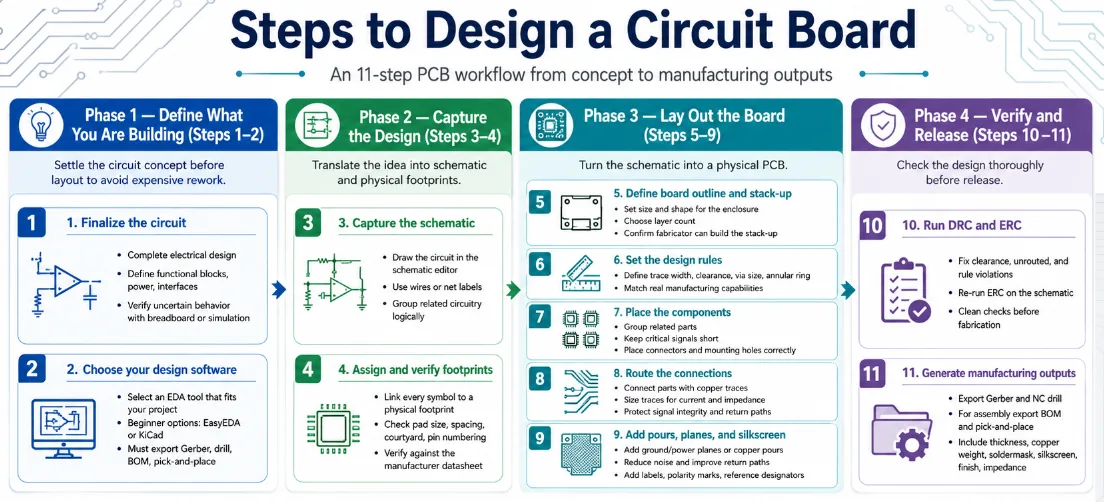
Figure 2. steps to design a circuit board details
Practical Tips That Save a Re-Spin
Most second versions of a board exist because of a small set of avoidable oversights. Building these habits into your process saves both time and the cost of another fabrication run.
Before you route
- Double-check every footprint against its datasheet, paying special attention to pin 1 and connector orientation.
- Add decoupling capacitors close to each IC’s power pins; missing them is a classic cause of flaky behavior.
- Confirm connector genders and pinouts against the parts they mate with.
While you route
- Size power and ground traces for the current they actually carry.
- Give high-speed and sensitive signals short paths and clean return paths, the discipline behind high-speed PCB manufacturing.
- Keep clearance appropriate to the voltages present and to the manufacturing process.
Before you release
- Fix every DRC and ERC item, not just the obvious ones.
- Run a manufacturability check, such as a free DFM review, before ordering.
- Re-read the silkscreen for reference designators, polarity marks, and pin-1 indicators.
None of these steps is difficult, but skipping them is the most common reason a first board comes back for a revision. A few minutes of checking saves a fabrication cycle.
The 11 Steps at a Glance
| Step | Action | Output |
|---|---|---|
| 1 | Finalize the circuit | A settled, verified design concept |
| 2 | Choose design software | A tool that exports manufacturing files |
| 3 | Capture the schematic | A clear, connected schematic |
| 4 | Assign and verify footprints | Correct land patterns for every part |
| 5 | Define outline and stack-up | Board shape, size, and layer plan |
| 6 | Set design rules | Buildable trace, clearance, and via limits |
| 7 | Place components | A routable, sensible layout |
| 8 | Route connections | Copper traces sized for current and signals |
| 9 | Add pours, planes, silkscreen | Clean return paths and clear markings |
| 10 | Run DRC and ERC | A verified, error-free design |
| 11 | Generate manufacturing outputs | Gerber, drill, BOM, pick-and-place |
Working through these eleven steps in order, with manufacturability in mind throughout, produces a design that a factory can build cleanly. You can read more about Highleap Electronics and how we take a finished design from files to working boards.
Frequently Asked Questions
What are the main phases of designing a circuit board?
Four: define the circuit and choose software; capture the schematic and assign footprints; lay out the board (outline, rules, placement, routing, pours); and verify and release (DRC/ERC, then generate manufacturing files). The eleven steps fall within these phases.
Which step causes the most first-board failures?
Assigning footprints (step 4) is a frequent culprit, because a wrong land pattern means parts will not fit or solder correctly. Skipping or rushing the design-rule check (step 10) is the other common cause. Verifying footprints and passing DRC prevent most failures.
Do I need to set design rules before routing?
Yes. Setting minimum trace width, clearance, via size, and annular ring up front, matched to your manufacturer’s capabilities, steers the editor toward a buildable board and prevents violations from accumulating. Rules set after routing mean reworking traces.
What files does step 11 produce?
Gerber files for each layer and an NC drill file for fabrication, plus a bill of materials and a pick-and-place file for assembly. Also specify board thickness, copper weight, soldermask and silkscreen colors, finish, and any impedance requirements.
How is good placement different from good routing?
Placement decides where parts sit; routing connects them. Good placement, grouping related parts, keeping critical signals short, leaving room for copper, makes routing straightforward. Rushed placement makes routing difficult no matter how skilled you are, so invest time in step 7.
When should I think about manufacturability?
From the first step, not only at release. Leaving spacing for assembly, avoiding features finer than your fabricator can build, planning thermal paths, and designing for volume throughout prevents costly redesigns. A manufacturer’s DFM review before ordering confirms the design is buildable.
What is the most common reason a board needs a second revision?
Avoidable oversights: a wrong footprint, missing decoupling capacitors, an incorrect connector pinout, or DRC items left unfixed. Checking footprints against datasheets, adding decoupling caps, verifying connectors, and resolving every DRC and ERC item before release prevents most re-spins.
How long does designing a circuit board take?
It varies widely with complexity, from an afternoon for a simple board to weeks for a complex one. Schematic capture and routing usually take the most time, and a thorough verification pass before release is time well spent because it avoids a far slower re-spin later.
Do I need separate software for the schematic and the layout?
No. Modern EDA tools handle both schematic capture and PCB layout in one package and export the manufacturing files, so a single tool takes you from circuit to Gerbers. Choose one that supports your project’s complexity and exports standard outputs.
Can I skip the schematic and lay out the board directly?
It is strongly discouraged. The schematic is the source of truth that the layout and netlist are generated from and checked against; skipping it removes the electrical-rule check and makes errors far harder to catch. Capture the schematic first, then lay out the board from it.

Recommended Posts

TMM6 Filter PCB Manufacturing
Table of contentsWhy Microwave Filter Designers Use...

TMM4 Filter PCB Manufacturing
TMM4 filter PCB manufacturing is controlled by the...

TMM3 PCB Manufacturing for RF Modules
TMM3 PCB manufacturing is most useful where the RF module...

TMM6 PCB Fabrication
TMM6 fabrication is the process-control page for a mid-Dk...
How to get a quote for PCBs
Let‘s run DFM/DFA analysis for you and get back to you with a report. You can upload your files securely through our website. We require the following information in order to give you a quote:
-
- Gerber, ODB++, or .pcb, spec.
- BOM list if you require assembly
- Quantity
- Turn time
For PCBA services, please provide your BOM (Bill of Materials) and any specific assembly instructions. We also offer DFM/DFA analysis to optimize your designs for manufacturability and assembly, ensuring a smooth production process.