
PCB Trace Width Calculator: How to Size Traces for Current, Voltage Drop, and Impedance
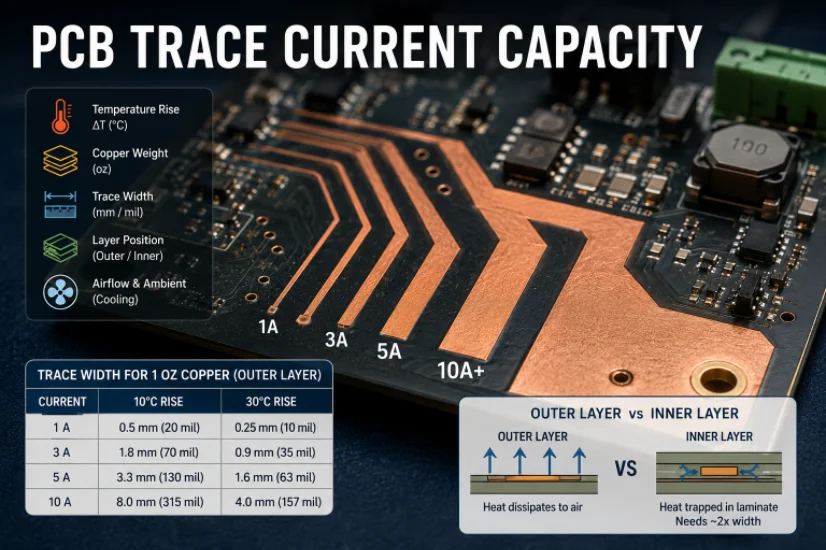
Figure 1. A PCB trace width calculator is a starting point for current, voltage drop, and impedance planning.
Trace width looks simple but is easy to get wrong: too narrow and a power trace overheats or drops too much voltage; too wide and you waste space or upset impedance. A trace width calculator gives a defensible starting number, but knowing what to feed it is what separates a reliable board from one that fails under load. This guide answers the real questions – what width for a given current, internal vs external, how to size 50-ohm traces – and shows how Highleap Electronics makes sure the width survives fabrication.
1. How does a PCB trace width calculator work?
A PCB trace width calculator uses the IPC-2221 formula to work backward from your current, allowable temperature rise, copper weight, and layer to the minimum trace width. Current is the dominant input – required area rises steeply with it – while temperature rise has much less effect, so chasing a higher allowed temperature buys little extra capacity. The inputs:
- Current – the maximum continuous current the trace will carry.
- Allowable temperature rise – 10°C is a conservative target; 30°C is often shown in examples. Lower rise means a wider trace.
- Copper weight – typically 1 oz or 2 oz; heavier copper carries the same current in less width.
- Layer (outer or inner) – inner traces need roughly double the width for the same current.
Two interpretation notes prevent mistakes: the formula is based on bare-trace test data and is optimistic for crowded real boards, so add margin on continuous power paths; and the result is a minimum, not a target – there is rarely harm in a wider power trace, but real harm in too narrow a one. When the required width gets impractical, stepping up to a heavy copper PCB is often cleaner. The essentials of how traces carry current live in this PCB trace primer.
2. What trace width do I need for 1, 3, or 5 amps?
For 1 oz copper on an outer layer at a conservative 10°C rise, 1 A needs about 0.5 mm (20 mil), 3 A about 1.8 mm (70 mil), and 5 A about 3.3 mm (130 mil). The full chart is a starting point based on IPC-2221, not a substitute for a calculation against your own temperature target; inner-layer traces need roughly double:
| Current | Width – 1 oz, outer, 10°C rise | Width at 2 oz |
|---|---|---|
| 0.5 A | ~0.3 mm (12 mil) | ~0.15 mm (6 mil) |
| 1 A | ~0.5 mm (20 mil) | ~0.3 mm (12 mil) |
| 3 A | ~1.8 mm (70 mil) | ~0.9 mm (35 mil) |
| 5 A | ~3.3 mm (130 mil) | ~1.7 mm (66 mil) |
| 10 A | ~8 mm (315 mil) – use a pour | ~4 mm (157 mil) |
Width grows fast with current. Beyond a few amps a single trace becomes impractical and a copper pour, plane, or heavier copper is the right answer – high-current rails do not belong on thin tracks, which is where dedicated heavy copper current-capacity engineering keeps them cool.
3. Internal vs external trace width: why inner traces are wider
An internal trace needs roughly double the width of an external trace to carry the same current, because it is sandwiched in laminate and cannot shed heat to the air. IPC-2221 uses different constants for the two cases for this reason – an outer trace cools by convection into air, while an inner trace is thermally insulated and stores more heat at the same width.
The practical consequence is that a width validated for an outer layer can quietly overheat if the same net is routed on an inner layer of a multilayer board. When you move power between layers, size for the inner-layer case and parallel multiple vias at each transition so the layer change does not become a hot bottleneck.
4. How to size a 50-ohm controlled-impedance trace
Size a 50-ohm trace from the stackup, not from a current calculator: its width depends on the dielectric thickness beneath it, the copper weight, and the laminate’s dielectric constant. High-speed and RF signals are sized for impedance – commonly 50 ohm single-ended, or differential pairs at a target like 90 or 100 ohm – and a current-based width simply does not apply.
Two consequences follow. First, you cannot choose impedance-controlled width in isolation; it is locked to the stackup, so the high-speed stackup must be decided before the trace geometry. Second, the fabricator must build that geometry accurately for the impedance to come out right, which means controlled-impedance traces should be agreed with whoever manufactures the board, using proper impedance control processing.
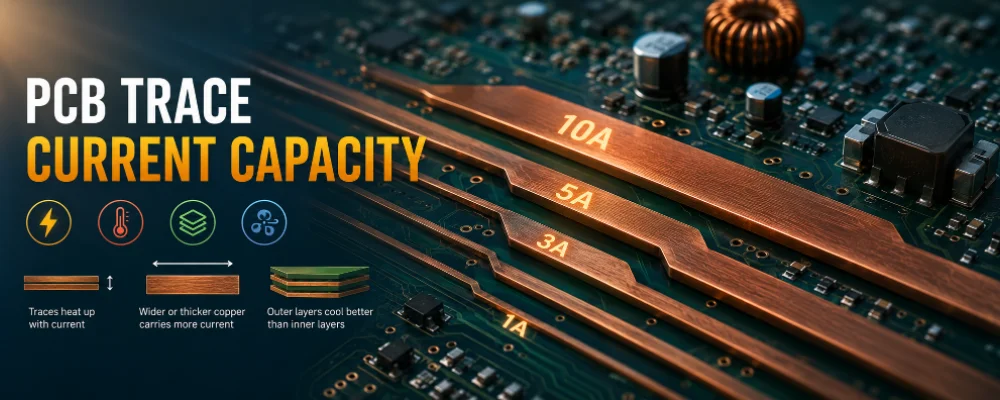
Trace width decisions should be checked against current capacity, voltage drop, copper weight, and fabrication tolerance.
5. Common PCB trace width mistakes
The most common trace width mistakes are using one default width for everything, ignoring the inner-layer penalty, forgetting voltage drop, and sizing signal traces for current instead of impedance. Each has a simple fix:
- One default width for everything – fine for signals, dangerously narrow for power. Size power traces to their current.
- Ignoring the inner-layer penalty – a width adequate outside can overheat on an inner layer, which needs roughly double.
- Forgetting voltage drop – a cool trace can still drop too much voltage on a low-voltage, high-current rail. Size for both heat and drop, part of good thermal management.
- Sizing signal traces for current – high-speed traces need impedance-based widths tied to the stackup, not IPC-2221 current widths.
- Specifying widths finer than the process can build – confirm minimum width and spacing with the fabricator.
6. Will the trace width survive fabrication?
A width you draw is not exactly the width you get – etching removes a little copper from the sides of every trace, so the finished trace is slightly narrower than designed, and heavier copper widens that tolerance. For tight power traces this nudges current capacity and voltage drop the wrong way; for impedance-controlled traces it can shift the impedance. When width is critical either way, confirm the design intent with the fabricator.
A pre-build design-for-manufacturing check confirms your trace widths and spacings are within process capability, that power traces meet their current and voltage-drop needs after etch, and that controlled-impedance traces are matched to a buildable stackup. Highleap then carries the board through thick-copper fabrication and assembly, with heavy-copper options for high-current designs and controlled-impedance processing and test for high-speed boards. When you request a quote, state the copper weight, the maximum current on power traces, any rails sensitive to voltage drop, and any controlled-impedance requirement with its target and stackup.
7. PCB trace width FAQ
What trace width do I need for 1 amp?
For 1 oz copper on an outer layer at a conservative 10°C rise, roughly 0.5 mm (about 20 mil). At 2 oz copper, about half that. Inner traces need roughly double for the same current.
Why do internal traces need to be wider than external ones?
Internal traces are surrounded by laminate and cannot shed heat to air, so they need roughly double the width of an external trace to carry the same current at the same temperature rise.
How do I size a trace for impedance instead of current?
Impedance-controlled width is set by dielectric thickness, copper weight, and the material’s dielectric constant, so it is tied to the stackup. Decide the stackup first, calculate against it, and confirm the build with your fabricator.
Should power and signal traces use the same width?
No. Power traces are sized for current and voltage drop and are often much wider; signal traces are sized for routing or, for high-speed lines, for impedance. One default width for both is a common cause of overheating.
Can Highleap build heavy-copper and controlled-impedance boards?
Yes. Highleap offers heavy copper for high-current designs and controlled-impedance processing and test for high-speed boards, with a manufacturability review to confirm your trace widths survive fabrication.

Recommended Posts

Isola Astra MT77 PCB Manufacturing
Figure 1. Isola Astra MT77 PCB ManufacturingIsola Astra...

Nelco N4000-13 PCB Material and Manufacturing Guide | Highleap Electronics
Figure 1. Nelco N4000-13 PCBNelco N4000-13 PCB is a...

Copper Clad Laminate: Complete Material Selection Guide for PCB Engineers
Every electrical property that matters in a printed...

Inside a China Ceramic PCB Factory: Process Control Across Power/LED/RF/Medical
Table of Contents Inside a China Ceramic PCB Factory: How...
How to get a quote for PCBs
Let’s run DFM/DFA analysis for you and get back to you with a report. You can upload your files securely through our website. We require the following information in order to give you a quote:
-
- Gerber, ODB++, or .pcb, spec.
- BOM list if you require assembly
- Quantity
- Turn time
For PCBA services, please provide your BOM (Bill of Materials) and any specific assembly instructions. We also offer DFM/DFA analysis to optimize your designs for manufacturability and assembly, ensuring a smooth production process.