
13 Basic Rules of PCB Layout (and the Failures They Prevent)

Figure 1. 13 Basic Rules Of Pcb Layout reference image for PCB manufacturing review.
- Layout — not the schematic — usually decides EMI, signal integrity, and yield
- The biggest single lever is a solid, continuous ground/return plane
- Decoupling: a small cap (e.g. 0.1 µF) at each power pin plus bulk capacitance, short path to the plane
- Trace width is set by current and temperature rise (IPC-2152 / IPC-2221)
- Spacing heuristics: the 3W rule for crosstalk, the 20H rule for plane edges
- Always run a DFM review against fab limits before releasing files
A schematic proves an idea can work; the PCB layout decides whether it actually works once it is built. The same netlist can produce a quiet, manufacturable board or one that radiates, fails at speed, runs hot, and racks up assembly defects — the difference is entirely in placement and routing. The thirteen rules below are the ones our engineers see ignored most often on incoming designs, organized in the order you would actually lay out a board, and stated with the concrete numbers that make them usable. None is exotic; together, sound PCB design and layout prevents the large majority of avoidable re-spins.
What follows reflects what our DFM team at Highleap Electronics looks for when reviewing a design layout before fabrication.
1. Why PCB Layout Matters More Than the Schematic
Every net on a board is a physical structure with resistance, inductance, and capacitance, and a return current that has to get home. A schematic hides all of that; the layout exposes it. Electromagnetic behavior, high-speed signal integrity, thermal performance, and even manufacturing yield are decided by where parts sit and how copper connects them — which is why an experienced engineer can rescue a marginal design in layout and a careless one can ruin a good schematic. Treating PCB layout best practices as rules rather than preferences is what makes a board predictable across production.
2. PCB Layout Rules 1–7: Floorplan, Grounding, and Power
The first decisions — before a single trace — set the ceiling on how good the board can be.
Rule 1 — Floorplan before you route
Place connectors, mounting holes, and the major functional blocks first, grouping parts by function so signals flow in one direction across the board. A deliberate floorplan shortens critical nets and prevents the tangled routing that forces compromises later.
Rule 2 — Keep current loops small
Every signal and power path forms a loop with its return, and loop area is what radiates and what picks up noise. Place parts and route so each loop — especially fast signals and switching-regulator hot loops — stays as small as possible; radiated emissions scale with loop area.
Rule 3 — Give the board a solid ground plane
A continuous ground plane is the single most powerful layout tool. It provides a low-impedance return directly beneath every signal, and you must not slot or split it under high-speed traces, because a signal crossing a gap loses its return path, its impedance jumps, and it radiates.
Rule 4 — Decouple at the pin
Place a decoupling capacitor (commonly 0.1 µF, sized to the device) right at each IC’s power pin, with a short, wide path to the power and ground planes, and back it with bulk capacitance for the board. A capacitor placed far away, or connected through a long thin trace, adds inductance and cannot supply the fast transient current the chip demands.
Rule 5 — Separate analog, digital, and power
Keep noisy digital and switching-power sections away from sensitive analog and RF, and route their return currents so digital noise does not flow through analog ground. Partition by function on the floorplan, and join grounds at a single, deliberate point where mixed-signal parts require it.
Rule 6 — Plan the power distribution network
Give each rail a low-impedance path: wide traces or dedicated planes, tight power-to-ground coupling for interplane capacitance, and enough copper that the rail does not sag under transient load. A weak power distribution network shows up as glitches that masquerade as logic bugs.
Rule 7 — Use enough layers to do rules 3–6
If you cannot give every signal layer an adjacent reference plane and carry your rails cleanly, add a layer pair. A 4-layer board with proper planes routinely outperforms a cramped 2-layer board, and adding copper is cheaper than the reliability cost of a compromised stackup.
3. PCB Layout Rules 8–13: Routing, Impedance, and Manufacturing
With the floorplan and planes set, routing turns the plan into copper without undoing it.
Rule 8 — Size traces for current and heat
A trace’s width and copper weight set how much current it carries for a given temperature rise, per IPC-2152 (and the older IPC-2221). Size power and ground traces deliberately rather than using the default signal width, and widen them where current is high.
Rule 9 — Keep high-speed nets short, referenced, and matched
Route fast signals short and direct, always over a continuous reference plane, and define controlled impedance for them in the stackup (commonly 50 Ω single-ended, 90–100 Ω differential). Length-match timing-critical groups and differential pairs, and keep clocks and high-speed lines away from board edges and sensitive nets.
Rule 10 — Control crosstalk and plane edges
Apply the 3W rule — center-to-center spacing of at least three trace widths — to limit crosstalk between sensitive parallel traces, and the 20H rule of pulling planes back from the board edge to reduce edge radiation. These cheap heuristics prevent expensive EMC surprises.
Rule 11 — Route with clean geometry
Use 45° bends rather than abrupt turns, and avoid acute angles, which can trap etchant during fabrication. Keep vias out of pads unless they are filled and plated, and minimize layer changes on fast nets, since each via adds a stub and a discontinuity. Pour and stitch copper sensibly — our notes on copper pour and via stitching cover stitching vias for both shielding and thermal spreading.
Rule 12 — Manage the heat path and design for assembly
Give hot components copper to spread heat, thermal vias under power pads, and thermal-relief connections on planes so pads still solder well. At the same time, honor component courtyards and spacing, orient similar parts consistently to speed inspection, and leave room for rework around fine-pitch parts and connectors — layout drives both reliability and assembly yield.
Rule 13 — Add test access and design to fab capability
Provide fiducials for placement machines, test points for in-circuit or functional test, and mechanical keep-outs for connectors and enclosures — then stay within your manufacturer’s minimum trace/space, annular ring, drill size, and layer-count limits. A theoretically ideal board that exceeds fab capability simply cannot be made, and test access added later usually forces a re-spin.
4. Common PCB Layout Mistakes to Avoid
The rules above map directly onto the failures we see most, and it helps to recognize each by its symptom rather than just its cause.
- A radiated-emissions failure at EMC test usually traces to a split or slotted ground under fast signals, or planes not pulled back from the edge.
- Random glitches that disappear when you probe are typically power-integrity: decoupling too far from the chip, or a rail that sags under transient load.
- Overheating or voltage drop on a rail comes from default-width power traces that were never sized to their current.
- A high-speed link that will not lock often means impedance was defined after routing, or the differential pair was never length-matched.
- A board that cannot be tested or placed accurately means fiducials or test points were left out — discovered too late to fix without a turn.
- A late “we can’t build this” from the fab points to acute angles, sub-minimum spacing, or an impossible drill aspect ratio.
The pattern across all of them is the same: the cost of following the rule during layout is trivial, while the cost of breaking it is a re-spin, a field failure, or a scrapped batch. The discipline pays for itself the first time it saves a board turn.
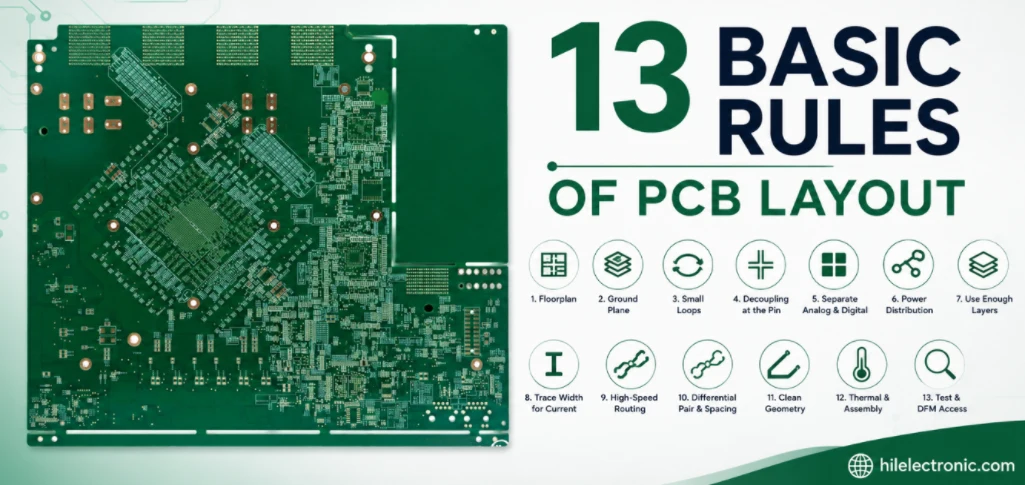
Figure 2. 13 Basic Rules Of Pcb Layout details should be checked before quotation and production.
5. PCB Layout and DFM Review at Highleap
Even a careful layout benefits from a second set of eyes that knows the factory’s limits. When you send a design to Highleap, our engineers run a free DFM review against the rules above and against our actual capability — checking trace and space, annular ring, drill sizes, the stackup and impedance, thermal relief, spacing for voltage, and test access — before anything is fabricated. The point is not to redesign your board but to catch the few issues that would otherwise surface as a re-spin or a yield problem.
Send your Gerbers or ODB++ and we will return specific, actionable feedback, then fabricate and assemble to the layout you intended. Catching a slotted plane or an unbuildable spacing on screen costs nothing; finding it after the first build costs a turn.
Get a Free DFM Review of Your Layout
6. PCB Layout FAQs
What is the most important rule of PCB layout?
Give the board a solid, continuous ground plane and never break it under high-speed signals. It provides a low-impedance return path directly beneath every trace, which controls impedance and minimizes EMI — the single biggest lever in a layout.
Where should decoupling capacitors go?
Right at each IC’s power pin, with a short, wide connection to the power and ground planes, backed by bulk capacitance for the board. A capacitor placed far away or connected through a long thin trace adds inductance and cannot supply the chip’s fast transient current.
How wide should a PCB trace be?
Wide enough to carry its current at an acceptable temperature rise, based on copper weight, per IPC-2152 or IPC-2221. Signal traces can be narrow, but power and ground traces should be sized deliberately and widened where current is high.
What are the 3W and 20H rules?
The 3W rule spaces sensitive parallel traces at least three trace widths apart, center to center, to limit crosstalk. The 20H rule pulls power and ground planes back from the board edge by about twenty times the dielectric thickness to reduce edge radiation.
Are 90-degree trace corners really a problem?
The electromagnetic effect of 90° corners is minor at most speeds, but acute angles should be avoided because they can trap etchant during fabrication. Routing with 45° bends is the standard, clean practice.
Why do I need fiducials and test points?
Fiducials let placement machines locate the board accurately, and test points enable in-circuit or functional test. Both are nearly free to add during layout but often force a re-spin if they are left out and needed later.
How many layers do I need for a good layout?
Enough to give every signal layer an adjacent reference plane and to carry your power rails. Simple designs work on 2 or 4 layers; dense or high-speed designs need 6 or more so grounding and impedance rules can be satisfied.

Recommended Posts

TMM4 Filter PCB Manufacturing
TMM4 filter PCB manufacturing is controlled by the...

TMM3 PCB Manufacturing for RF Modules
TMM3 PCB manufacturing is most useful where the RF module...

TMM6 PCB Fabrication
TMM6 fabrication is the process-control page for a mid-Dk...

TMM10 PCB Manufacturing for Compact RF Designs
Table of contentsHow TMM10 Shrinks RF StructuresTMM10 vs...
How to get a quote for PCBs
Let’s run DFM/DFA analysis for you and get back to you with a report. You can upload your files securely through our website. We require the following information in order to give you a quote:
-
- Gerber, ODB++, or .pcb, spec.
- BOM list if you require assembly
- Quantity
- Turn time
For PCBA services, please provide your BOM (Bill of Materials) and any specific assembly instructions. We also offer DFM/DFA analysis to optimize your designs for manufacturability and assembly, ensuring a smooth production process.