
AC-DC Power Supply PCB Design Guide

Figure 1. AC-DC power supply PCB design
AC-DC power supply PCB design is the discipline of arranging the conversion stages so the board is safe, efficient, low-noise and manufacturable at once — and most power-supply problems are layout problems, not schematic problems. A correct schematic can still produce a board that fails Hipot because the isolation gap is short, runs hot because the copper is thin, or fails EMC because the switching loop is large. Good design front-loads those constraints: it places the magnetics and bulk capacitor first, fixes the creepage and clearance early, plans the thermal path before routing, and keeps the high-di/dt loops tight. Highleap reviews these design factors as part of DFM on every mains board and feeds findings back before production.
Want a DFM review of your power-supply layout? Send your design and we will check spacing, copper and thermal risk before you build. Request a design-and-build quote.
The Layout Decisions That Make or Break a Power Board
The order in which you place components on an AC-DC board largely determines its fate. Power layout starts from the high-energy parts — the transformer, the primary switch, the bulk electrolytic capacitor, the output rectifier — because their position fixes the switching loops, the thermal hot spots and the isolation barrier. Once those anchors are placed well, the rest of the board falls into line; place them poorly and no amount of clever signal routing recovers the design. This is the opposite of digital layout, where you can often route your way out of a mediocre placement.
The guiding principle is to follow the power flow physically: AC input and filter at one edge, rectification and bulk storage next, the switching stage and transformer in the middle as the barrier, and the regulated output at the far edge. Keeping that flow linear shortens the high-current paths, naturally separates primary and secondary, and gives the heat somewhere to go. A board laid out against the power flow forces current to double back, lengthens loops and mixes the noisy and quiet domains — the root cause of a surprising share of “mysterious” supply failures.
Placement Priorities in Order
| Priority | Element | Placement Logic |
|---|---|---|
| 1 | Transformer / isolation barrier | Defines the primary-secondary divide; everything else placed around it. |
| 2 | Primary switch + controller | Kept tight to the transformer to minimize the switching loop. |
| 3 | Bulk electrolytic capacitor | Low-impedance path to the switch; kept away from heat sources. |
| 4 | Output rectifier + caps | Short, wide secondary loop for low ripple and low loss. |
| 5 | Input filter + feedback | Filter at the input edge; feedback sense routed quietly back to the controller. |
If there is one habit that distinguishes a robust power layout, it is placing for the power flow and the barrier first and treating routing as the consequence. Designers who reverse that order tend to discover the spacing or thermal problem only when the first article comes back — which is the most expensive moment to find it.
Designing Creepage and Clearance Into the Board
Safety spacing is the constraint that least forgives being treated as an afterthought. Creepage (distance along the surface) and clearance (distance through air) between primary and secondary copper are set by the working voltage, the insulation class and the environment, and they must be designed in from the first placement — not squeezed in later. For a 230VAC mains board, basic isolation commonly calls for spacing on the order of a few millimetres, and reinforced isolation for medical or outdoor use can roughly double that. The transformer, optocoupler and Y-capacitor are the parts that straddle the barrier, so they dictate where the line falls.
The most powerful design tool for spacing is the routed isolation slot — a milled slot in the laminate beneath the barrier components that increases the surface creepage path without enlarging the board. Designers pair the slot with a clean keep-out zone where no primary copper, via, test point or even silkscreen crosses into the secondary side. Done early, this costs nothing but discipline; done late, it can force a full re-layout. This is precisely the kind of thing a power-aware fabricator flags in DFM if the design has left it ambiguous.
Spacing Design Inputs
| Design Input | Effect on Spacing | Layout Action |
|---|---|---|
| Working Voltage | Higher voltage demands more creepage and clearance | Set the barrier width from the worst-case voltage across it. |
| Insulation Class | Reinforced roughly doubles basic spacing | Plan board size around the reinforced gap if required. |
| Pollution Degree | Dirtier environments need larger creepage | Add margin or specify coating for harsh settings. |
| Barrier Components | Transformer, opto and Y-cap span the gap | Choose creepage-rated parts and align them to the barrier line. |
| Slot Use | A milled slot extends surface creepage | Route a slot under the barrier to gain spacing without growing the board. |
Because the exact figures depend on the safety standard your product is certified to, the design rule is to lock the standard and class first and let every spacing number follow from it. We build to whatever creepage and clearance your design specifies and verify it with Hipot, but the cheapest place to get spacing right is the schematic-to-layout handoff, not the test bench.
Thermal Design: Copper, Vias and Component Placement
A power supply turns a real fraction of its throughput into heat, and where that heat goes is a layout decision. Even a 90%-efficient 100W supply dissipates roughly 10W, concentrated in the switch, the rectifiers and the magnetics. Thermal design is the art of spreading that heat into copper and out of the board before it cooks the most temperature-sensitive part — almost always the electrolytic capacitors, whose rated life roughly halves for every 10°C rise above their rating. Keeping the caps away from the hot corner is often the single highest-value thermal move on the board.
The toolkit is concrete: heavy copper to lower resistance and spread heat, thermal vias to couple a hot pad to inner or back-side copper, generous copper pour acting as a heatsink, and physical separation between heat sources and heat-sensitive parts. For higher dissipation, an onboard heatsink or metal-core laminate carries heat the copper alone cannot. The design has to match the copper and thermal plan to the real dissipation — a board that looks fine on the bench can fail in a sealed enclosure where there is nowhere for the heat to go.
Thermal Tools and What They Buy You
| Thermal Tool | What It Does | When to Reach for It |
|---|---|---|
| Heavy Copper | Lowers resistance, spreads heat laterally | Any board with multi-amp rails or hot traces. |
| Thermal Vias | Conduct heat to other copper layers | Under hot SMD switches and rectifiers. |
| Copper Pour | Acts as an integrated heat spreader | Around hot devices where board area allows. |
| Component Spacing | Keeps heat away from sensitive parts | Always — especially electrolytic caps. |
| Metal-Core / Heatsink | Carries heat the board cannot | High-density designs like LED drivers and dense converters. |
Thermal headroom is not free board area wasted — it is reliability bought. The designs that fail early in the field are usually the ones where thermal was treated as something to verify after layout rather than to plan during it. Matching copper, vias and placement to the actual watts is what keeps a supply alive through its rated life.
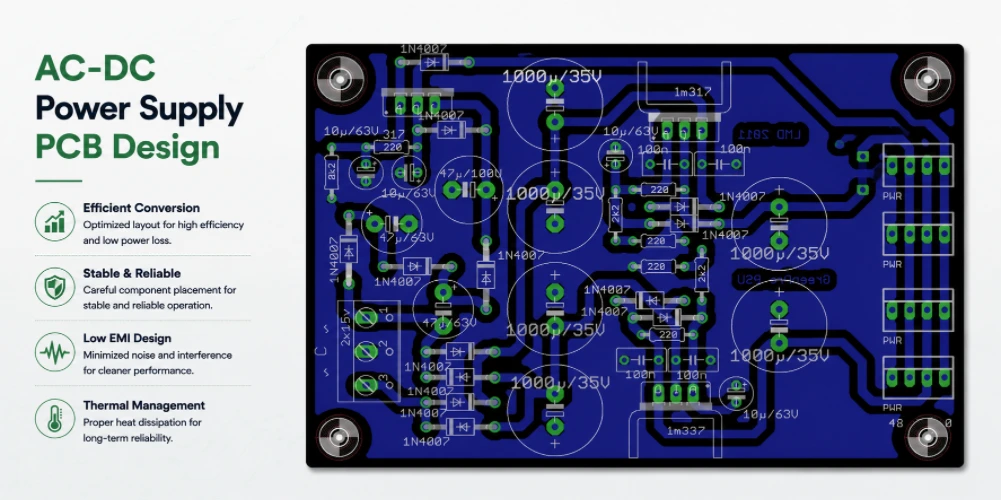
Figure 2. AC-DC power supply PCB design layout review
EMI by Layout: Taming the Switching Node
Every switch-mode supply is a deliberate noise generator — it works by switching current on and off thousands of times a second — and whether that noise stays inside the board or radiates out to fail EMC is overwhelmingly a layout question. The culprit is the high-di/dt switching loop: the path the current takes as the switch turns on and off. A large loop is an efficient antenna; a small, tight loop is not. Shrinking that loop area is the highest-leverage EMI move available, and it costs nothing but careful placement.
Around that core idea sit the supporting techniques: a solid ground plane to give return currents a short path, keeping the noisy switching node copper small in area, routing the gate drive tightly, and placing the input X/Y filter where it can actually do its job. Snubbers and common-mode chokes help, but they are treatments for noise that good layout would have prevented. Designing EMI out is far cheaper than filtering it out, and it is the difference between passing the EMC chamber on the first visit and an expensive cycle of board spins.
- Minimize the switching loop: keep switch, transformer and bulk cap tight so the high-di/dt path encloses minimal area.
- Solid return plane: give switching return currents a short, low-impedance path back to source.
- Small hot-node copper: the high-dv/dt switching node should be just large enough to carry current, no more.
- Tight gate routing: short gate-drive traces reduce ringing and radiated noise.
- Effective input filter placement: X/Y caps and common-mode choke positioned to catch conducted emissions at the source.
- Controlled Y-cap path: the safety capacitor across the barrier routed for both EMI and isolation compliance.
EMI work rewards prevention over cure every time. A board that minimizes its loops and respects its return paths usually passes EMC with simple filtering, while a board that ignores them often cannot be filtered into compliance at any reasonable cost — which is why we look at the switching-loop layout when we review a power design.
Designing for Manufacturability and Test
A design can be electrically and thermally perfect and still cost more than it should because it ignores how it will be built and tested. Design for manufacturability on a power board means respecting the fabricator’s real trace-and-space at the copper weight you have chosen — heavy copper over-etches, so a 4oz design needs wider spacing than a 1oz one — providing proper thermal relief on planes so parts can be soldered, and leaving room for the larger drills that magnetics and bulk capacitors require. These are not constraints that compromise the design; they are what let it be built repeatably at volume.
Design for test is the companion discipline: leaving accessible test points for the rails and feedback nodes, arranging the board so the isolation barrier can be Hipot-tested, and panelizing sensibly for assembly. A board designed with test in mind catches defects on the line instead of in the field. When we review a layout, manufacturability and testability are part of the same pass as spacing and thermal — because a board that cannot be built or tested economically is not really a finished design.
How Highleap Supports Your Power PCB Design
Highleap Electronics sits on the manufacturing side of design, which means our most useful contribution is closing the loop between what you have drawn and what can be built reliably. When you send a power layout, we review it for the things that actually sink power boards: creepage and clearance against your stated safety class, copper weight versus current and thermal load, switching-loop area, thermal-via and pour adequacy, and manufacturability at your chosen copper weight. We feed those findings back before production, while changes are still cheap.
From there we fabricate and assemble the board you have refined — single-sided through multilayer, 1oz to heavy 6oz+ copper, high-Tg and metal-core options, routed isolation slots, mixed THT and SMT assembly — and Hipot- and functional-test the result so the barrier and the supply are proven. You keep ownership of the design; we make sure the version that goes to production is one that will pass, perform and last. That collaboration is what turns a good schematic into a manufacturable power supply.
Have a power-supply layout you want pressure-tested before production? Send it over for DFM feedback and a build quote. Get DFM feedback and a quote.
During layout review, use Highleap’s PCB design support, impedance control PCB notes, PCB DFM checklist, heavy copper power-supply guidance, electrical testing guide, and FR4 material reference to catch production risks early.

Recommended Posts

Isola Astra MT77 PCB Manufacturing
Figure 1. Isola Astra MT77 PCB ManufacturingIsola Astra...

Nelco N4000-13 PCB Material and Manufacturing Guide | Highleap Electronics
Figure 1. Nelco N4000-13 PCBNelco N4000-13 PCB is a...

Copper Clad Laminate: Complete Material Selection Guide for PCB Engineers
Every electrical property that matters in a printed...

Inside a China Ceramic PCB Factory: Process Control Across Power/LED/RF/Medical
Table of Contents Inside a China Ceramic PCB Factory: How...
How to get a quote for PCBs
Let‘s run DFM/DFA analysis for you and get back to you with a report. You can upload your files securely through our website. We require the following information in order to give you a quote:
-
- Gerber, ODB++, or .pcb, spec.
- BOM list if you require assembly
- Quantity
- Turn time
For PCBA services, please provide your BOM (Bill of Materials) and any specific assembly instructions. We also offer DFM/DFA analysis to optimize your designs for manufacturability and assembly, ensuring a smooth production process.