
Hard Drive PCB: Function, Failure Modes, and Manufacturing
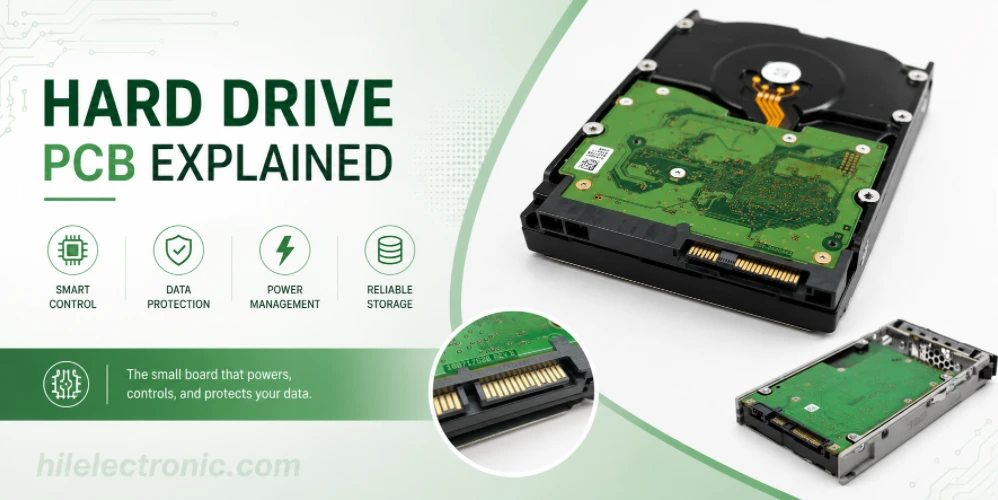
Figure 1. hard drive PCB image for Highleap Electronics PCB manufacturing and assembly review.
The hard drive PCB is the green board bolted to the underside of a 3.5″ or 2.5″ HDD. It runs the motor, positions the heads, manages the read channel, and talks to the host over SATA — and because part of it is uniquely calibrated to that one drive, you cannot reliably fix a dead drive by bolting on a board from an identical model. This guide explains exactly what the board does, why a straight swap usually fails, the manufacturing features that make these boards demanding, and how Highleap Electronics builds storage-grade PCBs and assemblies.
1. What does the PCB on a hard drive do?
The PCB on a hard drive is the drive’s electronics board, and it performs four jobs: it spins the platters with a brushless spindle motor, moves the read/write heads with the voice-coil actuator, conditions the tiny analog signals from the heads through a preamp and read channel, and handles the SATA (or SAS) interface and cache to the host computer. In short, the platters store the bits but the PCB is what turns those bits into a working disk the operating system can see.
Physically, a modern HDD board carries a main system-on-chip (the controller, combining the hard-disk controller, microprocessor, and read channel), a DRAM cache chip, a motor-driver IC that switches high currents to the spindle and actuator, and a small serial flash or ROM holding firmware. Crucially, some calibration and adaptive data — the parameters that tune the board to the exact magnetic characteristics of its own heads and platters — live in that flash and in the controller. That detail is the reason the next section matters so much.
2. Can you swap a hard drive PCB to recover data?
No — swapping in a PCB from an identical-model donor drive will usually not recover your data, and it can make things worse. Modern drives store drive-specific adaptive calibration (often called “adaptives”) in a serial flash chip on the board and inside the controller, and these values are matched to that one drive’s heads and platters. A donor board carries the wrong adaptives, so even a physically identical PCB will fail to read the platters correctly, and powering up with a mismatched motor driver can stress the heads.
When a board swap is attempted by professionals, the standard practice is to transfer the original drive’s ROM/flash chip onto the donor board so the correct adaptives travel with it — a delicate rework job, not a plug-and-play swap. For valuable data, the safe path is a specialist data-recovery lab rather than experimentation. If your interest is instead a damaged trace or a lifted pad on a board you are servicing, that is a different problem addressed by careful PCB trace repair techniques, and reconstructing an undocumented multilayer board is the domain of multilayer PCB reverse engineering. Either way, the lesson is that an HDD board is tightly coupled to its drive and is not a generic part.
3. What makes an HDD PCB hard to manufacture
Hard drive PCBs are demanding to manufacture because they combine high-speed SATA signaling, sensitive analog front ends, high-current motor drive, and fine-pitch BGA controllers on a compact, often multilayer board. Each of those pulls the design toward a different manufacturing capability, and a storage-grade board has to satisfy all of them at once:
- Controlled-impedance high-speed routing. SATA runs as differential pairs at multi-gigabit rates, so the differential traces need a defined impedance set by the stackup — work that depends on tight controlled-impedance requirements being met in fabrication.
- Multilayer stackup. Separating the noisy motor-drive currents from the delicate preamp signals and the high-speed interface usually needs a multilayer PCB with dedicated ground and power planes.
- Fine-pitch BGA assembly. The controller SoC is typically a fine-pitch BGA, which can only be placed and inspected reliably with a professional SMT line and X-ray.
- Reliable surface finish for contacts. Edge contacts and connector pads need a durable, flat finish, which is why a process like ENIG surface finish is common on storage and consumer boards.
These same characteristics show up across modern consumer-electronics PCBs, where compact, high-speed, mixed-signal boards are the norm rather than the exception.
4. Why hard drive PCBs fail (and how to design against it)
Hard drive PCBs most often fail from electrical overstress — a power surge or a failed TVS diode taking out the motor-driver IC — and from thermal fatigue cracking solder joints over years of heat cycling. The motor driver is the usual casualty because it switches the largest currents and runs hottest, so a surge or a marginal solder joint there is what kills many drives long before the platters wear out.
Designing against those failure modes is mostly about robust power handling and sound assembly. A clean power path with proper transient protection keeps a surge from reaching the driver; adequate copper and thermal relief under the hot ICs limits temperature swings; and high-quality solder joints — verified rather than assumed — resist thermal fatigue. Those last two points are manufacturing decisions as much as design ones, which is why catching a marginal footprint or thermal-pad pattern in a pre-build manufacturability review pays off well before volume. After assembly, AOI and X-ray confirm the joints that determine long-term reliability are actually sound.
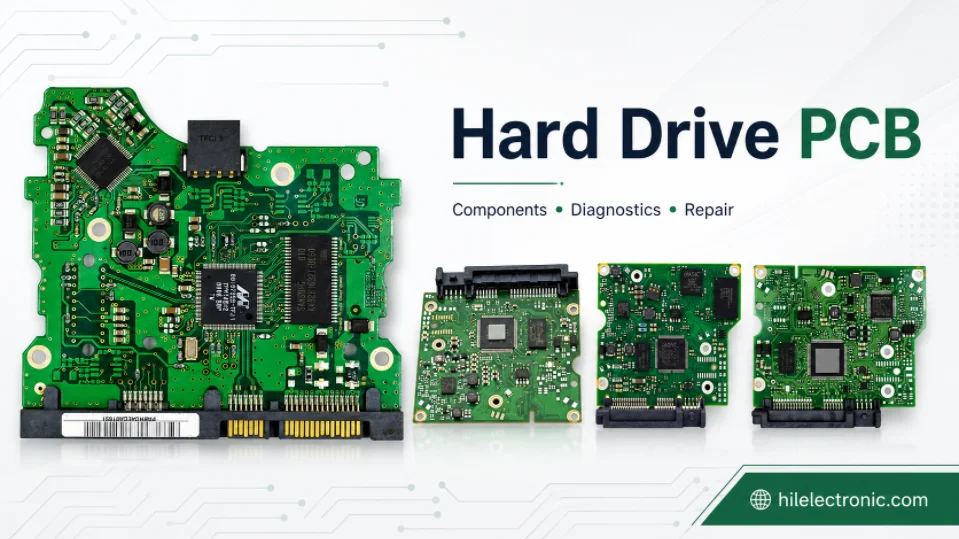
Figure 2. Manufacturing details for hard drive PCB should be checked before quotation and production.
5. SATA, SAS, and the signal-integrity demands of storage boards
Storage interfaces like SATA and SAS run as high-speed differential pairs, and meeting their signal integrity is the single most demanding part of a storage board’s layout. SATA operates at multi-gigabit data rates over a single differential pair per direction, while SAS pushes higher rates and is common in enterprise drives — and at those speeds, the trace geometry, not just the schematic, determines whether the link works.
Three layout disciplines decide success. The differential pair must hold a defined impedance (typically 100 ohm differential) set by the trace width, spacing, and dielectric thickness, which is why the board cannot be designed without a fixed stackup. The two traces of each pair must be length-matched so the signals arrive together, since skew between them degrades the differential signal. And the high-speed pairs must be referenced to a continuous ground plane and routed away from the noisy motor-drive currents, which is the practical reason these boards go multilayer. Achieving the impedance target then depends on the fabricator holding the specified geometry, the core of any controlled-impedance build; getting it wrong shows up as link errors or a drive that negotiates down to a slower speed. These same constraints govern other fast interfaces, so the discipline transfers directly to any multilayer high-speed design.
6. How Highleap builds storage-grade PCBs and PCBAs
Highleap manufactures storage-grade boards by combining controlled-impedance multilayer fabrication with fine-pitch, X-ray-verified assembly — the exact mix an HDD-class board needs. Through multilayer PCB manufacturing, the stackup is built to hold the SATA differential impedance while separating motor-drive noise from sensitive analog signals, with a durable surface finish for connector and contact areas.
On the assembly side, turnkey assembly covers component sourcing from authorized channels, fine-pitch BGA placement, and AOI plus X-ray inspection so hidden controller joints are checked, not guessed. For a new storage or data-device design, validating the build with a quick prototype PCB run before scaling avoids carrying a layout problem into volume. When you request a quote, share the layer count, the impedance targets for the high-speed pairs, the controller package, and your test expectations so the quote reflects the real board.
7. Hard drive PCB FAQ
Where is the PCB located on a hard drive?
It is mounted on the underside of the drive, usually held by a few screws, with the component side facing inward toward the casting. You remove it by undoing those screws and unseating the small connector that links it to the motor and head assembly.
Do SSDs have a PCB like hard drives?
Yes, but it is different. An SSD is essentially a PCB populated with a controller, DRAM, and NAND flash chips and has no motor or moving parts, so its board has no spindle or actuator drive — though it still relies on controlled-impedance high-speed routing for its interface.
How do I find a matching donor PCB for a hard drive?
A donor board must match not just the drive model but often a board revision and a board-code number printed on the PCB. Even then the original board’s ROM or flash chip usually has to be moved onto the donor, because the calibration data is unique to your drive.
Can a hard drive PCB be repaired instead of replaced?
Sometimes — a burned component such as a TVS diode or a damaged trace can be repaired by a specialist, which is often safer than a donor swap because it keeps the drive’s original calibrated electronics. Trace and pad damage is repairable; a failed controller generally is not.
What is the chip on a hard drive PCB that stores firmware?
It is a small serial flash or ROM chip holding part of the drive’s firmware and its adaptive calibration. Because those adaptives are matched to the specific drive, this chip is the part data-recovery technicians transfer when fitting a donor board.
Why does my external hard drive PCB have a USB-to-SATA chip?
External and portable drives add a bridge chip that converts the drive’s native SATA interface to USB. If such a drive fails, the bridge can sometimes be bypassed by connecting the bare drive directly via SATA, which is a common recovery step.

Recommended Posts

Rogers TMM3 PCB Manufacturer for Mechanical RF Modules
TMM3 is selected when an RF circuit must behave as part of...

Rogers TMM6 PCB Fabrication for Dk 6.0 Thermoset Microwave Boards
Figure 1. Rogers TMM6 PCB fabricationRogers TMM6 PCB...

Rogers TMM10i PCB Fabrication: Solving DFM Challenges
When RF engineers need to drastically shrink the footprint...
Rogers TMM13i PCB Manufacturer for Ultra-Miniature RF Substrates
TMM13i is used when a microwave circuit must become very...
How to get a quote for PCBs
Let’s run DFM/DFA analysis for you and get back to you with a report. You can upload your files securely through our website. We require the following information in order to give you a quote:
-
- Gerber, ODB++, or .pcb, spec.
- BOM list if you require assembly
- Quantity
- Turn time
For PCBA services, please provide your BOM (Bill of Materials) and any specific assembly instructions. We also offer DFM/DFA analysis to optimize your designs for manufacturability and assembly, ensuring a smooth production process.